If you have spent any time researching AI video tools this year, you have almost certainly run into Runway. It shows up in filmmaker forums, marketing team Slack channels, and “best AI video generator” roundups alike. But the platform has changed a lot since its early Gen-2 days, and the pricing page alone can leave you with more questions than answers.
This review breaks down what Runway AI actually does in 2026, what it costs once you factor in credits, how it stacks up against competitors like Pika, Kling, and Sora, and who genuinely gets value from a subscription. By the end, you will know whether Runway belongs in your workflow or whether your budget is better spent elsewhere.
What Is Runway AI (RunwayML)?
Runway AI, Inc. is a New York based generative AI company that builds tools for creating and editing video, image, and audio content using machine learning models. Cristóbal Valenzuela, Anastasis Germanidis, and Alejandro Matamala-Ortiz founded the company in 2018. The three collaborators met while studying at NYU. Today, the company holds a valuation of roughly $5.3 billion following its February 2026 Series E round.
Runway’s flagship product is its “Gen” series of video generation models, currently led by Gen-4.5. Alongside video generation, the platform includes an AI image generator, a full suite of editing tools, and newer experimental products like Game Worlds, which uses AI to build interactive, explorable environments in real time.
Real film and television productions have used the company’s tools, most notably the Oscar-winning film Everything Everywhere All at Once. This use gave Runway early credibility with professional creatives rather than just hobbyists experimenting with text prompts.
Is RunwayML the Same as Runway AI?
Yes. RunwayML was the platform’s original name, and the company later rebranded to simply “Runway.” Runway AI, Inc. is the official legal entity, and both names refer to the exact same product and company today.
Which Company Owns RunwayML?
Runway AI, Inc., a privately held, independent company headquartered in Manhattan, owns and operates RunwayML. Adobe, Google, and other larger tech companies do not own it, although Nvidia, Google, and Adobe Ventures have invested in the company.
Are AI and ML the Same Thing?
No. Artificial intelligence (AI) is the broad field of building systems that can perform tasks requiring human-like intelligence. Machine learning (ML) is a specific subset of AI where systems learn patterns from data rather than following hard-coded rules. Runway’s products use ML techniques to power its broader AI creative platform.
Runway AI Features Overview
Runway packs a lot into one platform, which is both its biggest selling point and, for new users, part of what makes the pricing confusing. Every feature draws from the same shared credit pool, so understanding what each tool actually does matters before you pick a plan.
Runway Gen-4.5 Video Generator
Gen-4.5 is Runway’s current flagship text-to-video and image-to-video model. It is built for cinematic motion quality, strong prompt adherence, and consistent scene coherence across longer clips. Reviewers and independent benchmarks have repeatedly ranked it among the strongest video models available in 2026, ahead of several competing tools on motion realism specifically.
Practical features inside the video generator include:
- Text-to-video generation from a written prompt alone
- Image-to-video generation that animates a still reference image
- Director Mode for fine control over camera movement and framing
- Motion Brush to paint exactly which parts of a frame should move
- Extend and Reframe tools to lengthen clips or change aspect ratio
- Third-party model access, including Veo 3.1 and Kling 3.0 Pro, inside the same interface
Runway AI Image Generator
Runway’s image generation tools sit inside the same credit system as video but cost far fewer credits per generation. This makes the Runway AI image generator a genuinely cost-efficient option if your primary need is stills, mood boards, concept art, or reference images to later animate into video.
Key image capabilities include text-to-image generation, image editing and inpainting, style transfer, and Reference Images, a feature that lets you feed in existing visuals to guide the look of new generations.
Editing and Post-Production Tools
Beyond generation, Runway includes what it calls AI Magic Tools, a set of more than 30 utilities covering the practical, unglamorous parts of video production. These include green screen keying without a physical green screen, object and background removal, frame interpolation for smoother motion, and outpainting to expand a frame beyond its original borders.
For teams already editing in Adobe products, a December 2025 partnership brought early access to Gen-4.5 directly inside Adobe Firefly, giving Runway a meaningful distribution channel beyond its own app.
Game Worlds and World Models
In August 2025, Runway launched the beta of Game Worlds, a product that generates non-linear, interactive narrative experiences in real time. It reflects the company’s broader ambition to move beyond video clips and toward what it calls “general world models,” AI systems trained to simulate physical environments and interactions rather than just generate static footage.
Mobile App
Runway launched an iOS mobile app in February 2026 that integrates Gen-4.5 and introduces Chat Mode, letting users generate content through a conversational interface rather than a traditional prompt box. This brings Runway closer to competitors like Pika and Hailuo, which have offered mobile-first experiences for longer.
Runway Gen Model History: From Gen-1 to Gen-4.5
Understanding Runway’s model lineage helps explain why searches for “Runway Gen-2” or “Runway Gen-3 Alpha” pricing often lead to outdated information. Each generation represented a real jump in quality, and older models have effectively been retired from active promotion.
| Model | Released | What It Did |
|---|---|---|
| Gen-1 | February 2023 | Video-to-video transformation using style references |
| Gen-2 | 2023 | Early text-to-video and image-to-video generation |
| Gen-3 Alpha | 2024 | Sharper visuals, better motion consistency |
| Gen-4 | 2025 | Improved character and scene consistency across shots |
| Gen-4.5 | Late 2025 | Current flagship model; top-tier motion and prompt accuracy |
If you are specifically comparing Runway’s Gen-2 to its Gen-3 Alpha model, know that both are now legacy options. New signups are steered toward Gen-4 Turbo or Gen-4.5 by default, and most third-party comparisons no longer benchmark the older models directly.
Runway AI Pricing in 2026
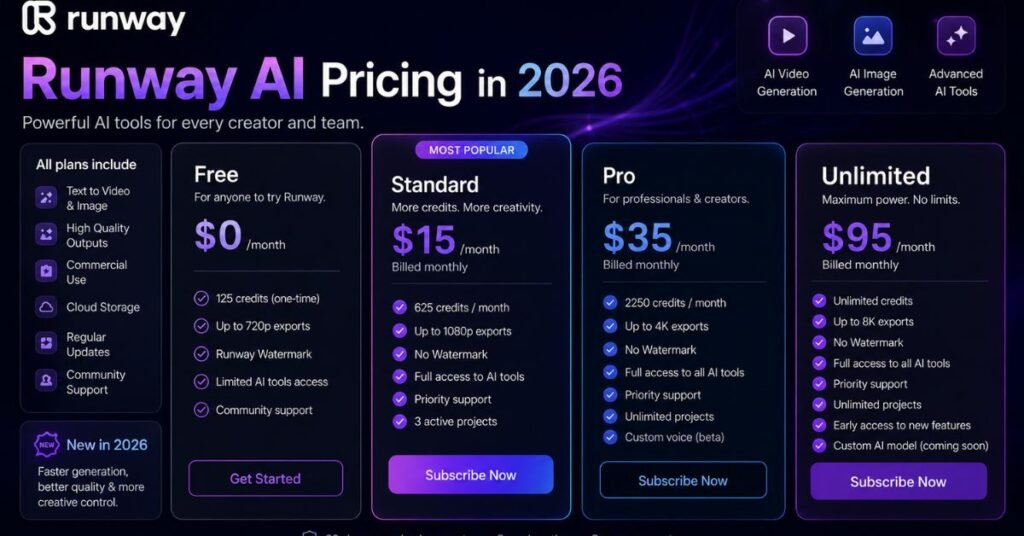
This is where most people get tripped up. Runway’s plan prices look simple on the surface, but the real cost depends heavily on the credit system underneath, since different models and features consume credits at very different rates.
| Plan | Monthly Price (annual billing) | Monthly Credits | Best For |
|---|---|---|---|
| Free | $0 | 125 one-time credits | Testing the platform |
| Standard | $12/user | 625 | Light use, image generation, Gen-4 Turbo |
| Pro | $28/user | 2,250 | Regular creators, weekly posting |
| Max | $76/user | 9,500 | High-volume video production |
| Enterprise | Custom | Custom | Agencies and large teams |
Runway has retired its older “Unlimited” plan. The plan offered the same credit allowance as Pro at nearly three times the price, along with a slower, throttled generation queue called Explore Mode. Runway has also removed Explore Mode from its current plans.
How Credits Actually Work
The number that matters most is this: one second of Gen-4.5 video costs 25 credits. That single fact reshapes how far each plan actually goes in practice.
- Standard (625 credits): roughly 25 seconds of Gen-4.5 video per month
- Pro (2,250 credits): roughly 90 seconds, or 6 to 9 usable ten-second clips after retries
- Max (9,500 credits): roughly 380 seconds, or around 38 usable ten-second clips
Image generation and older or lighter models like Gen-4 Turbo consume far fewer credits per output, so if your main use case is stills or lower-resolution video, the Standard plan stretches noticeably further than the seconds-of-Gen-4.5 math above suggests.
Which Plan Should You Actually Pick?
For most individual creators, Pro at $28/month is the realistic starting point rather than Standard. Standard is genuinely useful only if your primary output is images or Gen-4 Turbo video rather than the flagship Gen-4.5 model, since that is where the credit math becomes tight fastest.
Max only makes financial sense once you are publishing daily short-form video and need a genuinely high volume of finished clips, since the cost per usable clip drops meaningfully at that tier compared to Pro.
You May Also Lik
Google AI Studio vs Google Flow: Which AI Platform Is Better in 2026?
Runway AI Pros and Cons
No AI tool is a perfect fit for everyone, and Runway is no exception. Independent user reports and review aggregators point to a consistent set of strengths and real limitations worth knowing before you subscribe.
| Pros | Cons |
|---|---|
| Strong motion quality and scene coherence in Gen-4.5 | Credit system makes true cost hard to predict upfront |
| Combines generation and full editing suite in one app | Reported queue times of 10 to 20 minutes at peak usage |
| Access to third-party models like Veo and Kling in one place | No permanent free tier, only limited trial credits |
| Adobe Firefly integration extends its reach | Cost per finished clip is high compared to some rivals |
| Frequent model updates and active development | Learning curve for advanced tools like Director Mode |
How Runway AI Compares to Competitors
Runway is not the only serious AI video platform in 2026, and it is not automatically the right choice for every use case. Here is how it stacks up against some of the tools people most often compare it to.
| Tool | Strength | Best Fit |
|---|---|---|
| Runway | Cinematic motion, editing suite, Director Mode | Filmmakers, agencies, creative professionals |
| Pika | Fast, casual, free daily tier | Social media creators on a budget |
| Kling | Strong realism, competitive pricing | Creators wanting photorealistic output |
| Sora (OpenAI) | Deep integration with ChatGPT ecosystem | Users already inside OpenAI’s tools |
| HeyGen / Synthesia | Photorealistic AI avatars, multilingual | Corporate training and avatar-led content |
If your priority is talking-head avatar videos for training or marketing, HeyGen or Synthesia are generally a better fit than Runway. If you want cinematic, director-level control over generated footage, Runway remains one of the strongest options available.
You May Also Like
Best Image to Video Free AI Tools in 2026: Top 10 Picks Ranked
Who Should Use Runway AI?
Runway is not built for every type of creator, and being honest about fit will save you money either way.
- Filmmakers and creative agencies who need high-quality, controllable footage and treat cost per clip as secondary to output quality
- Marketing teams publishing regular short-form video who can commit to the Pro or Max tier
- Adobe-based creative teams who want Gen-4.5 access inside an existing Firefly workflow
- Developers and technical creators exploring Runway’s API and world model tools
Runway is a weaker fit if you only create occasional, low-stakes social clips, because the credit cost for each generation adds up quickly compared to free or cheaper alternatives designed for casual, high-frequency posting.
Is Runway AI Worth It in 2026? Our Verdict
Runway earns its reputation on output quality. Gen-4.5 genuinely produces some of the most coherent, cinematic AI video available right now, and having generation, editing, and third-party model access in one platform saves real time compared to juggling separate tools.
Where it struggles is transparency and predictability. The credit system means the advertised monthly price rarely reflects what a given creator will actually be able to produce, and reported queue delays during peak hours are a real friction point for time-sensitive work.
For professionals and teams that publish regularly and value quality over volume, Pro or Max is worth the investment. For casual users who just want the occasional social clip, the credit economics make Runway a harder sell compared to lighter, cheaper alternatives.
How to Get Started with Runway AI
- Create a free account and use your 125 trial credits to test Gen-4.5 output quality firsthand
- Generate a mix of content types, including at least one video and one image, to see how quickly credits deplete for your actual use case
- Estimate your monthly output needs in seconds of video or number of images before choosing a paid tier
- Start with Pro rather than Standard if Gen-4.5 quality is your priority, since Standard’s credit allowance runs out fast at that model’s rate
- Reassess after one billing cycle based on real usage rather than the plan’s advertised credit number alone
Frequently Asked Questions
Is RunwayML the same as Runway AI?
Yes. Runway AI, Inc. is the official company name behind the product formerly branded as RunwayML. Both names describe the same platform.
Which company owns RunwayML?
Runway AI, Inc. owns and operates RunwayML. It remains an independent, privately held company despite investment from firms like Nvidia and Adobe Ventures.
Are AI and ML the same?
No. Machine learning is a subset of the broader field of artificial intelligence, focused specifically on systems that learn patterns from data rather than fixed rules.
What is RunwayML?
RunwayML, now simply called Runway, is an AI platform for generating and editing video and images from text prompts, reference images, or existing footage.
Is Runway’s Gen-2 still available in 2026?
Gen-2 still exists in Runway’s model history, but it has been superseded by Gen-4 and Gen-4.5, which are now the default models offered to new users.
Does Runway AI have a free plan?
Runway offers 125 one-time free trial credits instead of an ongoing free tier, so users can test the platform before deciding whether to subscribe for long-term use.
How much does Runway AI cost per month?
Paid plans range from $12 per month for Standard to $76 per month for Max, billed annually, with an Enterprise tier available at custom pricing for larger teams.
Is Runway AI better than Pika or Kling?
Runway generally leads on cinematic motion quality and editing depth, while Pika and Kling are often cheaper and faster for casual, high-frequency content needs.
Can I cancel my Runway AI subscription anytime?
Monthly plans cancel at the end of the current billing cycle, while annual plans run for the full year and are not refunded on a pro-rated basis.
Does Runway include image generation in the same plan?
Yes. Image generation, editing, and Reference Images draw from the same credit pool as video, and image generation typically costs far fewer credits per output.
Conclusion
Runway has grown from a niche filmmaking experiment into one of the most capable AI video platforms on the market, and Gen-4.5 backs up that reputation with genuinely strong output. The trade-off is a credit system that takes real effort to understand and a price tag that scales quickly for anyone producing video at volume.
If you value output quality and plan to use Runway regularly, Pro is the sensible starting point, with Max reserved for teams publishing daily. If your needs are lighter or more occasional, it is worth testing the free trial credits first and comparing your actual usage against cheaper competitors before committing to a paid plan.