If you write with ChatGPT, Claude, or Gemini and then need the result to read like it came from a person, you’ve probably landed on GPTHuman. It’s one of a growing crowd of “AI humanizer” tools that promise to rewrite machine-generated text so it sounds natural and slips past AI detectors like GPTZero, Turnitin, and Originality.ai.
This guide walks through what GPTHuman actually does, how to use it step by step, what independent testing says about its writing quality and detection performance, where it genuinely helps, where it falls short, and how it stacks up against alternatives like Phrasly AI Humanizer and DigitalMagicWand. Everything below is based on GPTHuman’s own product pages plus multiple independent 2026 reviews not marketing copy repeated back to you.
One thing worth saying upfront: if you’re a student or employee under a policy that prohibits AI-assisted writing, running your draft through a humanizer doesn’t resolve that policy question — it just changes whether a detector flags it. Keep that in mind as you read.
What Is GPTHuman AI Humanizer?
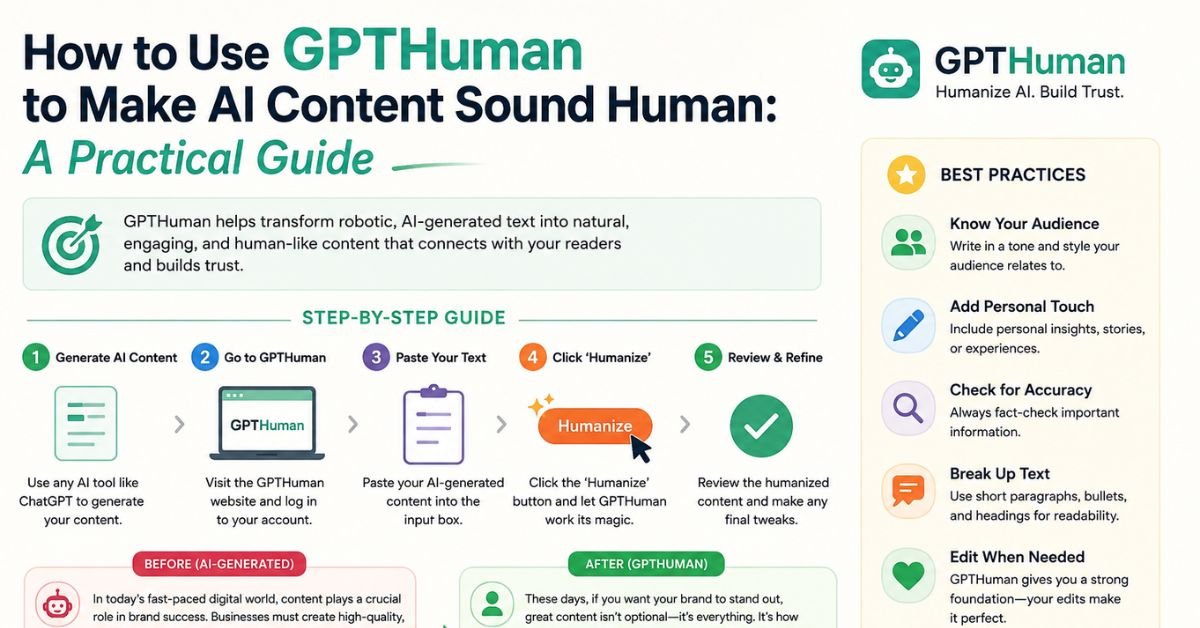
GPTHuman (at gpthuman.ai) is a web-based tool that takes text you’ve already generated with an AI model and rewrites it to sound more natural. You paste in a draft, tell the tool which model wrote it, pick a couple of settings, and get back a revised version in a second output panel.
The interface is a simple two-column layout: your original text on one side, the rewritten version on the other. Before running a humanization pass, you choose from two settings:
- Tone: Standard, High School, College, or PhD-level
- Mode: Professional, Balanced, or Enhanced — this controls how aggressively the tool restructures sentences and adjusts vocabulary density
After processing, GPTHuman returns the rewrite along with an internal Human Score, a Readability Score, and a Similarity Score, and gives you the option to click “Re-humanize” if you’re not happy with the first pass.
GPTHuman’s product lineup is narrower than most competitors: a Humanizer, an AI Detector, a Paraphraser, and an API. It doesn’t bundle a content generator, plagiarism checker, or document editor the way some rivals do. That focus is deliberate — the company positions GPTHuman as a specialist tool rather than an all-in-one writing suite.
One naming note worth flagging: there’s a separate site at gpthuman.com selling an unrelated product. This guide covers gpthuman.ai only, so double-check the URL before you sign up or pay.
A Quick Note on Language Support
GPTHuman’s marketing is a little inconsistent here. The homepage advertises support for around 80 languages, while the pricing page lists 50+. Treat the exact number as approximate rather than a hard guarantee, and test with a short sample in your target language before relying on it for anything long.
Why AI-Generated Text Gets Flagged in the First Place
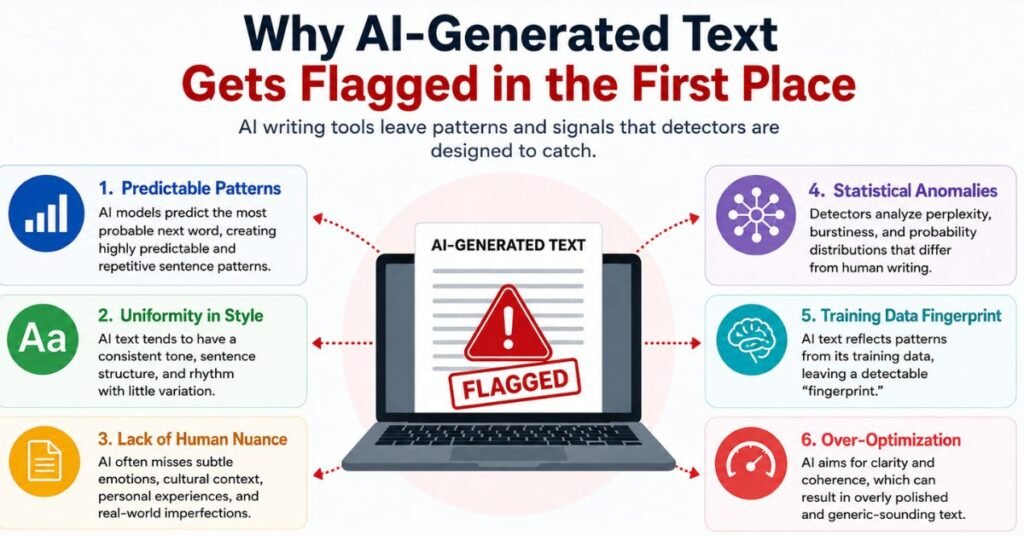
Before judging whether a humanizer works, it helps to understand what detectors are actually looking for. AI detectors don’t read for meaning the way a person does. Instead, they measure statistical fingerprints that large language models tend to leave behind:
- Low perplexity. This measures how “predictable” each word choice is given the words before it. Human writing tends to make slightly more surprising word choices; AI models, trained to produce the statistically likely next word, often read as smoother and more predictable.
- Low burstiness. Human writers naturally mix short punchy sentences with longer, more complex ones. AI-generated text tends to keep sentence length and rhythm more uniform across a paragraph.
- Repetitive structural patterns. Certain transition phrases, list formats, and paragraph shapes show up disproportionately often in AI output, and detectors are trained to recognize them.
- Vocabulary distribution. Some words and phrasing patterns appear far more frequently in AI-generated text than in typical human writing on the same topic.
Humanizer tools like GPTHuman work by deliberately disrupting these patterns — varying sentence length, swapping predictable phrasing for less common alternatives, and breaking up repetitive structures. That’s a genuinely different job than a simple synonym-swapping paraphraser, which is why the category positions itself separately. But it also explains why results are inconsistent: a rewrite can look natural to a human reader while still carrying enough of the original statistical fingerprint for a well-trained detector to catch it, especially on longer or more technical passages where the underlying structure is harder to disguise.
Choosing the Right Mode and Tone for Your Content Type
GPTHuman’s Tone and Mode settings aren’t just cosmetic — picking the wrong combination is one of the more common reasons people end up with output that still reads oddly. A few practical guidelines based on how reviewers describe the settings behaving:
- Blog posts and casual web copy: Standard tone, Balanced mode. This combination tends to produce the most naturally readable results with the least manual cleanup.
- Academic or research-adjacent writing: College or PhD tone, Professional mode. Even so, expect to manually restore any technical terms the rewrite may have softened or generalized.
- Marketing and social copy: Standard or High School tone, Enhanced mode, since a looser, more conversational rhythm usually reads better here than a heavily formal one.
- Anything long-form: Break the piece into logical sections before pasting it in, both to stay under the per-output word cap and to make it easier to keep tone consistent when you stitch the sections back together.
A mismatch — say, PhD tone paired with Enhanced mode on a casual blog post — is a common source of the “register inconsistency” reviewers describe, where part of a paragraph reads formally while another part suddenly turns conversational.
How to Use GPTHuman: Step-by-Step
- Generate your draft first. Write your piece in ChatGPT, Claude, Gemini, or whichever model you use normally.
- Create a GPTHuman account. A login is required even for the free tier.
- Paste your text into the input panel. There’s a hard cap per single output, which scales with your plan (more on this below).
- Select the source model. GPTHuman lets you flag which AI wrote the original text, which reportedly helps it target that model’s specific writing patterns.
- Choose a tone and a mode. Start with Standard/Balanced for general content; move to more aggressive settings only if the first pass still reads as robotic.
- Run the humanization and review the output. Check the Human Score and Readability Score, but treat them as a rough signal, not a guarantee — see “The Internal Score Problem” below.
- Re-humanize if needed, then edit by hand. Every independent review in this space agrees on one point: don’t publish a humanized draft without reading it yourself first.
- Cross-check with an external detector. GPTHuman’s built-in detector is useful as a sanity check but shouldn’t be your only test, especially for anything academic or client-facing.
How Good Is GPTHuman’s Writing Quality?
This is where the marketing and the independent testing start to diverge.
What Third-Party Testing Shows
Several outlets ran GPTHuman against real AI-generated drafts in 2026 and published their results. A few patterns show up consistently:
- One 2026 comparison test ran a Claude-generated marketing piece through GPTHuman’s Balanced mode (with the Claude source setting selected) and then checked the output with Originality.ai. The detector still flagged the humanized text as roughly 97% AI-generated.
- A separate detector-focused review generated a 150-word ChatGPT paragraph, humanized it with GPTHuman, and ran both versions through GPTZero, Grammarly’s AI detector, and Undetectable AI’s detector. The humanized version dropped sharply on the lighter tools (from 100% to 8% AI on GPTZero, and from 62% to 0% on Grammarly) but Undetectable AI’s detector — described as one of the stricter tools available — still flagged it at 62% AI, down from an original 99%.
The takeaway from both tests is the same: GPTHuman can meaningfully move the needle on lighter, more permissive detectors, but stricter detectors often still catch traces of AI-generated structure underneath the rewrite.
AI Detector Results
| Detector | Behavior reported in independent 2026 tests |
|---|---|
| GPTZero | Drops noticeably after humanization on short samples; less consistent on longer or technical text |
| Grammarly AI Detector | Reported drops close to 0% AI on short test samples |
| Undetectable AI Detector | Continued to flag GPTHuman output as majority-AI in more than one test |
| Originality.ai | One test recorded a 97% AI flag on humanized output |
Because detector results vary by content type, length, and which specific detector you use, don’t treat any single number as universal. Run your own draft through more than one detector before trusting the outcome.
What Independent Testers Found
Beyond detection scores, reviewers consistently raised concerns about the writing itself.
Register Inconsistency
Multiple reviews describe grammar and mechanical slips inside GPTHuman’s rewrites — awkward constructions, missing articles, and even straightforward typos appearing in otherwise coherent paragraphs. One test found the tool smoothing out a specific, technical phrase (“micro-segments and individual-level profiles”) into a much vaguer, more generic description — a sign that domain-specific vocabulary can get flattened during the rewrite. Reviewers described the resulting tone as inconsistent: parts of a paragraph read casually while other parts retain a stiffer, more formal register, which breaks the sense that one person wrote it.
The Internal Score Problem
GPTHuman’s built-in Human Score, Readability Score, and Similarity Score are useful for a quick gut check, but every independent review flags the same limitation: an internal detector graded by the same company that built the humanizer has an obvious incentive to score its own output favorably. None of the reviews found GPTHuman’s internal score reliably predictive of how a third-party detector like Originality.ai, Turnitin, or Copyleaks would grade the same text. If the stakes are real — a graded assignment, a client deliverable — the internal score alone isn’t enough evidence.
Where GPTHuman Actually Works
To be fair to the tool, reviewers weren’t uniformly negative. GPTHuman tends to perform reasonably well in a few specific situations:
- Short, casual content. Social captions, quick blog intros, and informal copy tend to come out reading naturally with minimal editing.
- Light detector checks. For lower-stakes situations where you just need to pass a basic tool like GPTZero on a short sample, GPTHuman’s Balanced mode is often enough.
- Budget-conscious, occasional use. GPTHuman sits at the cheaper end of the humanizer market, which makes it reasonable for someone testing the category before committing to a pricier tool.
- Users who want simple controls. The tone/mode picker is easy to understand compared to suites with a dozen configuration options.
Where it struggles more consistently: long-form technical content, anything that needs to survive a strict academic detector, and any workflow where you can’t afford to manually fix grammar and register issues afterward.
So, Is GPTHuman Worth Using?
It depends on what you’re using it for.
It’s a reasonable pick if:
- You need occasional, light humanization of short content
- You’re on a tight budget and don’t need enterprise-grade detector resistance
- You’re comfortable manually editing every output before you publish or submit it
It’s probably not the right pick if:
- You need long documents humanized in one pass without hitting per-output word caps
- You’re relying on it to survive a strict, dedicated detector rather than a basic one
- You need consistent tone and clean grammar without heavy manual cleanup
- Your school or employer has a policy against AI-assisted writing — a humanizer doesn’t change what the policy requires
Looking for a GPTHuman Alternative? Try Phrasly AI Humanizer
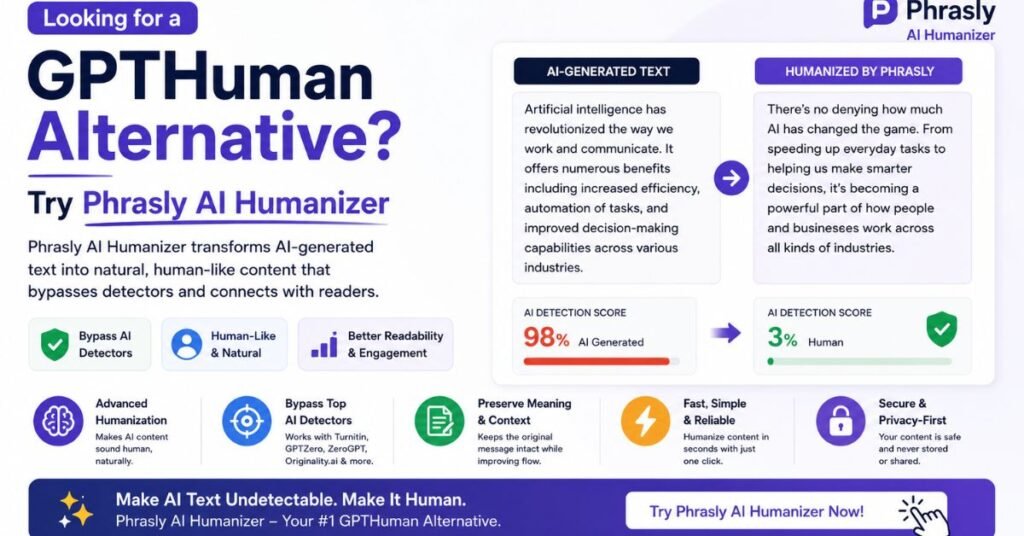
If GPTHuman’s per-output limits or writing quality don’t fit your workflow, Phrasly AI Humanizer is one of the more commonly recommended alternatives. It’s built specifically around humanization and detection, offers three rewrite intensities (Easy, Medium, Aggressive), and — in independent testing — has shown strong results on technical and factual writing in particular, though reviewers note it’s less consistent on creative or emotionally toned content. It’s not the only option (Leap AI, Undetectable AI, and others compete in the same space), but it’s worth a look if GPTHuman’s limits are the sticking point for you.
GPTHuman Free Plan: What You Actually Get
GPTHuman’s free tier requires you to sign in, and it’s genuinely a trial rather than a usable ongoing workflow. Here’s what’s included:
- 300 words of Humanizer output total
- Limited access to the built-in AI Detector
- Access to features like watermark removal, detectability settings, and the broader language list
That’s enough to test the interface and see what the output looks like on a small sample. It is not enough for repeated editing, long documents, or anything beyond a quick trial run.
Is GPTHuman Legit?
Yes — GPTHuman is a real, operating product with public pricing, a documented feature set, and an active support channel. That’s a different question from whether it performs as well as its marketing claims. Based on the reviews above, treat “legit business” and “reliably beats every AI detector” as two separate questions with two separate answers.
The Per-Output Cap Is the Real Issue
For most users, the practical friction isn’t the price — it’s the per-output word limit, which scales by plan:
| Plan | Max words per single output |
|---|---|
| Free | 300 |
| Starter | 750 |
| Plus | 1,200 |
| Unlimited | 2,000 |
If your draft is longer than your plan’s cap, you have to split it into multiple chunks and run each one separately — which makes it harder to keep tone and voice consistent across a full article. By comparison, some competitors process a full 5,000-word document in a single pass, which matters if you regularly work with long-form content.
Privacy and Data Usage
GPTHuman uses standard HTTPS and publishes a privacy policy, and its data handling is broadly comparable to other consumer humanizer tools. That said, no independent audit results are publicly available to verify specific data-retention or training-use claims. If you’re pasting anything confidential or sensitive — internal company drafts, unpublished research, personal information — read the current privacy policy on GPTHuman’s site before you paste it in, the same way you would with any third-party web tool.
Language Support
As mentioned above, GPTHuman advertises somewhere between 50+ and 80 supported languages depending on which page you check. English performance is the most thoroughly tested in reviews; quality in other languages is less documented, so test with a real sample before relying on it for non-English content.
How Does GPTHuman Compare to Alternatives?
GPTHuman vs DigitalMagicWand
DigitalMagicWand isn’t a dedicated humanizer — it’s a broader multimedia AI suite (images, audio, video, and text tools) with humanization as one feature among many. That has trade-offs in both directions.
| GPTHuman | DigitalMagicWand | |
|---|---|---|
| Product focus | Dedicated humanizer, detector, paraphraser, API | Text humanizer is one tool inside an image/audio/video/text suite |
| Free testing | 300 words total (login required) | Free demo, roughly one credit per use up to 30,000 characters (reported signup credits vary by source) |
| Style controls | Tone + Mode presets | Multiple named styles (Strong, Light, Informal, Essay, Journalistic, Academic, Narrative, and others) |
| Reported detector results | Mixed — strong on light detectors, weaker on strict ones | Mixed across detectors; one 2026 test found GPTZero unmoved by the humanized version while ZeroGPT and Scribbr scores dropped meaningfully |
| Best for | Users who want a single-purpose tool with simple settings | Users who already need image/audio/video tools and want humanization bundled in |
There’s one more structural difference worth calling out: because DigitalMagicWand is primarily an image, audio, and video platform, its text humanizer competes for engineering attention with tools like background removal and AI video generation. Reviewers who tested it specifically for writing quality noted that this shows up in the output — the rewrite logic feels less refined than tools built exclusively around text. If you only need a humanizer and don’t already use DigitalMagicWand’s other tools, that’s worth weighing against its more generous free trial.
Bottom line: DigitalMagicWand offers a more generous free test before you pay anything, but neither tool delivers uniformly clean results across every AI detector — you’ll want to verify with your own sample either way.
GPTHuman vs Phrasly AI Humanizer
| GPTHuman | Phrasly AI Humanizer | |
|---|---|---|
| Product focus | Standalone humanizer, detector, paraphraser | Full writing suite: humanizer, detector, content generator, document editor, plagiarism checker |
| Free plan | 300 words total | Around 300–550 words depending on current offer, plus limited content-generation credits |
| Per-output cap (top plan) | 2,000 words | Reported around 2,500–3,000 words on higher tiers, varying by plan and source |
| Rewrite controls | Tone + Mode | Easy / Medium / Aggressive intensity levels |
| Reported strengths | Cheap entry point, simple interface | Reported to perform especially well on technical and factual content in independent testing |
| Reported weaknesses | Grammar slips, tone inconsistency, narrow per-output cap | Creative and emotionally toned writing tests less consistently in reviews |
If your main frustration with GPTHuman is the 2,000-word ceiling on long documents, Phrasly’s larger per-output allowance is the more relevant difference — more so than any specific detector score, since detector results shift over time and by content type.
It’s also worth noting that Phrasly bundles more adjacent tools — a content generator, a document editor, and a plagiarism checker — into the same subscription. If you only need a rewrite tool and nothing else, that extra functionality may not be worth paying for. But if you’re already juggling separate subscriptions for drafting, humanizing, and detection, consolidating into one suite can be the more practical choice even if no single feature is best-in-class.
Common Mistakes People Make With AI Humanizers
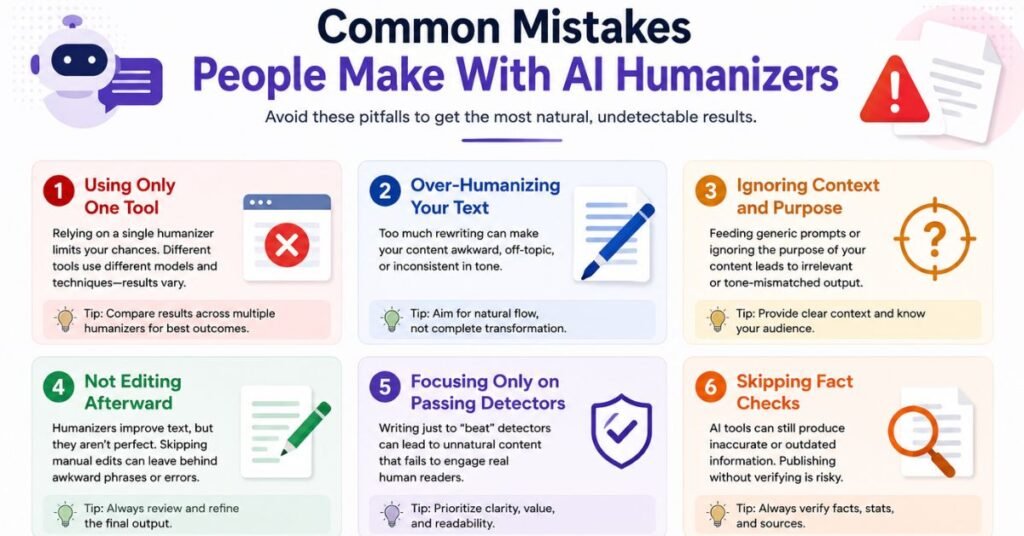
Across the reviews cited in this guide, a handful of mistakes come up again and again — and they apply to GPTHuman as much as any competitor:
- Trusting the internal score and skipping an outside detector. A tool’s own score is not a neutral judge of its own output. Always cross-check with a separate detector before anything important goes out the door.
- Running the maximum-aggression mode by default. More aggressive rewriting increases the odds of losing precise terminology, especially in technical or scientific writing. Start conservative and only increase intensity if the lighter setting isn’t enough.
- Skipping the manual read-through. Every review cited here — even the more favorable ones — recommends reading the output before publishing. Grammar slips and dropped nuance are common enough that this step isn’t optional.
- Assuming one pass is final. Long documents split across multiple humanization runs can end up with inconsistent tone from section to section. Read the finished piece start to finish, not just section by section.
- Ignoring the policy question. A humanizer changes what a detector sees. It doesn’t change what your school, publisher, or employer’s rules actually require. Check the relevant policy before deciding whether to use one at all.
The Bottom Line
GPTHuman is a real, working product, and for short, low-stakes rewrites where you have time to edit the result yourself, it does the job reasonably well. Where it runs into trouble is anywhere the stakes are higher: long documents that hit its 2,000-word cap, content that needs to survive a strict detector, or writing where grammar and tone need to be clean without a manual pass.
If you decide to try it, treat the internal Human Score as a starting point rather than a verdict, cross-check anything important with an outside detector, and budget time to edit the output by hand. And if a policy against AI-assisted writing applies to what you’re working on, remember that a humanizer addresses detectability — not the underlying policy question.
Frequently Asked Questions
Does GPTHuman actually bypass Turnitin?
Independent tests are mixed. GPTHuman performs better against lighter, consumer-grade detectors than against stricter tools like Turnitin or Undetectable AI’s detector, which have continued to flag humanized output in multiple 2026 reviews.
Is GPTHuman free to use?
There’s a free tier, but it caps you at 300 words of total Humanizer output and requires an account — it’s a trial, not an ongoing free workflow.
How many words can GPTHuman process at once?
It depends on your plan: 300 words on Free, up to 750 on Starter, 1,200 on Plus, and 2,000 on Unlimited, per single output.
Is GPTHuman safe to use with sensitive text?
It uses standard HTTPS and has a public privacy policy, similar to most consumer humanizers, but there’s no independent data-handling audit publicly available. Avoid pasting confidential material until you’ve read the current policy yourself.
Can GPTHuman replace manual editing?
No. Every independent review recommends reading and editing the output before publishing or submitting it — grammar slips and tone shifts show up often enough that a manual pass is still necessary.
Does using a humanizer make AI-assisted writing acceptable at school or work?
Not automatically. A humanizer changes whether a detector flags the text; it doesn’t change what your institution’s or employer’s policy actually requires. Check your specific policy before using one for graded or professional work.
How does GPTHuman compare on price to competitors?
It sits at the budget end of the humanizer market. Whether that makes it the better value depends on whether you need higher per-output limits or stronger detector resistance, both of which some competitors offer at a similar or only slightly higher price.
What’s the difference between a humanizer and a paraphrasing tool?
A paraphraser mainly swaps words and rearranges sentence order. A humanizer like GPTHuman goes further, targeting the statistical patterns (sentence-length variation, word predictability) that detectors specifically look for, not just surface wording.
Can GPTHuman handle non-English content well?
It’s harder to verify. GPTHuman advertises broad language support, but independent reviews focus almost entirely on English output, so quality in other languages is less documented — test with a real sample first.
Does re-running “Re-humanize” multiple times improve results?
Not reliably. Reviewers note that repeated re-humanization passes can drift further from the original meaning without meaningfully improving detector scores, so it’s better to manually edit a decent first pass than to keep regenerating.
Is there a way to test GPTHuman without paying?
Yes — the free plan gives 300 words of Humanizer output after you create an account, enough to judge the interface and get a feel for output quality on a short sample.