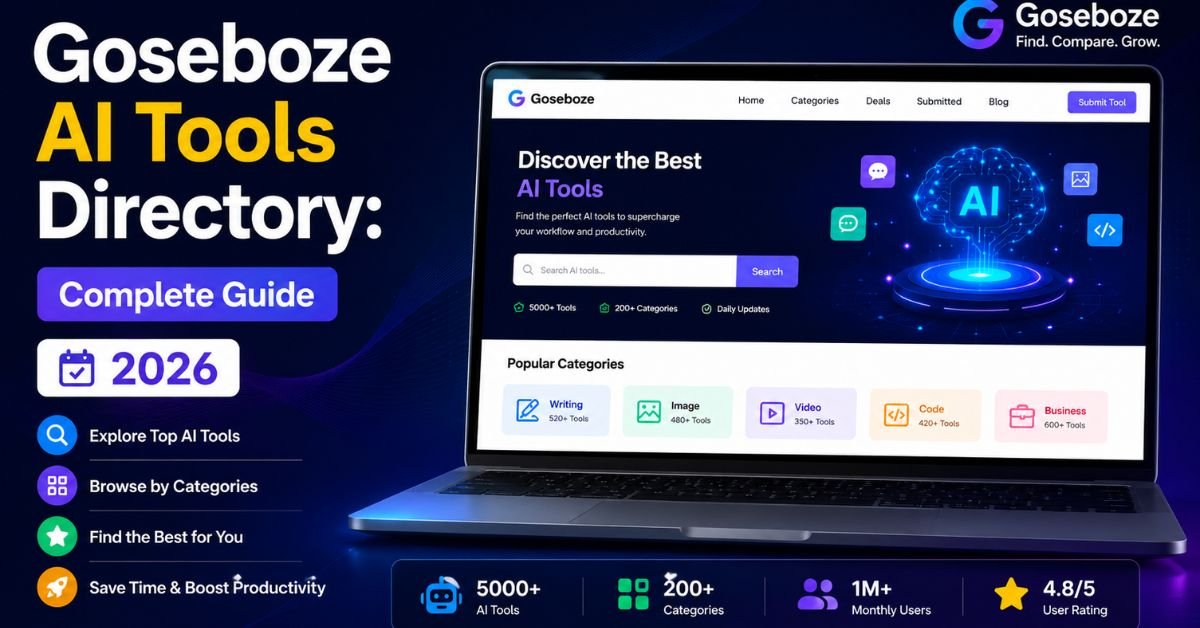
If you’ve searched for “Goseboze AI tools,” you’ve probably landed on conflicting answers. Some pages talk about it like a single AI app. Others call it a directory. The confusion is understandable — the AI tools market is crowded, and directory sites don’t always explain themselves clearly on the homepage.
Here’s the short version: Goseboze is a web-based directory that lists AI products from other companies, organized into categories you can browse or search. It doesn’t build software itself. Think of it less like ChatGPT and more like a curated shopping aisle for AI tools, where every “product” links out to its own website.
This guide walks through what’s actually on the site, how the browsing and submission process works, where it’s strong, where it falls short, and how it stacks up against other AI directories — so you can decide in a few minutes whether it’s worth adding to your toolkit.
What Goseboze Actually Is
Goseboze positions itself as a directory for discovering, comparing, and listing AI products. On the site, tools are organized under category filters such as chatbots, image generation, writing assistants, productivity, marketing, and email marketing, among others. Each listing typically includes a product name, a short description, a category tag, and a pricing label (free, freemium, or paid), along with a link through to the product’s own website.
The directory’s own stats page states it hosts several hundred listed products across dozens of categories and draws tens of thousands of monthly visitors — figures that are worth treating as a rough scale indicator rather than a guaranteed, constantly updated count, since directory numbers shift as tools are added or removed.
A few things are useful to understand up front:
- Goseboze doesn’t generate content, images, code, or anything else. It’s a catalog, not a generator.
- Listings are often submitted by the tool owners themselves. That means descriptions can read like marketing copy rather than independent reviews.
- The directory covers a mix of well-known tools and smaller, newer products. You’ll find household names sitting next to tools you’ve never heard of.
How Browsing and Listing Works
Using Goseboze is fairly straightforward, and it follows the same basic pattern as most AI directory sites:
- Land on the homepage or category page. You can browse by category (chatbots, image generation, writing assistants, productivity, and others) or use the search bar if you already have a task in mind.
- Filter by pricing. Free, freemium, and paid filters help you narrow results before you start clicking through.
- Open a product card. Each card shows a short description and a pricing tag, with a “View Details” link.
- Visit the tool’s own site. This is where you’d actually sign up, test the free tier, or check current pricing — the directory listing itself isn’t where the tool runs.
For AI product owners, there’s also a listing submission flow accessible from the main navigation. Submission is presented as free, and the process generally asks for the tool’s name, category, description, pricing model, and website link. As with any directory, it’s sensible to verify current submission terms and review timelines directly on the site before submitting, since these details can change.
Categories You’ll Find
Based on the site’s navigation and product listings, the main categories cluster around a handful of familiar AI use cases. Here’s a snapshot of what’s represented:
| Category | What It Covers | Example Listings Found |
| Chatbots | Conversational AI assistants for support, sales, or general use | ChatGPT |
| Writing Assistants | Copywriting, editing, grammar, and content generation | Grammarly, CopyChecker |
| Image Generation | Text-to-image and creative visual tools | DALL·E, Midjourney |
| Productivity | Workspace and task-management AI add-ons | Notion AI |
| Marketing | Ad optimization, campaign management, and personalization | Ryze AI, AdCreative.ai |
| Email Marketing | Campaign building and deliverability tools | TrueEmailer |
| Audio | Music and voice generation | MakeBestMusic |
This isn’t an exhaustive list of every category on the site, but it reflects the categories most visible in navigation and featured listings. If you’re looking for something more specific — coding assistants, video editing, SEO tools, or automation — the category filter and search bar are the fastest way to check current coverage, since directory inventories change over time.
Why the “Is It One AI Tool?” Confusion Happens

Part of the reason so many people search for clarity on this topic is that the phrase “Goseboze AI tools” reads like a product name rather than a category description. It’s easy to assume, from the wording alone, that there’s a single app called Goseboze that writes content, edits images, or answers questions the way a chatbot would.
That assumption breaks down as soon as you open the site. There’s no chat window, no prompt box, and no generation feature anywhere on the homepage. Instead, the entire experience is built around browsing, filtering, and clicking through to other companies’ products. The clearest way to think about it: Goseboze relates to individual AI tools the same way a comparison-shopping site relates to individual retailers. It aggregates and organizes; it doesn’t manufacture.
This distinction matters practically. If you sign up expecting a generative AI product, you’ll be disappointed — there’s nothing to “use” on Goseboze itself beyond search and filters. If you go in expecting a directory, the experience matches expectations much better, and you’ll get more out of the visit.
A Look at Real Listings on the Site
Rather than guess at what’s inside the directory, here’s a sample of products that actually appear on Goseboze’s homepage and product pages, along with their listed category and pricing tag at the time of research:
| Tool | Category | Pricing Tag | What It’s For |
| TrueEmailer | Email Marketing | Freemium | AI-assisted email campaign creation and deliverability |
| CopyChecker | Writing Assistant | Freemium | Content authenticity checking and writing productivity |
| Ryze AI | Marketing | Freemium | AI copilot for managing paid ad campaigns |
| MakeBestMusic | Audio | Paid | AI music and song generation with vocals |
| Reddapi.dev | Marketing | Freemium | Turns Reddit data into business intelligence via API |
| ChatGPT | Chatbots | Freemium | General-purpose conversational AI |
| DALL·E | Image Generation | Freemium | Text-to-image generation |
| Midjourney | Image Generation | Paid | AI image generation focused on artistic output |
| Notion AI | Productivity | Freemium | Writing and planning assistant inside Notion |
| Grammarly | Writing Assistant | Freemium | Grammar, clarity, and tone checking |
A quick note on accuracy: directory pricing tags reflect what’s been submitted or last updated on the listing page, not necessarily the tool’s current live pricing. Always confirm cost and plan details on the tool’s official site before signing up, especially for paid tools where pricing tiers change often.
Strengths and Weaknesses
Like any user-submitted directory, Goseboze has clear upsides and equally clear limits. Laying them out side by side makes the trade-offs easier to weigh.
What Works Well
- Fast category browsing. If you already know you need a writing assistant or an image generator, the category filters get you to relevant options quickly.
- Low-friction discovery for niche tools. Because listings are open to submission, you’ll find smaller or newer products that haven’t yet made it into more heavily curated lists like Product Hunt or Futurepedia.
- No cost to browse. There’s no paywall or account requirement just to look through listings.
- Simple, scannable format. Product cards are short and consistent, which makes comparing several tools at once easier than reading full review articles for each one.
Where It Falls Short
- Listings aren’t independently reviewed. Since many descriptions come from the tool creators themselves, expect marketing language rather than a balanced pros-and-cons breakdown.
- Quality varies a lot. A directory that accepts open submissions will inevitably include some abandoned, low-effort, or duplicate-feeling tools alongside genuinely useful ones.
- No built-in ratings or verified reviews. Unlike community-voted platforms, there isn’t a strong signal for “this tool is trusted by many users” beyond the listing itself.
- Pricing and feature details can go stale. Because updates depend on the tool owner revisiting their listing, some information may lag behind what’s actually on the product’s live website.
Beyond the Headline Categories: Content, Video, SEO, Code, and Automation
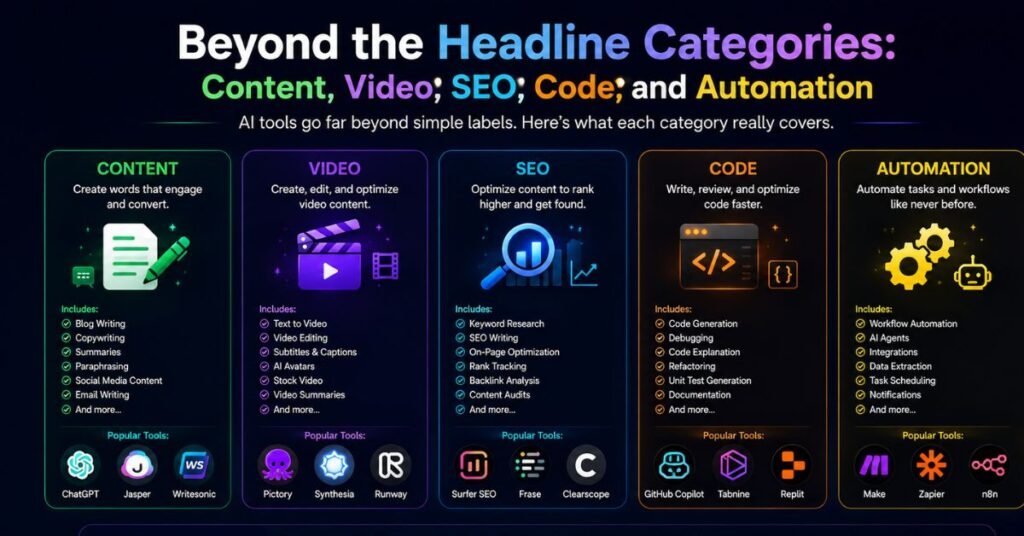
The category filters visible in the main navigation — chatbots, image generation, writing assistants, and productivity — only tell part of the story. AI directories like this one commonly expand their category taxonomy behind the search bar or through tags on individual listings, covering areas that don’t always get their own top-level navigation link. Based on how listings are tagged and described, a few additional groupings are worth knowing about if you’re searching for something more specialized:
- AI Content and Copywriting. Beyond general writing assistants, this covers tools built for blog posts, ad copy, product descriptions, or long-form drafting at scale.
- AI Video Creation and Editing. Tools in this space typically handle avatar-based video generation, automated editing, captioning, or localization — useful for training content or marketing without a production team.
- AI Chatbots and Enterprise Search. This spans both consumer-facing conversational bots and internal “ask a question, get a cited answer” tools that connect to workplace apps like Slack or Gmail.
- SEO and Marketing Analytics. Tools that assist with keyword research, ad optimization, or campaign monitoring fall here, often overlapping with the marketing category.
- AI Coding Assistants. Code completion, debugging, and pair-programming tools are typically grouped together, though this category tends to be smaller on general-purpose directories than on dedicated developer-tool sites.
- Automation. Workflow and task-automation tools, including those that chain multiple AI actions together, usually sit in their own bucket separate from productivity apps.
If a category you need isn’t visible in the top navigation, the search bar is usually the faster route — searching by task (“resume screening,” “voice cloning,” “meeting notes”) tends to surface relevant listings even when they’re not prominently featured on a category page.
Common Mistakes People Make When Using AI Directories
A directory is only as useful as the way it’s used. A few recurring habits tend to waste time on any AI directory, Goseboze included:
- Browsing without a goal. Scrolling through categories with no specific task in mind almost always ends in decision fatigue rather than a shortlist.
- Trusting the listing description as the final word. Since many descriptions are written by the tool’s own team, they read like sales copy. A five-minute look at the tool’s actual website, and ideally an independent review, closes that gap.
- Skipping the pricing check. A “freemium” tag doesn’t tell you how generous the free tier actually is. Always confirm current limits on the vendor’s site.
- Assuming a listing is recently updated. Directories accumulate stale entries over time. If a tool’s site looks abandoned or the last update was long ago, treat that as a signal to look elsewhere.
- Picking the first result instead of comparing two or three. Even within a single category, feature sets and pricing models can differ enough to matter — a quick side-by-side beats settling on the first card you click.
Goseboze vs. Other AI Directories
If you’re deciding where to spend your discovery time, it helps to see how Goseboze compares to other well-known directory-style sites.
| Feature | Goseboze | Product Hunt | Futurepedia |
| Curation style | Open submission, minimal editing | Community voting and daily launches | Editor-reviewed listings |
| Focus | AI tools specifically | All tech products, not just AI | AI tools specifically |
| Best for | Broad, fast category browsing | Discovering new launches and community buzz | More vetted, higher-confidence picks |
| Ratings/reviews | Not prominent | Upvotes and comments | Varies by listing |
| Listing cost | Free | Free | Varies |
None of these are strictly “better” in every scenario — Product Hunt is stronger for spotting buzzworthy new launches, Futurepedia leans toward tighter curation, and Goseboze is useful when you want a wide net across many small and mid-size AI products in one place. Using more than one source and cross-checking reviews elsewhere (Reddit threads, YouTube walkthroughs, or the vendor’s own case studies) is a reasonable habit regardless of which directory you start with.
Who Gets the Most Value From It
Goseboze tends to work best for people who already have a specific task in mind rather than those browsing aimlessly. It’s a reasonable fit for:
- Freelancers and small business owners comparing budget-friendly or freemium tools for a single task, like email marketing or writing assistance.
- Founders listing a new AI product who want an additional discovery channel beyond their own site and social channels.
- Researchers and marketers doing a first pass on “what exists in this category” before narrowing down to two or three finalists for deeper testing.
- Anyone early in their AI-tool search who doesn’t yet know specific product names and needs a starting point organized by task rather than brand.
It’s a weaker fit if you’re looking for in-depth comparative reviews, verified user ratings, or guaranteed up-to-date pricing — for that, pairing directory browsing with independent review sites or firsthand free trials is the more reliable path.
How to Use the Directory Effectively
A directory is only as useful as the process you bring to it. A few practical habits make browsing faster and reduce wasted clicks:
- Define the task before you browse. “I need something for grammar checking” narrows things far faster than browsing categories at random.
- Filter by pricing first if budget matters. Checking the freemium or free filter early avoids getting attached to a tool you’d have to pay for right away.
- Open two or three tools in the same category, not just one. Comparing descriptions side by side highlights differences in features faster than reading one listing at a time.
- Treat the listing as a preview, not a verdict. Visit the tool’s actual website to confirm pricing, check for a free trial, and look for support documentation or security details if it’s for team use.
- Look outside the directory for validation. A quick search for independent reviews or a demo video adds a layer of confidence a directory listing alone can’t provide.
A Practical Checklist Before You Commit to Any Listed Tool
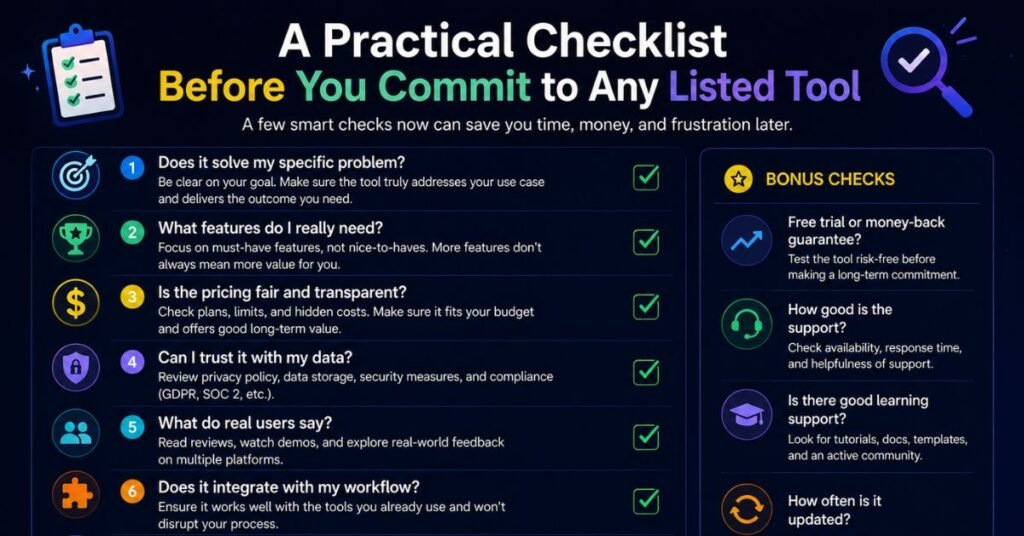
Once a directory listing catches your interest, it helps to run through a short checklist before creating an account or entering payment details. This applies whether you found the tool on Goseboze, Product Hunt, or anywhere else:
- Confirm the pricing on the vendor’s own site. Directory pricing tags are a starting signal, not a guarantee — plans and limits change more often than listings get updated.
- Test the free tier or trial first, if one exists. A short hands-on test reveals more about fit than any description can.
- Check for basic credibility signals. A working support page, visible documentation, and a reasonable update history are good signs; a bare-bones site with no contact information is a reason to slow down.
- Search for independent opinions. A quick look at Reddit threads, YouTube walkthroughs, or review aggregators adds a perspective the directory listing itself won’t provide.
- For team or business use, check for admin and security basics. Look for user-role controls, integration options, and any documentation on data handling before rolling a tool out beyond a single user.
- Note the category fit. Some tools are broad “does everything” products, while others are narrow and purpose-built. Matching the tool’s scope to your actual task avoids paying for features you’ll never use.
Before committing to a tool, it’s also worth checking community discussions on Reddit to see real user experiences, common issues, and feature limitations that may not appear in the product’s marketing materials.
Conclusion
Goseboze is a straightforward AI product directory, not a standalone AI tool. Its real value is speeding up the first stage of your search — narrowing hundreds of possible tools down to a shortlist by category and pricing. From there, the responsibility shifts to you: visiting each tool’s actual site, checking current pricing, testing a free plan if one’s available, and reading independent reviews before committing.
Used that way — as a starting point rather than a final answer — it can save real time compared to searching the open web tool by tool. Used as a substitute for actual research, it can just as easily lead you to an abandoned or low-quality product. The directory format works in your favor only if you keep the verification step after it.
Frequently Asked Questions
Is Goseboze itself an AI tool?
No. Goseboze is a directory website that lists AI products built by other companies; it doesn’t generate text, images, or code on its own.
Is browsing Goseboze free?
Yes, browsing and searching listings is free; individual tools listed on the site may have their own free, freemium, or paid plans.
Can I list my AI product on Goseboze?
Yes, the site includes a “List Your Product” submission flow that asks for your tool’s name, category, description, pricing, and website link.
Does Goseboze verify or test the tools it lists?
There’s no strong indication of independent testing; many listings appear to be submitted directly by tool owners, so treat descriptions as marketing copy rather than a review.
How does Goseboze compare to Product Hunt or Futurepedia?
Goseboze focuses specifically on AI tools with open submissions, Product Hunt covers all tech products with community voting, and Futurepedia leans toward more editor-reviewed AI listings.
Is Goseboze useful for finding SEO tools?
It can help you discover SEO-related listings if the category exists on the site, but it doesn’t perform SEO work itself — you’d still need to visit and use the actual tool.
Are the tools listed on Goseboze all high quality?
Quality varies. Because submissions are open, you’ll find both established, well-known tools and smaller or less-tested products in the same category.