If you’ve spent any time researching business software in the last two years, you’ve probably noticed that “AI automation” shows up everywhere — in product pages, LinkedIn posts, and every second webinar invite. Yet ask five people to define it and you’ll likely get five different answers.
That confusion is understandable. AI automation sits at the intersection of two fields that used to be separate: traditional workflow automation (think RPA and BPA) and artificial intelligence (think large language models and machine learning). The result is a category that borrows vocabulary from both worlds, which makes it easy to mix up with older terms like intelligent automation or newer ones like agentic AI.
This guide clears that up. You’ll learn what AI automation actually means, how it’s different from RPA, BPA, IA, and agentic automation, how the technology works under the hood, real examples from sales to finance, the benefits and risks, and a practical walkthrough of building your first AI automation using a no-code platform like Make. We’ll also cover two of the topics people search for constantly alongside this one: the best AI automation testing tools and the best AI tools for YouTube automation.
Let’s start with the fundamentals.
AI and Automation
Traditional automation is rule-based. You tell a system “if X happens, do Y,” and it follows that instruction exactly, every time. This works beautifully for predictable, repetitive tasks — moving a file from one folder to another, sending a confirmation email after a form submission, or updating a spreadsheet on a schedule.
The problem is that most real business work isn’t that tidy. A customer support ticket might contain a rambling complaint buried in three paragraphs of context. An invoice might arrive as a scanned PDF with a layout your system has never seen before. A sales lead might describe their needs in a way that doesn’t match any predefined keyword list.
AI automation is what happens when you add a layer of artificial intelligence — usually a large language model, a machine learning classifier, or a computer vision system — on top of that rule-based foundation. Instead of only reacting to fixed triggers, the system can now read, interpret, summarize, classify, and even generate content before deciding what action to take next.
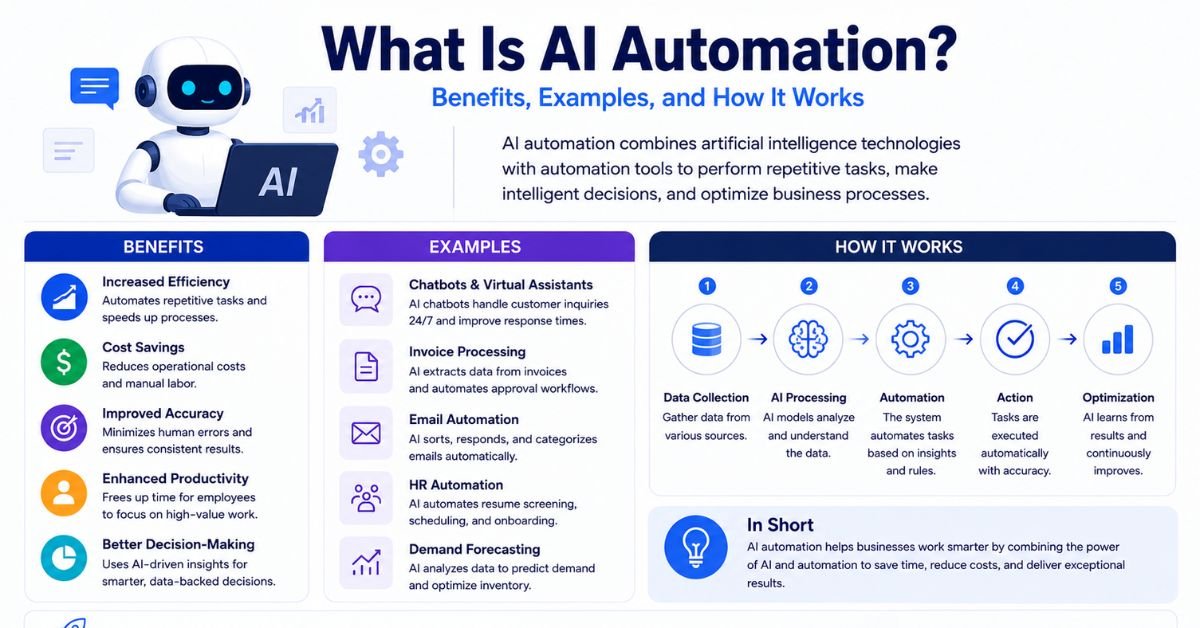
Put simply: AI automation uses artificial intelligence to handle the “thinking” part of a workflow, and automation tools to handle the “doing” part. The trigger might stay exactly the same as a traditional automation — a new email, a new form submission, a new record in a database — but what happens between the trigger and the final action becomes far more capable.
How does AI automation differ from RPA, BPA, IA, and agentic automation?
This is where most of the confusion lives, so let’s break each term down clearly. All of these approaches automate work, but they differ in how much intelligence is involved and how much freedom the system has to act on its own.
| Automation type | What it actually does | Uses AI? | Best suited for |
| Robotic Process Automation (RPA) | Mimics human clicks, keystrokes, and copy-paste actions inside existing software interfaces | Rarely, and only in limited add-on form | Repetitive, rule-based tasks in legacy systems with stable interfaces |
| Business Process Automation (BPA) | Coordinates an entire end-to-end process across multiple teams, tools, and approvals | Optional | Onboarding, invoicing, approval chains |
| Intelligent Automation (IA) | Combines RPA with AI capabilities like OCR, NLP, or basic machine learning to handle semi-structured data | Yes | Document processing, claims handling, form extraction |
| AI Automation | Connects apps through APIs and uses AI models to interpret, decide, summarize, or generate content mid-workflow | Yes | Modern software stacks, customer support, content operations |
| Agentic Automation (Agentic AI) | Deploys autonomous AI agents that set their own steps, choose tools, and take action toward a goal with minimal supervision | Yes | Complex, multi-step workflows requiring judgment at every stage |
A simple way to think about the progression is this: RPA follows fixed rules. Intelligent automation adds a layer of pattern recognition on top of those rules. AI automation adds genuine language understanding and generation into the mix. Agentic automation goes a step further and lets the AI decide which steps to take at all, not just how to execute a predefined one.
None of these approaches has made the others obsolete. A lot of enterprise automation stacks today actually blend all four — RPA bots handling legacy screen scraping, BPA orchestrating the broader process, AI automation reading unstructured inputs, and early-stage agentic components handling the more judgment-heavy decisions.
AI Automation Examples
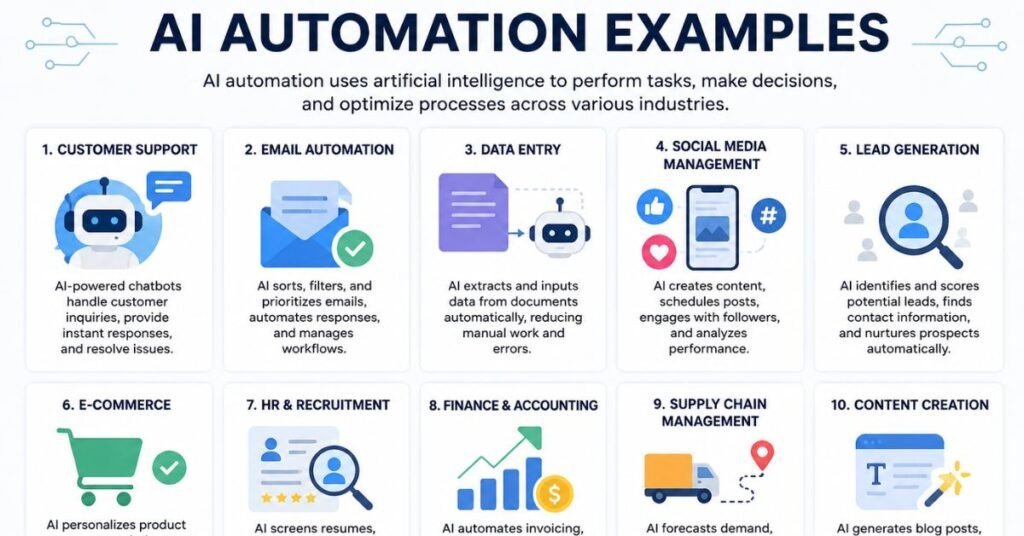
Theory is useful, but AI automation becomes much clearer once you see it applied to specific business functions. Below are realistic examples broken out by department — Front Office, Back Office, Customer Experience, Employee Experience, and Operational Efficiency — because that’s typically how organizations map automation opportunities internally.
Front Office
The front office covers everything customer- and revenue-facing: sales, marketing, and business development.
- Lead qualification and routing: A new lead fills out a form. An AI model reads their responses, scores intent and urgency, enriches the record with company data, and routes it to the right sales rep — instead of a generic round-robin assignment.
- Personalized outreach at scale: Instead of a single templated email, AI automation can draft a follow-up message tuned to the specific deal stage, industry, and prior conversation history, which a rep then reviews before sending.
- Content repurposing: A single blog post or webinar transcript gets automatically turned into LinkedIn posts, email newsletter blurbs, and short video scripts, keeping every channel fed without extra manual work.
Back Office
Back-office AI automation typically targets finance, procurement, HR, and administrative work — the tasks that rarely touch a customer directly but still consume enormous amounts of staff time.
- Invoice and receipt processing: AI extracts vendor names, line items, totals, and due dates from scanned invoices or email attachments and pushes structured data straight into accounting software.
- Contract review: AI scans incoming contracts for non-standard clauses, flags anything that deviates from approved language, and routes only the exceptions to legal for human review.
- Resume screening: Instead of a keyword filter, an AI model reads full resumes against a role’s requirements and produces a ranked shortlist with reasoning attached.
Customer Experience
This is one of the fastest-growing categories of AI automation, largely because customer support tickets are the definition of unstructured, high-volume, judgment-heavy work.
- Tier-1 ticket deflection: AI reads an incoming support ticket, checks it against the knowledge base, and drafts a reply — which either goes out automatically for low-risk queries or is queued for human approval on anything sensitive.
- Sentiment-based escalation: Instead of routing every ticket the same way, AI automation flags frustrated or high-churn-risk customers and escalates those conversations to a senior agent immediately.
- Review monitoring: New reviews on platforms like G2 or Trustpilot are automatically classified by sentiment and topic, with negative themes turned into tracked issues for the product team.
Employee Experience
Internally, AI automation is increasingly used to reduce the administrative burden on employees themselves.
- IT helpdesk triage: Common password resets or access requests are resolved automatically, while genuinely complex issues are routed to a human technician with full context already attached.
- Onboarding assistance: New hires get instant, conversational answers to policy questions instead of waiting on an HR ticket queue.
- Meeting summarization: AI automatically transcribes and summarizes meetings, then distributes action items to the right people without anyone needing to write meeting notes manually.
Operational Efficiency
Finally, there’s a broad category of operational use cases that don’t map neatly to a single department but drive efficiency across the whole organization.
- Anomaly detection: AI automation continuously monitors transaction data or system logs and flags unusual patterns that a rules engine would miss entirely.
- Demand forecasting: Machine learning models analyze historical sales and external signals to adjust inventory and staffing recommendations automatically.
- Cross-system data cleanup: AI normalizes messy, inconsistent data — different date formats, inconsistent naming conventions, duplicate entries — before it lands in a CRM or data warehouse.
How Does AI Automation Work?
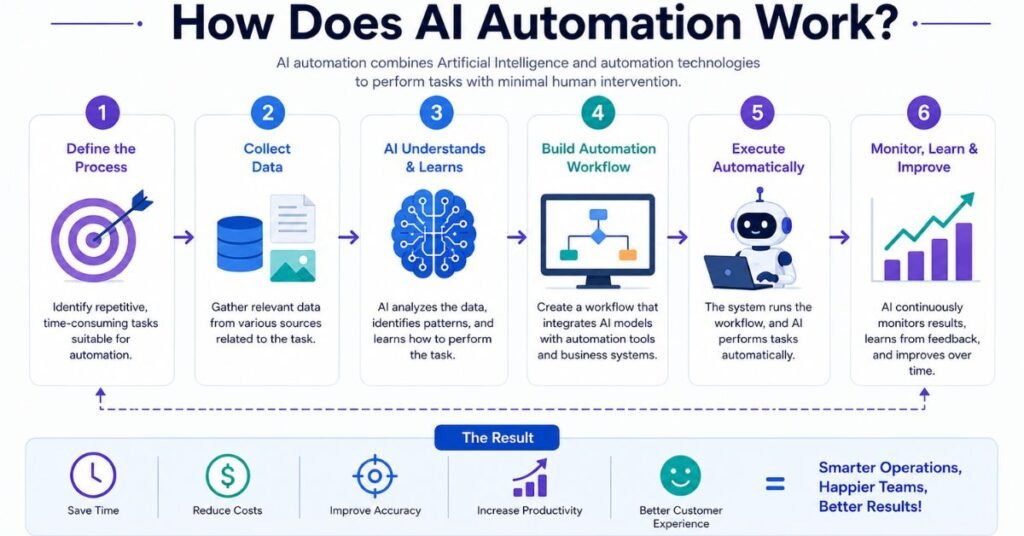
Every AI automation, whether it’s a simple one-step ticket classifier or a complex multi-app revenue workflow, tends to follow the same underlying pattern. Understanding these stages makes it much easier to design your own automation later.
Data Collection
Everything starts with data entering the system — a new email, a form submission, a webhook notification, a new row in a spreadsheet, or a scheduled pull from an API. This is functionally identical to a traditional automation trigger. The difference shows up in the next stage.
Data Preparation
Before an AI model can do anything useful, the incoming data usually needs cleaning and structuring. This might mean converting a PDF into readable text, stripping out HTML formatting from an email, or standardizing date and currency formats. Poor data preparation is one of the most common reasons AI automations underperform in production — the model is only as good as what it’s given to read.
Training
Some AI automations rely on pre-trained, general-purpose models (like a large language model used for classification or drafting), which require no additional training on your end. Others — particularly machine learning models used for fraud detection, demand forecasting, or predictive maintenance — need to be trained or fine-tuned on your organization’s historical data so they learn the specific patterns relevant to your business.
Execution
This is where the AI reasoning actually happens: the model reads the prepared data, applies its training or prompt instructions, and produces an output — a classification, a summary, a drafted reply, a decision about which branch of a workflow to follow. That output is then handed off to an action step, such as updating a CRM record, sending a Slack message, or creating a support ticket.
Continuous Learning
The best AI automations don’t stay static. Feedback loops — human corrections, approval or rejection data, outcome tracking — feed back into the system over time, either through model retraining or through refined prompts and rules. This continuous learning is what separates a one-off automation from a system that keeps getting more accurate the longer it runs.
Benefits of Implementing AI Automation
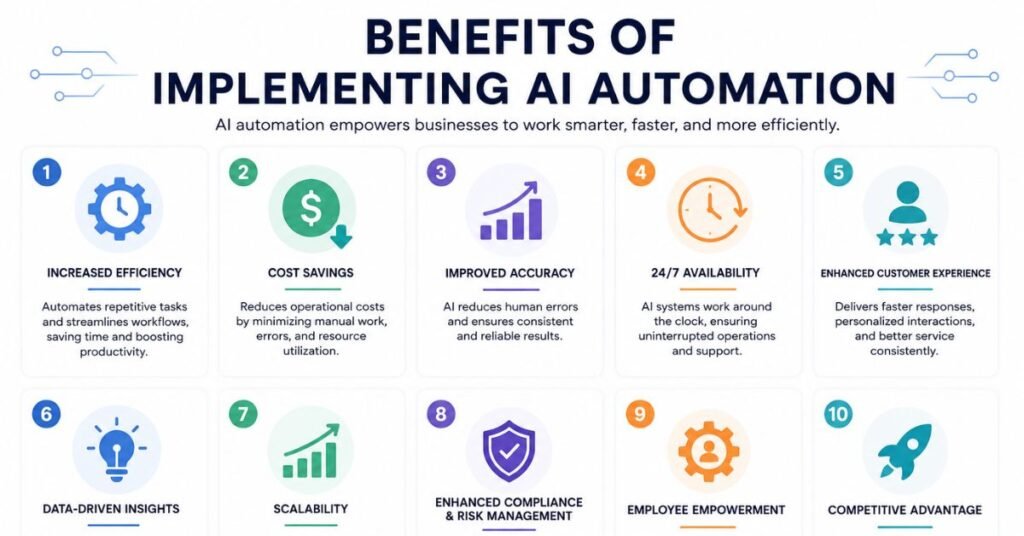
The appeal of AI automation isn’t abstract — it shows up in measurable operational improvements when implemented well.
1. Enhanced Efficiency and Productivity
Tasks that used to take a human hours — reading through a stack of documents, drafting dozens of personalized emails, manually triaging a support queue — can be compressed into minutes. Ticket triage, lead routing, and content drafting are among the areas where teams report the sharpest cycle-time reductions.
2. Improved Decision-Making
AI automation can surface patterns and correlations in large datasets that would take a human analyst days to find manually, giving decision-makers better information faster — whether that’s flagging an unusual expense pattern or predicting which leads are most likely to convert.
3. Cost Reduction
By reducing the amount of manual, repetitive work required to keep a process running, organizations can scale output without a proportional increase in headcount. One well-designed AI automation can effectively do the work that previously required a small team of people handling repetitive intake and triage tasks.
4. Improved Customer and Employee Experiences
Faster response times, more consistent service quality, and fewer administrative bottlenecks all translate into a better experience — for customers waiting on support and for employees who no longer have to do the tedious parts of their job manually.
5. Data Analysis
AI automation naturally produces cleaner, more structured data as a byproduct of processing unstructured inputs. That data becomes far more useful for reporting, forecasting, and strategic planning than data that was manually and inconsistently entered.
How Do You Build an AI Automation in Make?
Understanding the theory is one thing — actually building an AI automation is another. Make (formerly Integromat) is one of the most widely used no-code platforms for this, precisely because it lets you visually connect a trigger, an AI reasoning step, and an action without writing raw API calls. Here’s the five-step process that production-ready AI automations tend to follow, regardless of which platform you use.
Step 1: How Do You Choose the Right Process?
Not every process is a good candidate for AI automation. The strongest candidates typically share three characteristics:
- The process runs frequently (a good rule of thumb is at least 10 times per week)
- It currently requires a human to read or interpret unstructured input
- The output needs to be structured enough for a downstream system to use
If a process is missing two of these three traits, it’s usually better served by simple rule-based automation rather than AI.
Step 2: How Do You Choose the Right AI Model?
There’s no single “best” AI model for every task — the right choice depends entirely on what the step needs to do.
| Task type | Best-fit model category | Example use |
| Reasoning and classification | Large language models tuned for long-context understanding | Triaging detailed support tickets |
| Text generation | General-purpose generative language models | Drafting outbound sales emails |
| Voice and audio | Speech-focused AI models | Outbound qualification calls |
| Document and web data extraction | Extraction-focused AI tools | Pulling line items from supplier invoices |
Many production automations actually chain two or three models together — one to extract raw data, another to validate or classify it, and a third to generate the final output.
Step 3: How Do You Build the Scenario?
On a visual platform, you connect modules rather than write code:
- Add your trigger module — choose an instant/event-based trigger over a polling one whenever possible, since polling consumes resources on every check even when nothing has changed.
- Add the AI module and map the relevant fields from the trigger into its prompt or input.
- Add a router or conditional branch if the AI’s output needs to send the workflow down different paths (for example, “urgent” tickets vs. “routine” tickets).
- Add the action modules for each branch — updating a CRM, sending a notification, creating a record.
Step 4: How Do You Add Human Oversight?
Any AI automation that takes an external, customer-facing, or financially significant action should include a review checkpoint before that action executes. This is usually called a “human-in-the-loop” step. In practice, that means:
- Inserting a review step between the AI’s output and the final action
- Routing that review request to a human via Slack, email, or a dashboard
- Allowing the reviewer to edit the AI’s draft before it’s approved, so only approved content moves forward
Step 5: How Do You Test and Monitor It?
Before turning any AI automation fully live, run it in test mode with a range of realistic inputs — including edge cases like empty fields, extremely long text, or unexpected formats. Once it’s live:
- Add an error-handling route to catch failures gracefully instead of silently dropping data
- Monitor operation counts and error rates regularly, not just at launch
- Periodically audit a sample of AI outputs to catch quality drift before it becomes a customer-facing problem
What Are the Risks and Limits of AI Automation?
AI automation is powerful, but treating it as a “set it and forget it” system is where most failures come from. There are four risk categories worth understanding before you scale up.
1. Data Quality and Availability
AI models are only as reliable as the data they’re given. Inconsistent formatting, incomplete records, or biased historical data will produce unreliable outputs no matter how good the underlying model is.
2. Resistance to Change
Employees who have handled a process manually for years can be understandably skeptical of automation, especially if past technology rollouts were poorly communicated. Successful implementations tend to involve the affected team early and frame AI automation as removing tedious work rather than replacing people.
3. Lack of Skilled Workforce
Designing, monitoring, and maintaining AI automations requires a mix of process knowledge and technical fluency that many teams are still building. Under-investing in this skill set is one of the most common reasons pilots never make it to production.
4. Complexity of Implementation
Connecting multiple systems, handling edge cases, and building in proper error handling is more involved than it looks in a demo. Organizations that succeed usually start with one well-scoped process, prove it out, and expand from there rather than trying to automate everything at once.
Beyond these four, there are specific technical risks worth naming directly:
- Hallucination — AI can generate confident, plausible-sounding but factually wrong output. The mitigation is a human review step before anything customer-facing goes out.
- Bias — Model outputs reflect patterns in their training data, which can unintentionally replicate historical biases. Regular spot-checks with diverse reviewers help catch this early.
- Data leakage — Uncontrolled or “shadow” use of AI tools without proper governance creates real security exposure. Routing sensitive data only through approved, vetted models is the standard mitigation.
- Model drift — AI behavior can shift silently when a vendor updates the underlying model. Logging outputs over time makes drift visible before it causes damage.
- Cost creep — Usage-based AI and automation platforms can get expensive at scale if left unmonitored. Setting usage limits and reviewing consumption regularly keeps costs predictable.
Which AI Is Best for Automation?
There’s no universal answer here — the right AI depends on the specific task inside your workflow. That said, most production AI automations cluster their model choices around four categories:
| Category | What it’s good for | Typical use case |
| Reasoning and classification models | Long-context understanding, nuanced judgment calls | Triaging lengthy, detailed support tickets |
| Generation models | Broad content creation and drafting | Writing outbound sales or marketing copy |
| Voice and speech models | Two-way conversational voice interactions | Automated outbound qualification calls |
| Extraction-focused tools | Pulling structured data out of documents or web pages | Reading line items off a supplier invoice |
The most effective automations in production rarely rely on a single AI tool. A common pattern is chaining models together — one extracts raw data from a document, a second validates and classifies that data, and a third generates the final structured output that flows into your business systems.
What’s Next: Agentic AI Automation
Agentic AI automation represents the next evolution beyond fixed-path AI automation. Where a standard AI automation follows a defined sequence of steps with AI embedded at one or more points, an agentic system plans its own sequence — it interprets a goal, decides which tools to use, and takes action largely on its own, adjusting its approach as conditions change.
This is a meaningful shift in autonomy, and it comes with a meaningful shift in risk. Agentic systems need a visible, controllable execution layer to be safe at any real scale, which is why platforms building agentic capabilities emphasize inspectable decision trails — every tool call and output should be traceable, not a black box.
A few signs that a team is genuinely ready to move from AI automation toward agentic automation:
- You already have ten or more AI automations running reliably in production
- Your workflows regularly need to adapt their own steps based on context rather than following one fixed path
- You want a single system to coordinate work across many different tools rather than triggering isolated actions one at a time
For most teams, agentic automation isn’t a replacement for AI automation — it’s a natural next step once the foundational building blocks are already proven.
Where Should You Start?
If all of this feels like a lot, here’s the simplest way to begin: pick one process that runs often, currently requires someone to read messy input, and produces a result another system could use. Build a single AI automation around it, with a human review checkpoint before anything customer-facing goes live. Monitor it for a month. That one working scenario becomes the template you scale from — it’s a far more reliable path than trying to automate everything across the business at once.
Best AI Automation Testing Tools
Software testing is one of the areas where AI automation has moved fastest from proof-of-concept to genuine production use. Traditional test automation — writing and maintaining scripts tied to specific UI selectors — has always had a maintenance problem: every time a button moves or a class name changes, tests break, and someone has to fix them. AI-powered testing tools exist specifically to reduce that burden.
Broadly, these tools fall into two camps. AI-assisted tools add intelligence — like self-healing locators or smart element detection — on top of a traditional scripting foundation. AI-native or agentic tools go further, generating and maintaining test coverage directly from plain-language descriptions or observed application behavior, with humans reviewing rather than writing every line.
Here’s a comparison of leading tools across both categories:
| Tool | Category | Best known for | Best for |
| Applitools | Visual validation | AI-powered visual regression testing that catches layout breaks | Teams worried about silent UI/visual regressions |
| Mabl | AI-native, cloud platform | Learning-based test creation, execution, and maintenance | Teams wanting low-code end-to-end testing with strong self-healing |
| Testim (Tricentis) | AI-augmented | Smart, multi-attribute locators that survive UI changes | Teams with an existing script-based suite that want less maintenance |
| testRigor | AI-native, autonomous | Generates and maintains tests from plain-English descriptions | Non-developers who need to own automated coverage without coding |
| Katalon | AI-assisted | Self-healing added to a broad, established automation framework | Teams already invested in a scripting-based approach |
| LambdaTest (KaneAI) | Agentic execution | AI agent drives a real browser from a human-written test plan | Teams whose hand-written suites have become too brittle to maintain |
| ACCELQ | AI-native, codeless | Reads requirements directly and auto-generates test flows | Regulated industries needing strong requirements traceability |
| Functionize | AI-native | Natural-language and recorded-action test creation | Enterprise teams managing large, frequently updated apps |
What makes a testing tool genuinely “AI-powered”?
Not every tool that markets itself as “AI testing” delivers the same depth of intelligence. The strongest platforms typically offer a combination of:
- Self-healing test scripts — automatically adapting when the underlying UI changes, instead of simply failing
- Natural-language test authoring — letting testers describe a scenario in plain English rather than writing selector-based code
- Visual regression detection — catching layout and design breaks that functional tests alone would miss
- Intelligent test prioritization — running the tests most likely to catch a regression first, rather than the entire suite every time
- CI/CD integration — plugging directly into pipelines like GitHub Actions, Jenkins, or GitLab CI so testing happens automatically on every build
A practical note on expectations
It’s worth being realistic here: AI testing tools significantly reduce the volume of repetitive scripting and maintenance work, but they don’t eliminate the need for human judgment. Understanding which bugs actually matter to real users, weighing business risk, and making calls on ambiguous test results still requires an experienced QA engineer in the loop. The teams getting the most value from these tools tend to use AI to amplify their testers’ output rather than trying to remove testers from the process entirely.
How Do You Choose the Right AI Testing Tool?
Rather than picking the tool with the longest feature list, match the tool to your actual bottleneck:
- If flaky, maintenance-heavy tests are your biggest problem → prioritize self-healing capabilities (Mabl, Testim, Katalon)
- If silent visual regressions are your biggest problem → prioritize visual validation tools (Applitools)
- If your team includes non-developers who need to own coverage → prioritize codeless, natural-language tools (testRigor, ACCELQ, Mabl)
- If your existing hand-written suite has become unmanageable → consider agentic execution tools that drive a browser from a curated test plan rather than fixed scripts (LambdaTest KaneAI, Mabl Agentic Tester)
Best AI Tools for YouTube Automation
YouTube automation refers to building and running a channel — often a “faceless” channel where the creator never appears on camera — using AI tools to handle scripting, voiceover, visuals, editing, thumbnails, and search optimization, largely without manual production work. It’s become one of the more popular content business models precisely because AI has made every stage of that pipeline dramatically cheaper and faster than a traditional video production workflow.
The key thing to understand is that no single tool does the entire job well. Successful automated channels build a stack — a handful of specialized tools chained together, each handling one stage of the pipeline.
The YouTube Automation Pipeline, Stage by Stage
| Stage | What it involves | Well-known tool categories |
| 1. Scripting | Generating an original, well-structured video script from a topic or outline | General-purpose AI chat assistants |
| 2. Voiceover | Converting the script into natural-sounding narration | AI voice generation and cloning tools |
| 3. Visual assembly | Turning the script and audio into a full video with scenes, transitions, and captions | Text-to-video assembly platforms |
| 4. AI avatars (optional) | Adding a photorealistic or animated presenter without filming a real person | AI avatar generation tools |
| 5. Thumbnails | Designing high-click-through-rate thumbnail images | AI image generation and design tools |
| 6. SEO and optimization | Researching keywords, optimizing titles/descriptions, and scoring thumbnails | YouTube-focused SEO and analytics tools |
Stage 1: Scripting
A strong script is the foundation everything else builds on. General-purpose AI chat assistants are commonly used here because they can research a topic, draft a full narration script, and format it as a scene-by-scene breakdown that’s easy to hand off to a video assembly tool.
Stage 2: Voiceover
Robotic-sounding narration is one of the fastest ways to lose viewer retention, so this stage matters more than most creators expect. Modern AI voice tools can produce narration that’s genuinely difficult to distinguish from a human recording, offer large libraries of pre-built voices, and in many cases support cloning a creator’s own voice for consistent branding across every video.
Stage 3: Visual Assembly
This is where the script and voiceover get turned into an actual video — stock footage, AI-generated scenes, captions, transitions, and background music assembled automatically around the narration track. Text-to-video platforms in this category can typically produce a complete rough-cut video from nothing more than a topic prompt or finished script.
Stage 4: AI Avatars
For channels that want a human presenter without appearing on camera, AI avatar tools generate a photorealistic or stylized digital presenter that lip-syncs to the script. This works particularly well for educational, corporate, or news-style content, where viewers tend to trust a face-forward presenter more than a pure voiceover-and-visuals format.
Stage 5: Thumbnails
Thumbnails function like a billboard — they’re often the single biggest factor in whether a video gets clicked at all. AI image generation tools let creators produce eye-catching, stylized concepts that would be difficult or expensive to source from stock photography, while keeping a consistent visual style across every upload for brand recognition.
Stage 6: SEO and Optimization
Once a video exists, discovery tools handle keyword research, title and tag optimization, thumbnail A/B testing, and trend spotting — helping a video actually get found rather than getting buried under the roughly 500 hours of footage uploaded to YouTube every minute.
A Simple Budget vs. Premium Stack Comparison
| Stage | Budget-friendly option | Premium option |
| Scripting | Free-tier AI chat assistants | Paid-tier assistants with longer context and research features |
| Voiceover | Free-tier voice generators with limited monthly characters | Paid plans with voice cloning and full commercial rights |
| Assembly | Entry-level text-to-video platforms | Full-featured assembly tools with advanced scene control |
| Thumbnails | Free design tools with AI-assisted templates | Dedicated AI image generators for fully custom art styles |
| SEO | Free tiers of keyword and analytics tools | Paid tiers with competitor analysis and CTR prediction |
A lean automated channel can realistically run on a modest monthly budget once you’re combining free tiers strategically, while a channel producing daily output at scale usually needs the paid tiers across most stages to keep quality and character/render limits from becoming a bottleneck.
A Word on Quality Control and Platform Policy
Two things matter more than any individual tool choice:
- Human review before publishing. The biggest trap in YouTube automation is publishing raw AI output without a check. A hallucinated script fact or a glitchy generated clip that slips through erodes viewer trust fast. Treat AI as handling the bulk of the production work, with a final human pass for polish and accuracy before anything goes live.
- Originality matters to the platform. YouTube’s policies target low-effort, mass-produced, reused content — not AI-assisted content itself. Channels using AI to produce genuinely original scripts, unique voiceovers, and original visual scenes are treated the same as any other channel. Straight reposts or minimally modified duplicate content are what tend to get suppressed or demonetized.
Conclusion
AI automation is transforming how businesses and creators work by combining intelligent decision-making with automated workflows. Whether you’re improving customer support, streamlining operations, testing software, or creating content, the key is to start with one high-impact process and build from there. With the right tools, human oversight, and a focus on continuous improvement, AI automation can save time, reduce costs, and help you scale more efficiently while allowing your team to focus on higher-value work.
Frequently Asked Questions
What is AI automation?
AI automation is the use of artificial intelligence to interpret, decide, or generate content within a business workflow, then chain that intelligence together with traditional automation tools so the whole process runs with minimal manual effort.
How is AI automation different from RPA?
RPA follows fixed, rule-based steps to mimic human clicks and keystrokes, while AI automation adds genuine language understanding and decision-making, allowing it to handle unstructured or unpredictable inputs that RPA alone cannot process.
Is AI automation the same as agentic AI?
No. AI automation typically follows a defined sequence of steps with AI embedded at certain points, while agentic AI plans its own sequence of actions and chooses which tools to use with much less human direction.
Can AI automation replace employees?
In most cases, no — it’s better understood as augmentation. AI automation handles repetitive, structured-output work reliably, freeing employees to focus on judgment calls, exceptions, and strategic tasks that still require human oversight.
Do I need coding skills to build an AI automation?
Not necessarily. No-code and low-code platforms like Make let you build AI automations by visually connecting modules and mapping data fields, with coding only needed for highly custom or unusual logic.
What is the biggest risk in AI automation?
Hallucination — AI confidently generating incorrect output — is one of the most common risks, which is why any automation taking a customer-facing or financially significant action should include a human review checkpoint.
Which AI model is best for automation?
There isn’t a single best model for every task. Reasoning-focused models work well for classification and judgment calls, generation-focused models are stronger for drafting content, and specialized tools handle voice or document extraction better than general-purpose models.
Are AI testing tools reliable enough to replace manual QA?
Not entirely. AI testing tools significantly reduce repetitive scripting and maintenance work and catch more edge cases than manual testing alone, but human testers are still needed to judge business risk and evaluate ambiguous results.
Is YouTube automation against YouTube’s policies?
No — YouTube’s policies target inauthentic, mass-duplicated content, not AI assistance itself. Channels using AI to produce original scripts, unique voiceovers, and original visuals are treated like any other channel.
How much does it cost to start an AI-automated YouTube channel?
A lean, budget-conscious stack combining free tiers of scripting, voiceover, assembly, and SEO tools can get a channel started for a small monthly cost, with spending scaling up as a creator moves to paid tiers for higher output and commercial usage rights.
How do I get started with AI automation in my business?
Start small: pick one process that runs frequently, currently requires a person to interpret unstructured input, and produces a structured output. Build a single automation around it with human oversight, monitor it closely, and expand from there once it’s proven reliable.