
Choosing an analytics platform used to mean picking a dashboard tool. In 2026, it means picking a thinking partner for your data. Nearly every vendor on the market now slaps “AI-powered” on its homepage, but only a handful actually changed how teams interact with numbers moving from “build a chart” to “ask a question and get a trustworthy answer.”
This guide breaks down the AI-powered analytics tools list that actually matters this year. You’ll get an honest look at features, pricing, strengths, and limitations for eleven leading platforms, plus a practical framework for matching a tool to your team’s size, skill level, and governance needs.
AI-Powered Analytics Tools List for 2026
Before diving into individual reviews, here’s the short version. These are the eleven platforms most consistently recommended by analysts, data teams, and industry comparisons this year:
- Microsoft Power BI
- ThoughtSpot
- Amplitude
- Mixpanel
- Tableau
- Looker
- Julius AI
- Metabase
- Zoho Analytics
- Qlik
- Domo
Each tool takes a different approach to the same core problem: helping people get answers from data faster, without sacrificing accuracy or governance. Some lean on natural language search. Others lean on predictive modeling, embedded machine learning, or agentic workflows that investigate problems on their own. None of them are interchangeable, which is exactly why the comparison matters.
How to Evaluate the AI-Powered Analytics Tools List
Every analytics tool on the market claims to “surface insights automatically.” Before you trust that claim, it helps to know what you’re actually comparing. Four factors separate a genuinely useful AI analytics platform from a chatbot bolted onto an old dashboard.
Types of AI Interaction Models
Not all “AI” in analytics tools works the same way. Broadly, you’ll encounter three interaction styles:
- Conversational query (NL-to-SQL): You type a question in plain English, the tool converts it into a database query, and returns a chart or number. This is the most common model, used by Power BI Copilot, ThoughtSpot Spotter, and similar assistants.
- Agentic investigation: The AI doesn’t stop at one answer. If a metric drops, it automatically segments the data, tests hypotheses, and returns a root-cause explanation rather than a single chart.
- Embedded predictive/ML models: The platform runs forecasting, anomaly detection, or churn prediction in the background, surfacing alerts before anyone asks a question.
The more advanced platforms in 2026 combine all three, but most tools still do one of these well and the others adequately at best.
Governance and Data Quality
An AI tool is only as trustworthy as the data feeding it. Strong platforms include a governed semantic layer — a single, shared definition of business metrics like “revenue” or “active user” — so the AI can’t accidentally invent a different version of a number depending on how the question was phrased. Look for:
- Row-level security and access controls
- Audit trails showing how an AI-generated answer was derived
- A centralized metrics layer instead of scattered, conflicting calculations
Pricing Models
AI analytics pricing in 2026 generally falls into four buckets:
| Pricing model | How it works | Typical fit |
|---|---|---|
| Per-user subscription | Flat monthly fee per seat (e.g., $14–$70/user) | Small to mid-size teams |
| Tiered platform pricing | Free, Pro, and Enterprise tiers with feature gating | Startups scaling up |
| Consumption/capacity-based | Pay for compute or query volume | Large enterprises with variable usage |
| Custom enterprise contracts | Negotiated annual pricing, often undisclosed | Large organizations with complex needs |
Integration and Skill Fit
The “best” tool changes completely depending on who’s using it. A self-serve marketing analyst needs something closer to a search engine. A data engineering team wants a tool that respects existing pipelines, version control, and SQL-based workflows. Always weigh integration with your existing stack — spreadsheets, data warehouses, CRM, or BI tools — alongside the learning curve for your specific team.
Detailed Overview of Top AI Analytics Tools
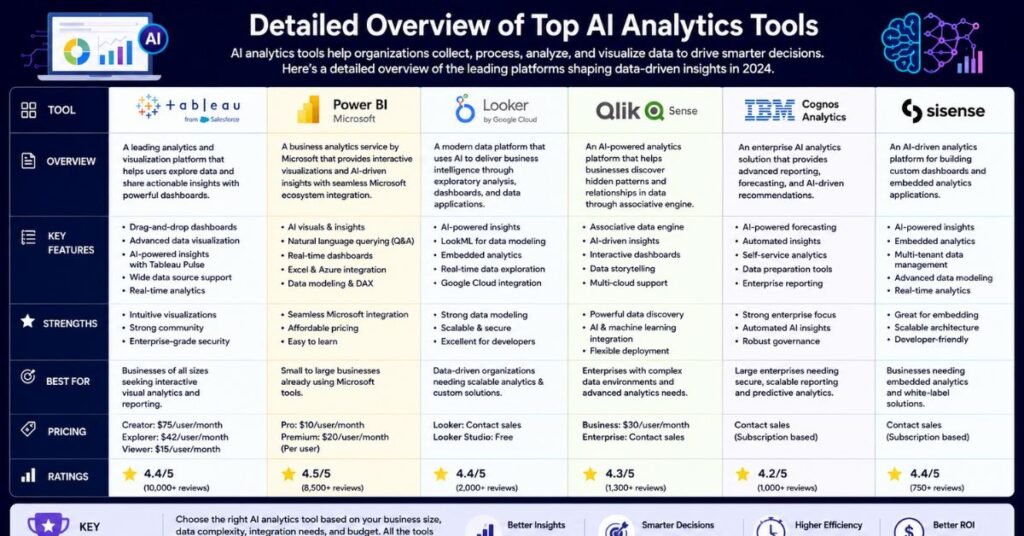
1. Microsoft Power BI
Power BI remains one of the most widely adopted business intelligence platforms, and its Copilot integration has made it a serious contender in the AI analytics tools list for 2026. It’s particularly strong for organizations already standardized on Microsoft 365, Excel, Teams, and Azure.
Key features:
- Copilot generates DAX formulas, builds report pages, and answers natural language questions about dashboards
- Deep integration with Excel and Microsoft Fabric/OneLake
- Strong row-level security and enterprise governance controls
- Requires a pre-built semantic model before Copilot can function effectively
Pricing: Pro tier around $14/user/month; Copilot add-on roughly $30/user/month; Premium/Fabric capacity pricing for larger deployments.
Best for: Microsoft-standardized enterprises that want cost-effective reporting with emerging AI assistance.
Limitations: Copilot’s natural language answers are only as good as the underlying semantic model — without clean DAX logic in place, the AI can struggle with nuanced questions.
2. ThoughtSpot
ThoughtSpot pioneered search-based analytics long before “natural language querying” became a buzzword. Its Spotter AI agent now positions the platform as an “agentic analytics” tool, with a semantic layer upgrade (Spotter Semantics) that adds deterministic reasoning and governed business definitions.
Key features:
- Search-style interface that feels closer to a search engine than a traditional dashboard
- SpotIQ automatically surfaces anomalies and trends
- Analyst Studio (formerly Mode Analytics) for agentic data preparation
- Visible search tokens for verifying how an answer was generated
Pricing: Enterprise-tier, typically negotiated; not publicly listed.
Best for: Non-technical users who want the fastest path from question to visualized answer.
Limitations: Newer agentic features are still maturing relative to the core search product, and pricing transparency is limited.
3. Amplitude
Amplitude is a product analytics platform built for teams tracking user behavior, engagement, and retention inside digital products. Its AI layer focuses on behavioral pattern detection rather than general business reporting.
Key features:
- AI-powered insights that flag unusual shifts in user behavior or conversion funnels
- Predictive cohorts that estimate which users are likely to churn or convert
- Strong event-based tracking for product and growth teams
- Natural language query support for exploring user journeys
Pricing: Free starter plan available; paid plans scale with monthly tracked users, typically requiring a custom quote for growth and enterprise tiers.
Best for: Product, growth, and UX teams analyzing in-app user behavior rather than financial or operational data.
Limitations: Less suited to general business intelligence or finance reporting outside the product analytics use case.
4. Mixpanel
Mixpanel sits in a similar category to Amplitude but is often favored for its simpler interface and event-based funnel analysis. Its 2026 AI features lean toward making behavioral data accessible to non-analysts.
Key features:
- Natural language querying for funnel, retention, and engagement reports
- AI-generated summaries that explain why a metric changed
- Self-serve dashboard building without SQL knowledge
- Strong mobile and web event tracking
Pricing: Free tier for smaller datasets; paid Growth and Enterprise plans priced by tracked users and data volume.
Best for: Startups and product teams that want fast, self-serve behavioral analytics.
Limitations: Like Amplitude, it’s purpose-built for product data and isn’t a general-purpose BI replacement.
5. Tableau
Tableau remains the benchmark for visualization quality. Now under Salesforce, it has layered several AI tools across the platform — Tableau Agent for conversational exploration, Tableau Pulse for AI-generated metric summaries, and Einstein Discovery for predictive modeling.
Key features:
- Tableau Agent supports multi-step conversational workflows and chart creation
- Tableau Next (agentic platform with auto-generated semantic models and MCP support)
- Einstein Discovery for explainable forecasting and anomaly detection
- A free Tableau Desktop edition with unlimited data connections (cannot publish to Cloud/Server)
Pricing: Viewer around $35/user/month, Explorer around $70, Creator around $115/user/month (annual); Tableau Agent billed separately.
Best for: Organizations in the Salesforce ecosystem prioritizing visualization quality and predictive analytics.
Limitations: Its semantic layer is thinner than Looker’s, and AI consistency suffers when business logic is scattered across individual calculated fields rather than centralized.
6. Looker
Looker (Google Cloud) is built around LookML, a modeling language that enforces a single, governed source of truth for business metrics. Its AI capabilities, powered by Gemini, are layered on top of that semantic foundation.
Key features:
- LookML-based semantic layer for consistent metric definitions across the company
- Gemini-powered natural language querying
- Open-source MCP Toolbox for connecting external AI agents to Looker data
- Strong integration with BigQuery and the broader Google Cloud ecosystem
Pricing: Enterprise contracts averaging roughly $80,000+ per year, scaling significantly with usage; Gemini AI features included at no extra cost through late 2026.
Best for: Large enterprises with existing Looker deployments and in-house LookML expertise.
Limitations: Requires a dedicated modeling team, and many agentic features remain in preview rather than full general availability.
7. Julius AI
Julius AI is built for ad-hoc, conversational data analysis rather than enterprise dashboarding. Upload a spreadsheet or connect a dataset, ask a question in plain English, and Julius runs the analysis, builds a chart, and explains the reasoning.
Key features:
- Conversational, chat-based interface for exploratory analysis
- Generates Python code behind the scenes so users can verify the logic
- Handles statistical modeling, regression, and forecasting without requiring code knowledge
- Quick to start — no data warehouse setup required
Pricing: Free tier with limited usage; paid individual and team plans typically in the $20–$45/user/month range.
Best for: Analysts, students, and small teams who need a fast answer from a file without building a persistent dashboard.
Limitations: Not designed for live, governed enterprise reporting or large-scale production datasets.
8. Metabase
Metabase is an open-source BI tool favored by smaller teams and engineering-led organizations that want transparency and control without enterprise pricing. Its AI features are lighter than the bigger platforms but growing.
Key features:
- Open-source core with a self-hosted option, keeping data fully in-house
- Simple natural language-style question builder for non-technical users
- SQL editor for advanced users who want full query control
- Clean, lightweight dashboarding without a steep learning curve
Pricing: Free open-source edition; paid Cloud/Pro plans typically starting in the low hundreds of dollars per month, scaling with usage.
Best for: Startups, engineering teams, and budget-conscious organizations that prioritize transparency and self-hosting.
Limitations: Fewer advanced AI/agentic features compared to enterprise-grade platforms like ThoughtSpot or Tableau.
9. Zoho Analytics
Zoho Analytics is a strong fit for small and mid-size businesses, particularly those already using other Zoho products. It balances affordability with a genuinely useful natural language query layer.
Key features:
- “Ask Zia” AI assistant for natural language questions and auto-generated visualizations
- Prebuilt dashboards and connectors for common SaaS and accounting tools
- Affordable pricing tiers compared to enterprise BI platforms
- Embedded analytics option for SaaS companies building reporting into their own products
Pricing: Plans typically start around $24–$30/month for small teams, scaling up with rows of data and user count.
Best for: Small to mid-size teams that want natural language queries without enterprise-level cost.
Limitations: Less suited to highly complex, large-scale data environments compared to Looker or Qlik.
10. Qlik
Qlik combines its long-standing associative data engine with a growing suite of AI tools, including Qlik Predict for code-free predictive modeling and a newly launched MCP server for connecting external AI applications.
Key features:
- Associative Engine for real-time, exploratory what-if analysis
- Qlik Predict for explainable, code-free machine learning
- Qlik Trust Score, an embedded indicator of data trustworthiness
- MCP server enabling integration with external large language models
Pricing: Enterprise SaaS pricing, generally custom-quoted based on data volume and user count.
Best for: Organizations that want both conversational analytics and embedded machine learning in a single platform.
Limitations: Steeper learning curve than newer, simpler tools, and several agentic features are still relatively new.
11. Domo
Domo positions itself as an end-to-end data platform — combining data integration, preparation, visualization, and AI-driven alerting in one system, with a strong emphasis on mobile and executive dashboards.
Key features:
- Domo.AI for predictive analytics and threshold-based alerting
- Beast Mode AI Writer, which generates calculated fields from natural language
- Domo Embed for white-labeled, customer-facing analytics
- Genuinely strong mobile experience for executive reporting
Pricing: Enterprise-level, not publicly listed; generally a premium investment compared to mid-market tools.
Best for: Organizations with real-time reporting needs and executives who actively check metrics on mobile devices.
Limitations: Pricing tends to be high relative to value for teams running straightforward, non-real-time reporting.
AI Analytics Tools Comparison
| Tool | Best For | AI Interaction Style | Starting Price | Governance Strength |
|---|---|---|---|---|
| Microsoft Power BI | Microsoft 365 enterprises | NL-to-SQL via Copilot | ~$14/user/month | Strong |
| ThoughtSpot | Non-technical search-based analysis | Search + agentic (Spotter) | Custom/Enterprise | Strong |
| Amplitude | Product and growth teams | Behavioral pattern detection | Free tier + custom | Moderate |
| Mixpanel | Startups, product analytics | NL queries + funnel AI | Free tier + custom | Moderate |
| Tableau | Visualization-heavy reporting | Conversational + predictive | ~$35/user/month | Moderate |
| Looker | Large enterprises on Google Cloud | Gemini NL queries on LookML | ~$80K+/year | Very strong |
| Julius AI | Ad-hoc, exploratory analysis | Chat-based, code-transparent | Free tier + ~$20–45/mo | Light |
| Metabase | Budget-conscious, technical teams | Simple NL question builder | Free (open-source) | Moderate |
| Zoho Analytics | Small/mid-size businesses | Ask Zia NL assistant | ~$24–30/month | Moderate |
| Qlik | Hybrid conversational + ML needs | Associative + predictive AI | Custom/Enterprise | Strong |
| Domo | Real-time, mobile-first reporting | Predictive alerting | Enterprise/custom | Strong |
How to Choose the Right Tool for Your Team
There’s no universal “best” AI analytics platform — only the best fit for your specific situation. Use these questions to narrow the AI-powered analytics tools list down to a shortlist:
- What’s your existing data stack? If you’re already on Google Cloud, Looker has a natural fit. If you’re Microsoft-standardized, Power BI’s procurement conversation is far simpler.
- Who’s actually asking the questions? Non-technical marketing or sales teams benefit most from search-style tools like ThoughtSpot or Zoho’s Ask Zia. Data teams that want transparency may prefer Metabase or Julius AI, where the underlying SQL or Python is visible.
- Do you need product analytics or business intelligence? Amplitude and Mixpanel are purpose-built for in-app behavior; they’re not substitutes for general BI platforms like Tableau or Power BI.
- How important is governance? Regulated industries or large enterprises should prioritize a centralized semantic layer, audit trails, and row-level security over flashy chat interfaces.
- What’s your realistic budget? Enterprise contracts with Looker, Domo, or Qlik can run into six figures annually. Smaller teams often get 80% of the value from Zoho Analytics, Metabase, or Power BI’s Pro tier at a fraction of the cost.
- Do you need real-time, embedded, or mobile analytics? If executives check metrics on their phones daily, Domo’s mobile-first design is a genuine differentiator.
A simple rule of thumb: start with the tool that fits your current data infrastructure and team skill level, not the one with the longest feature list. AI analytics platforms add the most value when the underlying data and metric definitions are already solid — bolting AI onto a messy, ungoverned data environment just produces confident-sounding wrong answers faster.
My Honest Take on AI Analytics Tool Adoption in 2026
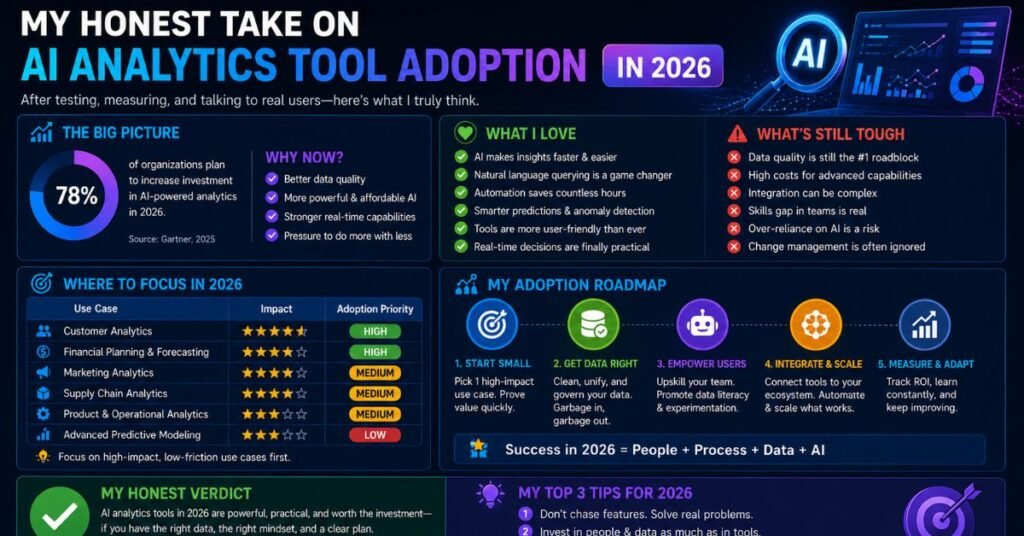
After comparing these platforms closely, one pattern stands out: the AI layer is only ever as good as the semantic layer underneath it. Tools like Looker and Qlik, which have invested years into governed data modeling, tend to produce more reliable AI-generated answers than tools that simply bolted a chatbot onto an existing dashboard product.
That said, “more governed” doesn’t always mean “better fit.” A 20-person startup doesn’t need Looker’s $80,000-a-year contract or Qlik’s enterprise complexity. It needs something like Zoho Analytics or Metabase that gets a team from raw spreadsheet to usable chart in an afternoon. Meanwhile, a regulated enterprise handling sensitive financial data genuinely needs the audit trails and row-level security that Power BI, Looker, or Qlik provide.
The other honest observation: agentic analytics — AI that investigates a metric drop on its own rather than just answering one question — is still maturing across the board in 2026. Vendors are racing to ship these features, but most are labeled “preview” or “early access” for a reason. Treat agentic claims with healthy skepticism until you’ve tested them on your own data, not a vendor demo dataset.
Finally, don’t underestimate how much team skill level matters. The most “powerful” tool on paper is worthless if your team avoids using it because the learning curve is too steep. The tools that win in practice are the ones people actually open every day.
Make Sure Your AI Analytics Tools Are Working With Clean Data
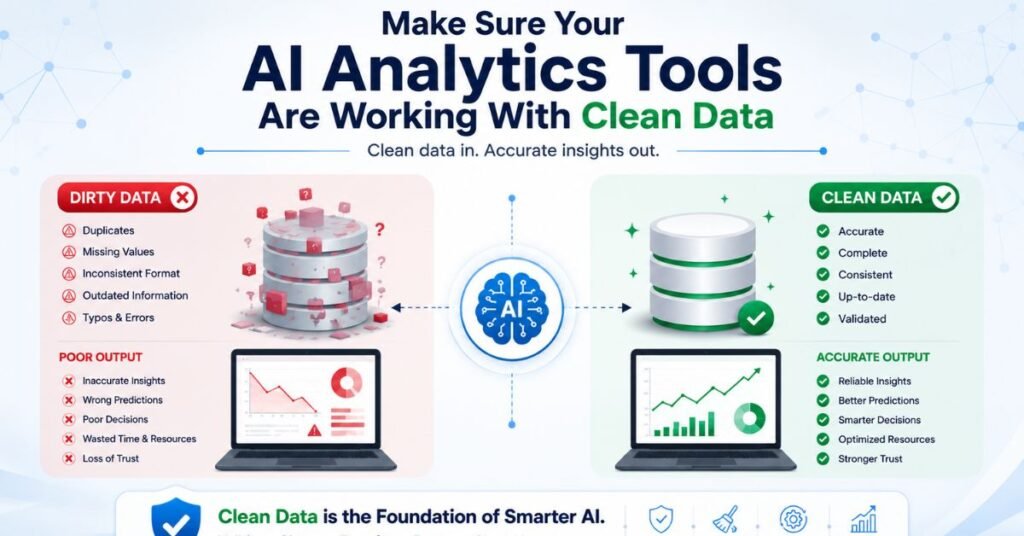
No AI model, no matter how advanced, can compensate for messy, duplicated, or poorly labeled source data. Before rolling out any of the platforms above, audit your data pipelines for consistency, eliminate conflicting metric definitions, and centralize your key business terms in a single semantic layer wherever the tool supports one. An AI analytics tool sitting on top of clean, governed data will consistently outperform a more “advanced” tool fed inconsistent inputs.
It’s also worth keeping an eye on top AEO tools for AI search visibility analytics — as AI-generated answer engines like ChatGPT, Gemini, and Perplexity increasingly shape how customers discover brands, tracking your visibility inside those AI answers is becoming as important as traditional SEO tracking. Many of the analytics platforms above are starting to add AI-answer monitoring features, so it’s worth checking whether your chosen tool already covers this emerging category before adding a separate point solution.
Common Mistakes Teams Make When Adopting AI Analytics Tools
Even with the right platform, rollout often goes wrong in predictable ways. Watching out for these mistakes can save months of wasted effort.
- Skipping the semantic layer setup. Teams rush to enable Copilot or Spotter before defining what “revenue” or “active customer” actually means in their business. The AI then answers confidently using inconsistent logic, and trust collapses the first time two people get different numbers for the same question.
- Treating AI output as final, not a starting point. Even the most mature platforms can misinterpret intent behind a question. Generated charts and summaries should be spot-checked against known numbers, especially during the first few months of use.
- Buying enterprise features the team won’t use. It’s tempting to choose the platform with the longest feature list, but agentic investigation, embedded ML, and MCP integrations add little value if your team never queries data outside a handful of recurring reports.
- Ignoring change management. Rolling out a new analytics tool without training non-technical staff on how to phrase questions, interpret AI-generated charts, or flag inaccurate answers leads to low adoption, regardless of how capable the tool is.
- Underestimating data prep time. Most AI analytics rollouts spend more time cleaning, connecting, and modeling source data than configuring the AI features themselves. Budget accordingly.
What’s Next for AI Analytics Through 2026 and Beyond

A few trends are worth watching as this category keeps moving:
- Agentic workflows becoming standard. Industry analysts expect a sharp rise in task-specific AI agents embedded in enterprise applications, meaning more platforms will shift from single-question chat to multi-step autonomous investigation by default.
- MCP (Model Context Protocol) adoption. Several platforms in this comparison, including Tableau, Looker, and Qlik, have added MCP servers so external AI tools can query governed data directly. Expect this kind of interoperability to become a baseline expectation rather than a differentiator.
- Trust and explainability features maturing. Features like Qlik’s Trust Score and visible search tokens in ThoughtSpot point toward a broader shift: vendors are responding to legitimate concerns about AI hallucination in business-critical reporting by making AI reasoning more transparent and auditable.
- Consolidation around fewer, deeper platforms. As pricing pressure increases and buyers grow tired of stitching together multiple point solutions, expect more teams to consolidate around a single governed platform rather than running separate tools for product analytics, BI, and predictive modeling.
None of these trends should change your near-term decision-making process. They’re worth tracking so that whatever tool you pick today can reasonably grow with your team over the next two to three years rather than becoming another tool you have to migrate away from.
Frequently Asked Questions?
What is an AI analytics tool?
An AI analytics tool lets users query business data using natural language and automatically generates charts, summaries, or predictions instead of requiring manual SQL or dashboard building.
Which AI analytics tool is best for beginners?
Zoho Analytics, Metabase, and Julius AI are generally the easiest for non-technical users to start with, thanks to simple natural language query interfaces and low setup overhead.
Are AI analytics tools accurate?
They can be highly accurate when built on a governed semantic layer, but most rely on large language models that can occasionally produce plausible-sounding but incorrect answers, so verification features matter.
How much do AI analytics tools cost in 2026?
Pricing ranges widely, from free open-source tools like Metabase to enterprise contracts exceeding $80,000 per year for platforms like Looker, depending on data volume and user count.
Can small businesses use enterprise AI analytics platforms like Qlik or Looker?
Technically yes, but smaller teams usually get better value from mid-market tools like Zoho Analytics or Power BI before scaling into enterprise platforms.
What’s the difference between AI analytics and traditional BI tools?
Traditional BI tools visualize data for humans to interpret, while AI analytics platforms attempt to interpret the data themselves, surfacing root causes, anomalies, and recommendations automatically.
Do AI analytics tools replace data analysts?
No. They reduce repetitive query work and speed up exploration, but human analysts remain essential for validating insights, defining metrics, and making judgment calls AI can’t reliably make.
Conclusion
The AI-powered analytics tools list for 2026 proves one thing clearly: there’s no single winner. Power BI and Looker dominate enterprise reporting, ThoughtSpot and Zoho Analytics lead on natural language accessibility, Amplitude and Mixpanel own product analytics, and Julius AI and Metabase serve fast, transparent, lower-cost analysis. The right choice depends on your data infrastructure, team skill level, governance requirements, and budget — not on which vendor has the flashiest AI demo.
Start by auditing what you actually need solved this quarter, shortlist two or three tools from this comparison that match your stack, and run a real trial with your own data before committing to an annual contract. The tools will keep evolving fast through 2026 — but a clear evaluation framework will serve you regardless of which platform you choose.