Most founders don’t need forty AI tools. If you’re new to AI, start with our Why AI Tools Are Important guide. That’s the gap this guide is trying to close.
If you’ve searched for “AI tools for startups” recently, you’ve probably landed on lists that read like affiliate catalogs — fifty tools, no context, no sense of what actually matters when you’re a two-person team trying to ship something before the runway runs out. This guide takes a different approach. It’s organized around what founders actually need to do: come up with and validate an idea, build a working product or website, research the market, and grow without hiring a large team. Along the way, you’ll find comparison tables, budget guidance, and honest notes on where AI tools fall short.
What Counts as an AI Tool for a Startup?
An AI tool for a startup is any software that uses machine learning or large language models to do work a founder or small team would otherwise have to do manually — writing, coding, analyzing data, generating designs, scoring a business idea, or automating a repetitive task. The label covers a wide range of products, from general-purpose assistants like ChatGPT or Claude to narrow, purpose-built tools that only do one job (like scoring a startup idea against market data).
The useful distinction isn’t “AI tool vs. not AI tool.” It’s whether the tool solves a problem a general assistant can’t handle well on its own. A general chatbot is fine for drafting an email. It’s a poor substitute for a tool that pulls live competitor pricing or searches real community discussions for evidence that people want what you’re building.
How to Choose AI Tools for Your Startup Without Wasting Money
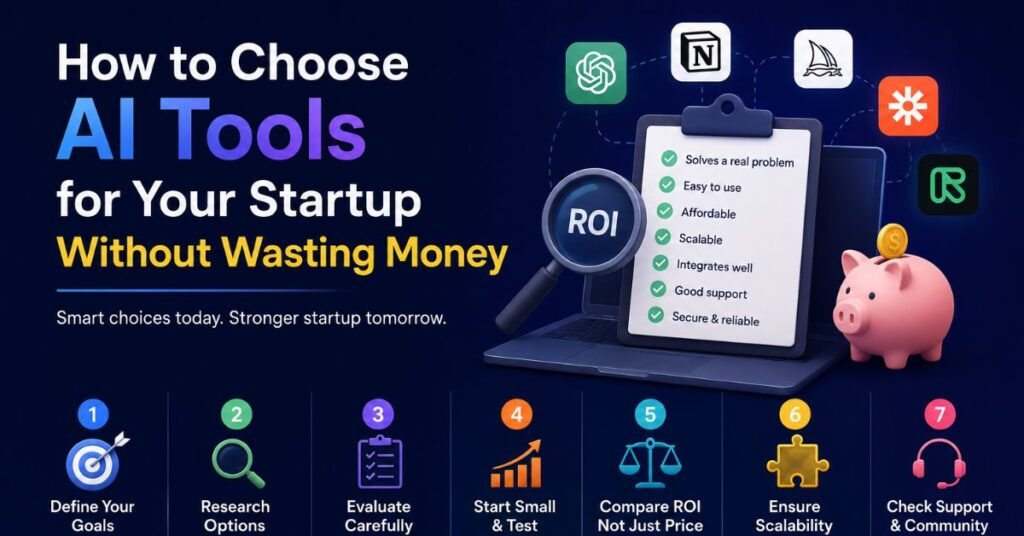
Before adding anything to your stack, run it through a short checklist. This matters more than any individual tool recommendation, because the biggest waste in a startup’s AI budget isn’t a bad tool it’s five overlapping tools that each do 60% of the same job.
- Stage fit. A pre-revenue founder validating an idea needs different tools than a 15-person team trying to scale sales outreach. Buying growth-stage tools too early is a common and expensive mistake.
- Does it replace a real bottleneck? If a general LLM can already do the job with a well-written prompt, a specialized paid tool needs to earn its cost with speed, accuracy, or a feature the general tool lacks.
- Free tier or low entry cost. Most legitimate startup tools offer a usable free plan. Be cautious of anything that requires an annual contract before you’ve tested it.
- Does it scale with you, or break at 20 people? Some tools are genuinely built for teams of two. Ask what happens to pricing and functionality once you grow.
- Data portability. Can you export your work if you switch tools later? Lock-in is a real cost, especially for anything holding customer or financial data.
A reasonable rule many operators use: don’t run more AI tools than your team has active workflows for. If nobody on the team touches a tool weekly, it’s not part of your stack — it’s a subscription you forgot to cancel.
AI Tools for Startup Ideas and Brainstorming
Before you can validate anything, you need an idea worth testing. This is where “startup AI ideas” tools and idea generators come in — and where founders most often overestimate what AI can do for them.
A large language model like ChatGPT or Claude is genuinely useful here, but the quality of the output depends entirely on the quality of the input. Instead of asking “give me a startup idea,” founders get far better results by feeding the model their own skills, industry experience, and observed problems, then asking it to combine those into concrete concepts. Purpose-built idea generators work the same way under the hood — they just structure the questions for you and often cross-reference the output against real search or community data instead of relying purely on the model’s training knowledge.
What actually works for idea generation:
- Start from a problem you’ve personally experienced or watched someone else struggle with — not a trend headline.
- Use an AI tool to generate several variations of the same core problem, then narrow based on your own ability to execute.
- Cross-check any “market gap” the AI identifies against a real search — Google Trends, Reddit, or a niche AI-idea database — before treating it as evidence of demand.
- Treat AI-generated ideas as a starting hypothesis, not a business plan. The model has no way to know if you can actually build or sell the thing it suggested.
AI Tools for Startup Idea Validation
This is arguably the highest-leverage category on this list, because a bad idea validated too optimistically is the single most expensive mistake a founder can make. Industry data on startup failure consistently points to lack of market need as one of the most commonly cited reasons startups don’t survive — which is exactly the problem idea-validation tools are built to catch early.
There are two fundamentally different approaches in this category, and mixing them up leads to false confidence:
- LLM-based validators feed your idea description to a language model and return a score, a SWOT-style breakdown, or a market summary. They’re fast and often free, but the analysis is only as good as the model’s training data — it can generate plausible-sounding competitor names or market sizes that don’t actually exist.
- Evidence-based validators search real data sources — Reddit threads, search-volume trends, competitor pricing pages — and link their conclusions back to those sources so you can verify them yourself.
| Validation approach | Best for | Watch out for |
| General LLM (ChatGPT, Claude) | Quick brainstorming, stress-testing your own reasoning | Confident-sounding but unverifiable claims; always fact-check specifics |
| LLM-based scoring tools | Fast directional feedback, early-stage gut checks | Scores can be generous; look for tools that also list concrete weaknesses |
| Evidence-based validators | Founders who need traceable, source-linked market signals | Usually paid past the first report; still can’t replace talking to customers |
| Customer interview platforms | Testing willingness to pay and real behavior, not stated opinion | Takes longer and needs a real target audience to reach |
The most reliable process still combines AI with humans: use an AI tool to get a fast, structured first pass — market size, likely competitors, obvious red flags — then validate the parts that matter most through actual conversations with the people you’d be selling to. No validation tool, however well-built, can tell you whether you are the right person to build this particular business. That judgment stays with the founder.
Startup AI Website and No-Code Builders
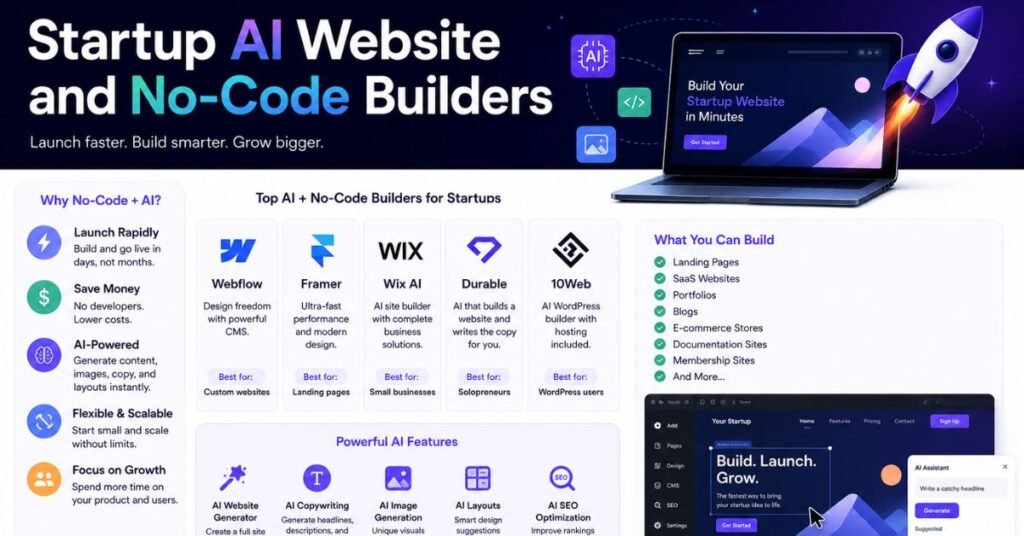
Once an idea clears a basic validation bar, most founders need something people can actually see and use — a landing page at minimum, sometimes a working product. This is where “startup AI website” and “startup builder AI” tools matter most, because they compress a task that used to require a developer into something a non-technical founder can do in a day.
What to look for in an AI website or app builder:
- Editable output, not a black box. The best builders generate a working site or app from a prompt, then let you edit it visually or in code — so you’re not stuck if the AI’s first draft misses the mark.
- Real hosting and domain support, not just a prototype you can’t actually launch.
- A reasonable free tier for testing before you commit to a paid plan.
- A path to a real app, not just a page, if your idea needs more than a static site — think forms, logins, or a database behind the scenes.
For a landing page or smoke test, no-code website builders with built-in AI copy and layout generation are usually enough, and several offer generous free plans. For a functional MVP with logic and a database, look at AI-assisted app builders that let you keep visual control over the logic instead of only generating unreviewable code. Either way, treat the first AI-generated version as a draft. Founders who ship the raw AI output without reviewing copy, functionality, and mobile responsiveness tend to lose visitors fast — a page that looks unfinished undermines the validation you just did.
AI Tools for Fundraising and Pitch Decks
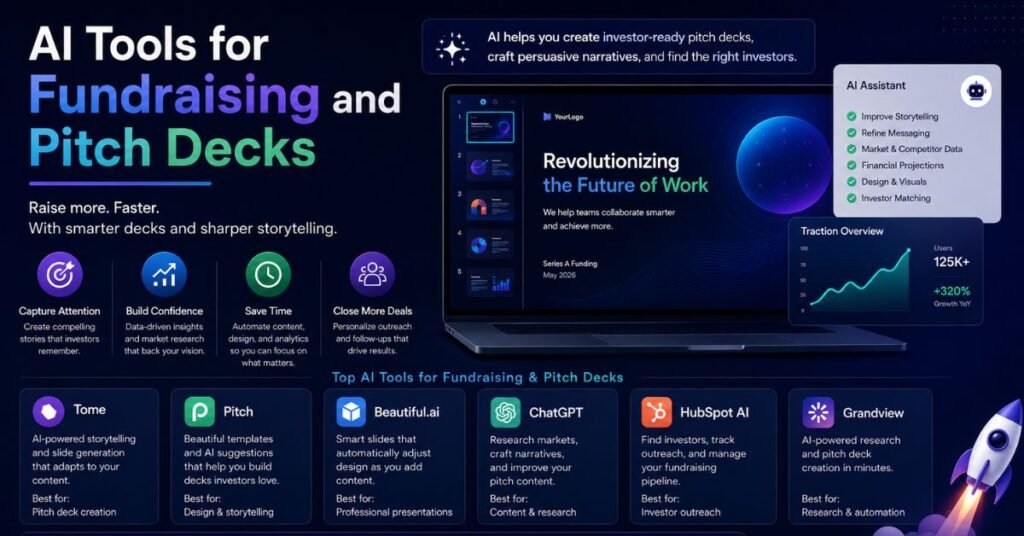
Raising money is one area where AI genuinely saves founders time, mostly because business plans and pitch decks follow recognizable structures that AI tools handle well — market sizing, financial projection templates, and formatting.
Where AI helps most in fundraising prep:
- Business plan drafting. AI-assisted planning tools can turn answers to structured questions into a first-draft business plan, complete with a template-based financial model. This saves hours of formatting work, though the strategic thinking still has to come from the founder.
- Pitch deck structure and design. Several tools generate a slide-by-slide draft from a short description of the business, then let you edit the visual design without starting from a blank template.
- Financial projections. AI tools can build out a standard three-statement model from basic inputs (pricing, expected customers, cost structure), which is useful as a starting point even though early-stage projections are inherently rough estimates.
- Investor research. AI research assistants can help identify investors who’ve funded comparable companies, though founders should still verify current fund status and check-size ranges directly, since this information changes often.
The risk in this category is treating an AI-generated deck as investor-ready without a hard edit. Investors see a lot of pitch decks, and generic AI phrasing or a projection that doesn’t hold up to a follow-up question will cost you more credibility than a plainer, more honest deck would.
Keeping Startup Data Safe When Using AI Tools
This gets skipped in a lot of “best AI tools” lists, but it matters as soon as you’re putting real customer or financial data into any AI tool.
- Read the data-retention policy before uploading customer data. Some free tiers use your inputs to train their models by default; enterprise or paid tiers usually don’t, but confirm it rather than assuming.
- Avoid pasting sensitive financial or legal documents into general chat tools unless you’ve confirmed the vendor’s data handling terms, especially if you’re in a regulated industry.
- Separate test data from real customer data when trying out a new tool, so a bad first impression doesn’t come with a real privacy incident attached.
- Check where the tool is actually hosted and processed, particularly if you have customers in regions with strict data protection rules like the EU.
None of this means avoiding AI tools — it means treating them the way you’d treat any third-party vendor with access to your data: with a quick check before you commit, not after something goes wrong.
Best Free AI Tools for Startups (Building a Zero Budget Stack)
You can run a surprisingly capable startup workflow without spending anything for the first few months. Here’s a realistic free stack organized by job:
| Job to be done | Free tool category | What it covers |
| General writing, planning, coding help | General-purpose AI assistant (ChatGPT, Claude, Gemini free tiers) | Drafting, brainstorming, first-pass code, strategic thinking |
| Idea validation | Free-tier idea validators | Quick scoring, competitor lists, early red flags |
| Market and competitor research | AI research assistants with free plans | Sourced answers, trend checks, quick comparisons |
| Landing page / website | No-code builders with free hosting tiers | A live page to start collecting emails or signups |
| Design and graphics | AI-assisted design tools with free plans | Logos, social graphics, pitch deck visuals |
| Team knowledge and docs | Workspace tools with AI Q&A on free plans | Centralizing decisions so nothing lives only in someone’s head |
The honest limitation of a free stack is usage caps — most free tiers throttle you once you’re generating content or running validations daily. Budget for one or two paid upgrades once you hit those limits consistently, rather than upgrading everything at once “just in case.”
Building an AI Stack by Startup Stage
The tools that make sense change as the business changes. Trying to run growth-stage automation before you’ve validated demand is a common way to burn both money and time.
Pre-Idea and Validation Stage
Focus entirely on cheap, fast answers to “should I build this at all.” Lean on general AI assistants for brainstorming, one or two idea-validation tools for a structured gut check, and free research tools for market sizing. Spend nothing on CRM, automation, or advanced analytics yet — there’s no data to analyze.
MVP and Early Build Stage
This is where an AI website or app builder earns its cost, alongside a writing assistant for early marketing copy and a design tool for a basic visual identity. Keep the team on free or entry-level plans of everything; the goal is shipping something real, not having a polished tool stack.
Early Growth Stage
Once you have real users, add a lightweight CRM with built-in AI features to track relationships without manual spreadsheet work, a research assistant for ongoing competitive tracking, and workflow automation to connect the apps you’re already using. This is also the point where paid plans on your writing and design tools usually start paying for themselves.
Scaling Stage
At this point, tool selection becomes less about discovery and more about integration — making sure your CRM, automation platform, analytics, and communication tools actually talk to each other instead of creating data silos. Founders who skip this integration step end up with several accurate tools and no single accurate picture of the business.
What AI Tools Can’t Do for Your Startup
It’s worth being direct about the limits, because overselling AI here leads to real mistakes.
- AI can summarize a market. It can’t tell you whether you specifically have the right relationships, timing, or skill to win it.
- AI-generated competitor research needs verification. Language models can produce confident, detailed, and occasionally wrong information about who your competitors are and what they charge.
- Validation tools reduce risk; they don’t eliminate it. A high score is a reason to move faster toward a real customer conversation, not a reason to skip one.
- Automation multiplies whatever process you feed it — a broken workflow automated is still broken, just faster.
Treat AI tools as a way to compress the research and production time between “idea” and “real feedback from a real customer.” They’re not a substitute for that feedback.
Common Mistakes Startups Make With AI Tools
- Tool-hopping instead of committing. Trying a new tool every week feels productive but rarely beats sticking with one solid tool long enough to learn its strengths.
- Buying enterprise-tier tools too early. Many platforms have startup or free tiers specifically because they know early-stage teams don’t need the full feature set yet.
- Trusting AI-generated market data without checking it. A number that sounds precise isn’t automatically accurate — verify anything you’d put in front of an investor.
- Automating a process before it’s proven. If you haven’t manually done a task enough times to know it works, automating it just scales the mistakes.
- Ignoring integration. Five great tools that don’t share data create more manual work than three tools that do.
Conclusion
The founders getting real value from AI in 2026 aren’t the ones with the longest tool list. They’re the ones who picked a small set of tools matched to their actual stage, learned them well, and replaced a tool only when it stopped earning its place. Start with free tools for validation and early building, add paid tools only where they solve a specific bottleneck, and keep checking — every few months — whether each tool in your stack is still worth what it costs.
Frequently Asked Questions
What are the best free AI tools for startups?
A solid free stack includes a general AI assistant like ChatGPT or Claude, a free-tier idea validator, a no-code website builder with a free hosting plan, and a design tool with a free plan for basic graphics.
What is the best AI tool for validating a startup idea?
There’s no single best tool — general LLMs work for a fast gut check, while evidence-based validators that cite real sources are better when you need traceable market signals before investing time or money.
Can I build a startup website using only AI, without coding?
Yes. No-code AI website and app builders can generate a functional site or basic app from a text description, and most let you edit the result visually afterward.
How many AI tools does a typical startup actually need?
Most early-stage teams operate well with around five to seven tools covering writing, research, website or product building, validation, and basic project management — more than that usually means overlap, not more coverage.
Are AI startup idea generators actually useful?
They’re useful for expanding a rough concept into variations, especially when you feed them your own skills and experience instead of asking for a generic idea from scratch.
Is it safe to trust AI-generated market research for a pitch deck?
Not without verification. Treat AI-generated statistics, competitor names, and market sizes as a first draft to check against real sources before presenting them to investors.
What’s the realistic monthly budget for AI tools in the first year?
Many startups run entirely on free tiers for the first few months, then spend somewhere in the range of a few tools’ worth of paid plans once they hit usage limits — typically far less than hiring even a part-time specialist for the same work.
Do AI tools replace the need for customer interviews?
No. AI tools can speed up research and surface early signals, but they can’t replace a real conversation with a potential customer about whether they’d actually pay for your solution.
Is it safe to put customer data into AI tools?
Only after checking the tool’s data-retention and training policy. Paid or enterprise tiers usually offer stronger data protections than free tiers, but this should be confirmed, not assumed.