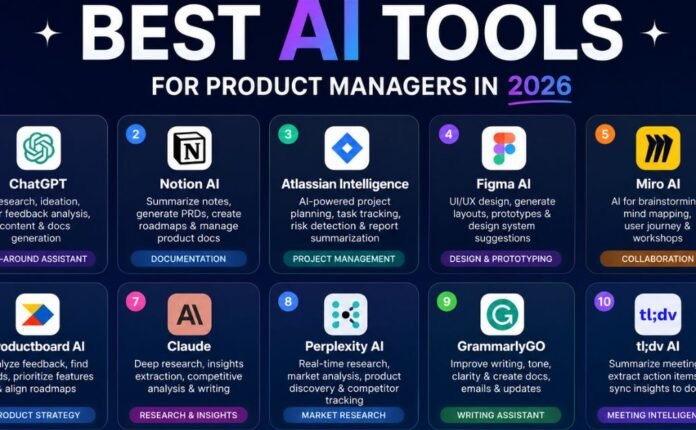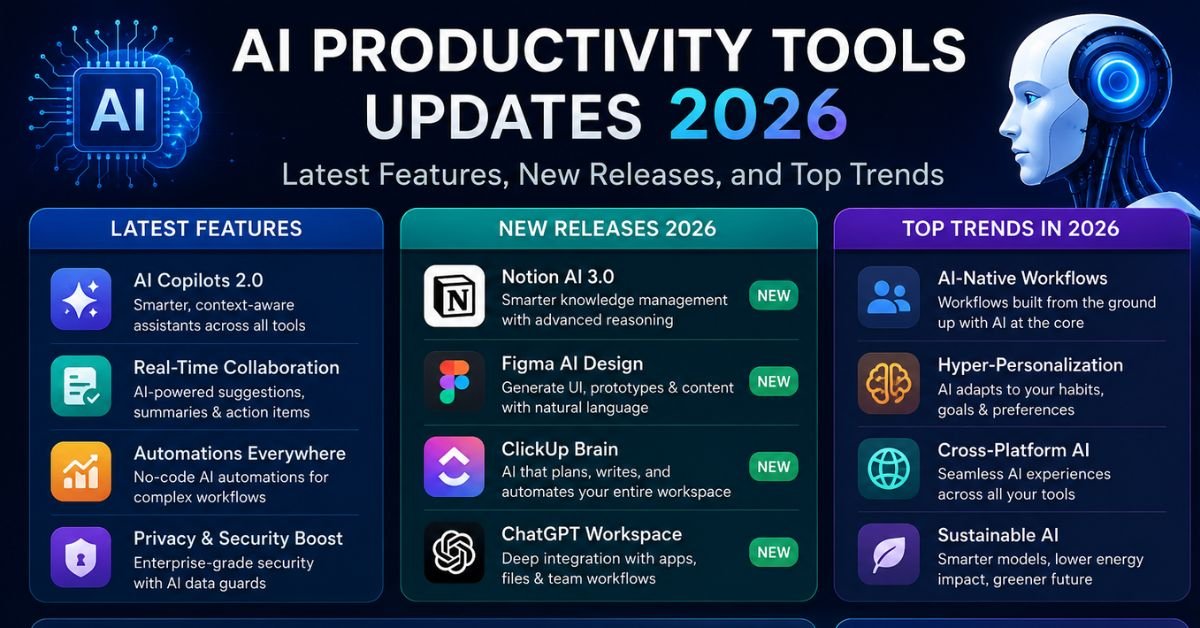
If you stepped away from AI productivity tools for even a few months this year, you’d come back to a different landscape. The shift isn’t just “new features” — it’s a change in what these tools actually do for you. In 2025, most AI tools answered questions and drafted text. In 2026, a growing share of them finish tasks on their own: booking the meeting, updating the spreadsheet, routing the email, checking the code back in.
This guide walks through what’s genuinely new in AI productivity software this year, which updates matter versus which ones are noise, and how to decide what belongs in your own stack. It’s organized so you can jump to the section you need — general AI assistants, workplace suites, meeting and automation tools, coding assistants, or the framework for evaluating anything new that launches after this article is published.
The Big Shift in 2026: From Assistant to Agent
The single biggest change this year is the move from “AI that responds” to “AI that acts.” Instead of asking a chatbot for a summary and then doing the follow-up work yourself, tools now increasingly handle the follow-up work too — drafting the reply, updating the record, scheduling the next step — with a person checking the output rather than producing it from scratch.
This matters practically, not just conceptually. Analysts tracking labor productivity have pointed to generative AI, combined with broader workflow automation, as a meaningful contributor to productivity growth when it’s adopted at scale rather than used as a novelty. That’s part of why large organizations have moved past pilot programs and are building AI directly into daily workflows instead of treating it as a side experiment.
A few patterns define this shift:
- Native integration over standalone apps. AI is increasingly built into the tools people already use email, spreadsheets, chat, project boards — rather than requiring a separate app.
- Multi-step agents. Instead of one prompt, one answer, tools now chain several actions together: research, draft, review, send.
- Specialization. Rather than one tool trying to do everything, teams are combining a general assistant with a handful of specialists for meetings, writing, automation, and coding.
Major Platform Updates Worth Knowing About
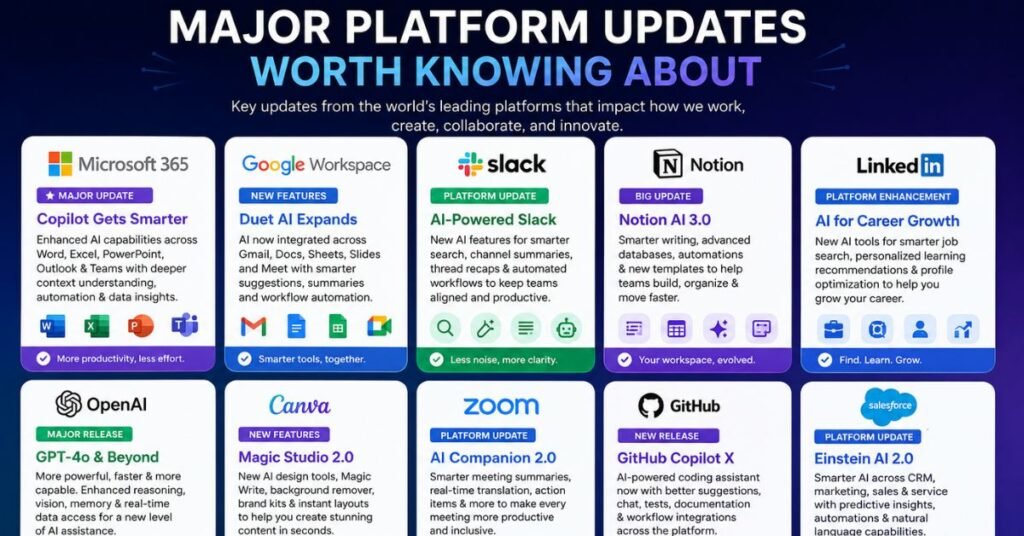
Microsoft 365 Copilot
Microsoft has spent the last couple of years building Copilot directly into Word, Excel, PowerPoint, Outlook, and Teams, and 2026 is where that investment is becoming more visible in daily use. Recent updates give Copilot more reasoning flexibility — lighter-weight modes for quick answers and deeper modes for multi-step analysis — plus the ability to take actions inside documents and calendars rather than just suggesting text. For teams already living inside Microsoft’s ecosystem, this has turned Copilot from “a smart autocomplete” into something closer to an execution layer for routine office work.
ChatGPT and OpenAI’s Ecosystem
ChatGPT’s 2026 updates have leaned into depth and reach rather than novelty for its own sake. Deep, multi-source research features have become genuinely useful for competitive analysis, literature reviews, and first-draft briefings — the kind of task that used to eat an afternoon. Browser-style integrations have also pushed ChatGPT toward more ambient, always-available use, rather than a tab you open only when you need it. For work outside document-heavy enterprise environments — coding, research, creative writing, and general problem-solving — it remains a default starting point for many independent professionals and students.
Google Workspace and Gemini
Google has continued embedding Gemini across Docs, Sheets, Slides, and Gmail, with an emphasis on searching and summarizing across a user’s own files rather than just generating new text. For teams already paying for Workspace, this is often the least expensive way to add AI capability, since it doesn’t require a new subscription on top of an existing one.
Notion, Zapier, and the Automation Layer
Notion AI has matured from a writing assistant into something that can summarize databases, answer questions across a workspace, and automate formatting tasks. Zapier has pushed further into “agentic” territory, where instead of building a fixed automation, you describe what you want in plain language and the system chains the necessary steps together across connected apps.
Coding Assistants
On the developer side, 2026 has been a consolidation year. AI-native coding environments have moved from beta products to stable, enterprise-ready tools, and established coding assistants have added deeper reasoning, better code review support, and tighter integration with existing developer workflows. Pricing models have also shifted in this category — several coding tools moved from flat subscriptions toward usage-based billing, which is worth checking carefully before committing a team to one platform.
Meeting and Voice Assistants
AI meeting-notes tools have gone from a nice-to-have to a category investors and enterprises now treat as durable rather than a passing ChatGPT feature. Tools like Otter, Fireflies, and Granola compete on transcription accuracy, sentiment and talk-time analysis, and how well the notes integrate into a CRM or project tool afterward. If your team spends significant hours in recurring calls, this remains one of the highest-ROI categories to adopt first.
AI Productivity Tools by Business Function
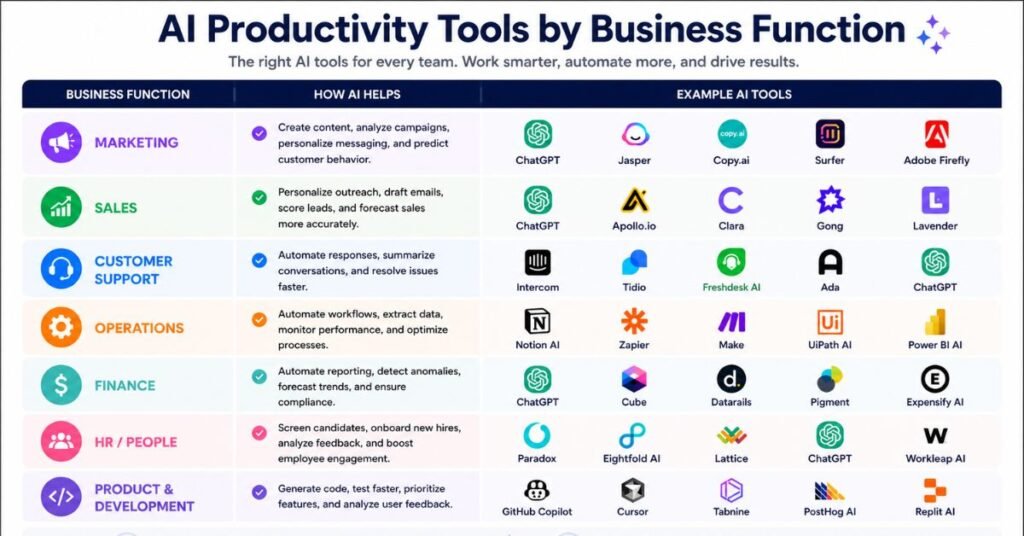
Different teams have different bottlenecks, and the most useful 2026 updates tend to cluster around a handful of core functions. Here’s how the landscape breaks down by the work it actually supports.
Writing and Content Creation
Writing tools have moved past generic drafting toward brand-consistent, multi-channel output. Features that mimic a specific company’s tone and style — sometimes called a “brand voice” setting — let marketing teams turn a single long-form piece into a week’s worth of shorter posts without losing consistency. For sales and outreach teams, similar tools now personalize cold emails using publicly available profile data and pull relevant details from a CRM automatically, cutting down on manual research before every message.
Meetings and Communication
Meeting assistants have become one of the fastest-growing categories precisely because the pain point is universal: nobody wants to choose between participating in a conversation and taking accurate notes. Beyond transcription, the more advanced tools now offer conversational analytics — tracking talk-time balance, flagging action items, and surfacing sentiment shifts during a call. Sales teams have started using this data to identify which pitches actually work and turn them into training material for new hires, rather than relying on anecdotal feedback.
Automation and Orchestration
This is where the “agent” trend is most visible. Instead of building a rigid, step-by-step automation, teams increasingly describe an outcome in plain language and let the system figure out which apps to touch and in what order. A practical example: automatically pulling a news summary, having AI turn it into an executive brief, and posting it to a team chat channel — all without a person manually copying information between tools. The caution here is cost control: task-based and credit-based pricing can escalate quickly for automations that run frequently, so it’s worth monitoring usage rather than assuming a flat monthly fee.
Research and Knowledge Work
Deep research features have genuinely changed how long certain tasks take. Competitive analysis, literature reviews, and first-draft intelligence briefings that once took hours of manual searching and synthesis can now be produced in a fraction of the time, with the researcher’s job shifting toward verifying and refining rather than starting from a blank page. Tools that ground their answers in sources you personally upload — rather than the open web — have also gained traction for teams that need citations they can click through and verify, which matters most in regulated or fact-sensitive industries.
Project and Task Management
AI-assisted scheduling tools now do more than remind you of deadlines — several can automatically build a day’s schedule around existing calendar commitments, prioritizing deep-focus blocks around meetings rather than requiring a person to manually rearrange tasks each morning. This matters because meeting-heavy workweeks continue to eat into the uninterrupted time needed for substantive work, and closing that gap has become a measurable focus for scheduling-tool vendors this year.
Coding and Development
AI-native development environments have gone from experimental forks of existing code editors to stable products with enterprise support, automated code review, and multi-step “agent” modes that can work through a coding task with less line-by-line guidance. Established coding assistants have kept pace by expanding their model options and improving how well they explain unfamiliar code — a detail that matters as much for onboarding new developers as it does for speed.
Pricing Trends to Watch in 2026
Pricing has shifted noticeably as AI features move from optional add-ons to core parts of software plans:
- Usage-based billing is spreading. Several coding and automation tools have moved away from flat monthly fees toward credit systems, where heavy users pay more for overflow beyond an included allotment.
- Enterprise office suites often require a qualifying base license. AI add-ons for products like Microsoft 365 typically aren’t sold standalone — they sit on top of an existing subscription tier, which affects the real all-in cost per user.
- Free tiers are shrinking in some categories even as they expand in others — it varies by vendor, so checking current plan details before committing a team is worth the extra ten minutes.
- Bundling is increasing. More vendors are folding AI capability into their core plans rather than charging a separate fee, which can make an existing subscription more valuable without requiring a new one.
The practical implication: don’t assume last year’s pricing page is accurate. Checking a vendor’s current terms before rolling a tool out to an entire team has become a necessary step, not an optional one.
Comparison Table: Popular AI Productivity Tools in 2026
| Tool | Best For | Standout 2026 Update | Works Well With |
| Microsoft 365 Copilot | Document-heavy enterprise work | Deeper reasoning modes, in-app actions | Word, Excel, Outlook, Teams |
| ChatGPT | General-purpose research & drafting | Expanded deep research, browser integration | Custom GPTs, coding tools |
| Google Gemini (Workspace) | Teams already on Google Workspace | Cross-file search and summarization | Docs, Sheets, Gmail |
| Notion AI | Knowledge management | Workspace-wide Q&A, auto-formatting | Databases, wikis, project trackers |
| Zapier (AI + Agents) | Cross-app automation | Natural-language workflow building | Nearly any connected app |
| Otter.ai / Fireflies | Meeting notes and follow-ups | Sentiment and talk-time analytics | Zoom, Teams, CRM tools |
| AI coding assistants (Copilot, Cursor, Claude Code) | Software development | Agentic multi-step coding, code review | GitHub, VS Code, CI/CD |
Tip for mobile readers: scroll the table horizontally, or focus on the first two columns — Tool and Best For — to quickly find the category you need.
How to Evaluate a New AI Tool Before Adopting It
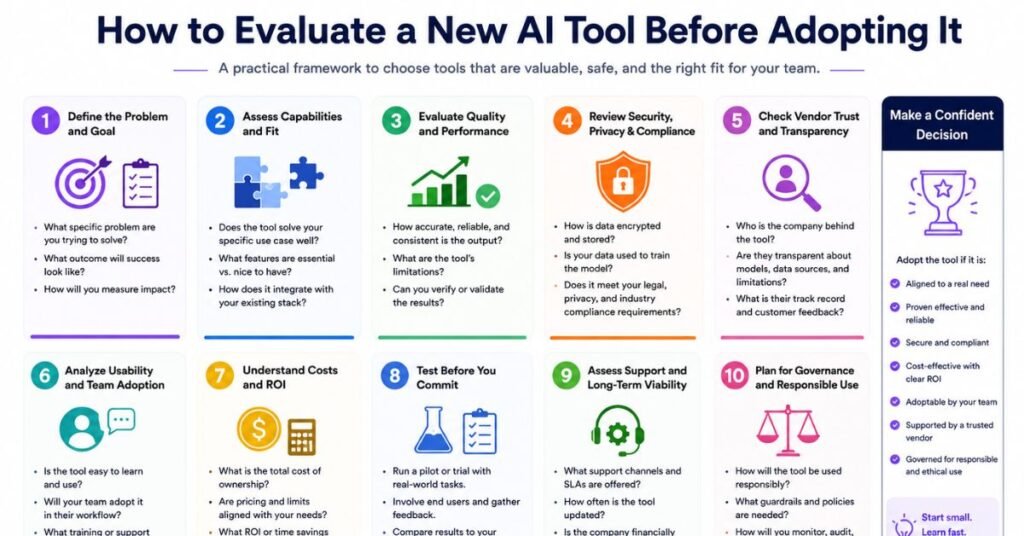
With so many updates landing every month, the real skill in 2026 isn’t knowing which tools exist — it’s knowing which ones deserve a place in your workflow. Before adding anything new, run it through a short checklist:
- Does it solve one of your top three time drains? If the tool doesn’t address a real bottleneck, it’s a distraction dressed up as progress.
- Do you already have this feature somewhere? Many teams pay for a new AI subscription before checking whether Microsoft 365, Google Workspace, or Notion already covers the need.
- Is the marginal gain worth switching costs? Getting 20% better at a tool you already use often beats the learning curve of a brand-new one.
- What does it cost at your actual usage level? Usage-based and credit-metered pricing can turn a predictable monthly fee into a variable one, especially for automation and coding tools.
- Does it fit your data governance policies? Pasting confidential or proprietary information into a consumer AI tool without checking company policy is a real and growing liability.
A simple rule that has held up well in 2026: keep your core AI stack to two or four tools, each solving one clear problem, each connected to the workflow you already use. Chasing every new release usually costs more time than it saves.
Building a Lean, Effective AI Stack
Most professionals don’t need fifteen AI subscriptions. They need a small set of tools that cover distinct jobs without overlapping:
- One general assistant for research, drafting, and brainstorming (ChatGPT, Claude, or Gemini).
- One embedded office assistant if you’re heavily inside Microsoft 365 or Google Workspace.
- One meeting assistant if your calendar is full of recurring calls.
- One automation layer to connect the apps you already use, so information doesn’t have to be copied by hand between them.
- One specialist tool for your specific function — coding, design, or writing — rather than trying to make a generalist do specialist work.
Once that stack is in place, the highest-value habit isn’t adding more tools. It’s reassessing quarterly: checking whether your current tools still fit, whether pricing has changed, and whether a genuinely better option has emerged for a real pain point you have — not just a shinier feature you saw in a demo.
Common Mistakes Teams Make With AI Productivity Tools
- Treating AI output as finished work. Even strong models make mistakes, especially on nuanced or domain-specific content. A human review step before anything important ships is still necessary.
- Chasing every update. Not every release is a reason to rebuild your workflow. Most updates are incremental, not transformative.
- Ignoring security policy. Confidential client or company data shouldn’t go into a general AI tool without knowing your organization’s rules first.
- Optimizing the stack instead of using it. It’s possible to spend more time researching productivity tools than actually producing anything with them. The tools exist to disappear into your workflow, not to become the project themselves.
- Buying a seat for every team member “just in case.” Usage often concentrates in a smaller group of power users; auditing seats regularly avoids paying for licenses nobody opens.
What’s Next: Trends to Watch
A few directions are becoming clear as 2026 progresses:
- Agentic AI is moving from experimental to usable, though still inconsistent for complex, multi-step business processes. Expect steady improvement rather than a sudden leap.
- Regulation is catching up. Compliance requirements for high-risk AI systems are becoming enforceable in some regions, and more US states are introducing rules around AI use in hiring and other regulated decisions. Expect more disclosure requirements to show up in the tools you already use.
- On-device AI is expanding, reducing the need to send every request to the cloud for lighter tasks.
- Vertical, industry-specific agents — for legal, financial, and medical workflows — are gaining traction faster than general-purpose tools in those specific fields.
- Consolidation, not proliferation. The market is settling around a smaller number of dominant platforms per category rather than continuing to fragment into new entrants every month.
AI Music Production Tools: 2026 Updates
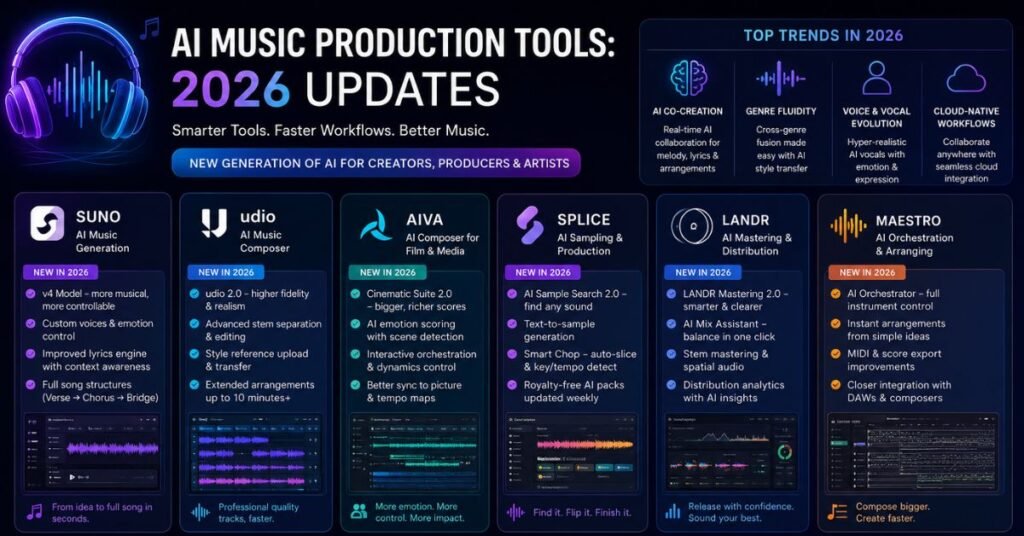
Music production has followed a similar pattern to office productivity software this year — less hype around brand-new categories, more meaningful upgrades to tools that already had traction.
- Full-song generation has matured. Platforms built for text-to-song generation now produce longer, more coherent tracks with clearer song structure, and several have added stem export so producers can pull out a vocal or instrumental line and finish the mix in a traditional DAW rather than accepting the AI’s full mix as final.
- Commercially safe generation is a growing category. Tools built around clean licensing are gaining traction with creators who need music for podcasts, videos, and other commercial projects without copyright uncertainty.
- AI mastering and mixing assistance keeps improving, with intelligent EQ matching, vocal processing, and spectral repair now common features in professional mastering suites — useful for demos and reference mixes, though many engineers still prefer a human pass for final releases.
- Voice and stem separation tools have become more targeted, moving beyond splitting a track into just vocals, drums, bass, and everything else, toward isolating specific instruments on request.
- The open-source and local-tool scene is growing as an alternative to cloud platforms, partly because hosting community-trained voice models at scale has proven expensive for some providers to sustain.
- Labels are shifting from lawsuits to licensing deals with major AI music platforms, signaling a move toward structured commercial partnerships rather than pure legal conflict.
As with productivity software, the practical takeaway is the same: AI tools generate raw material a draft, a stem, a rough mix — but a producer’s judgment, a DAW, and often a human mixing or mastering pass still turn that raw material into a finished, release-ready track.
Frequently Asked Questions
What is the biggest AI productivity trend in 2026?
The shift from AI as an assistant that answers questions to AI as an agent that completes multi-step tasks with minimal supervision.
Do I need multiple AI tools, or is one enough?
Most people do better with two to four focused tools rather than one tool trying to do everything or a dozen overlapping subscriptions.
Are AI productivity tools safe for confidential business data?
Only if you check your organization’s data policy first — many consumer AI tools aren’t approved for proprietary or client information.
Is Microsoft Copilot or ChatGPT better for productivity?
Copilot tends to fit better inside document-heavy Microsoft workflows, while ChatGPT is often preferred for general research, coding help, and creative drafting outside that ecosystem.
How often should I reassess my AI tool stack?
Roughly every quarter — pricing, features, and competitive alternatives change quickly enough that a yearly review is too slow.
What’s the biggest mistake people make with AI tools at work?
Treating AI output as finished work without a human review step, especially for anything client-facing or factually sensitive.
Are AI coding assistants worth it for small teams?
Often yes, especially for repetitive code review and boilerplate work, but check whether pricing is usage-based before scaling usage across the whole team.
Will AI agents replace human project managers or assistants?
Not in 2026 — agents are reliable for well-defined, repeatable steps, but multi-step business judgment still needs a person reviewing and directing the work.
Conclusion
The AI productivity landscape in 2026 rewards focus over collection. The platforms getting real use aren’t necessarily the newest ones — they’re the ones that solve an actual bottleneck and stay embedded in a daily workflow instead of sitting open in an extra browser tab.
Whether that means leaning further into Microsoft 365 Copilot because your team already lives in Word and Outlook, adding a meeting assistant because your calendar is packed with recurring calls, or picking one automation tool to stop copying data between apps by hand the goal is the same: less time managing tools, more time doing the work they’re supposed to support.