Artificial intelligence has quietly moved from research labs into everyday business operations. Somewhere between a chatbot answering a customer query and a factory sensor predicting a machine failure, a new discipline has taken shape: AI automation. It’s the reason a support ticket can be read, understood, and resolved without a human ever touching it, and the reason marketing teams can generate, test, and optimize campaigns in a fraction of the time it used to take.
This guide breaks down everything you need to know about AI automation — what it is, how it actually works under the hood, the tools powering it, and where it’s headed next. Whether you’re a business owner exploring automation for the first time or a technical professional evaluating platforms, you’ll walk away with a clear, practical understanding of the topic.
What Is AI Automation?
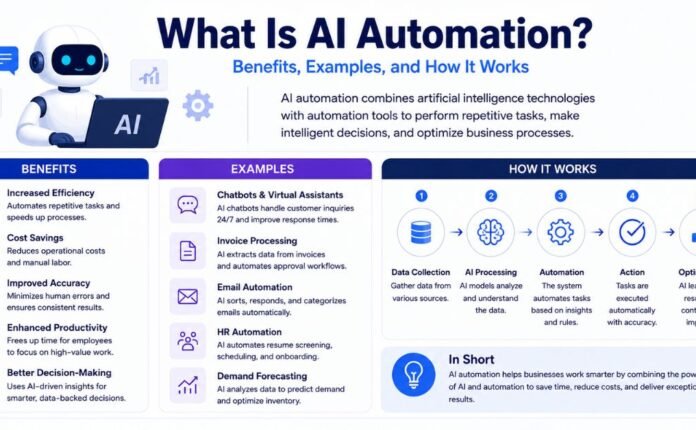
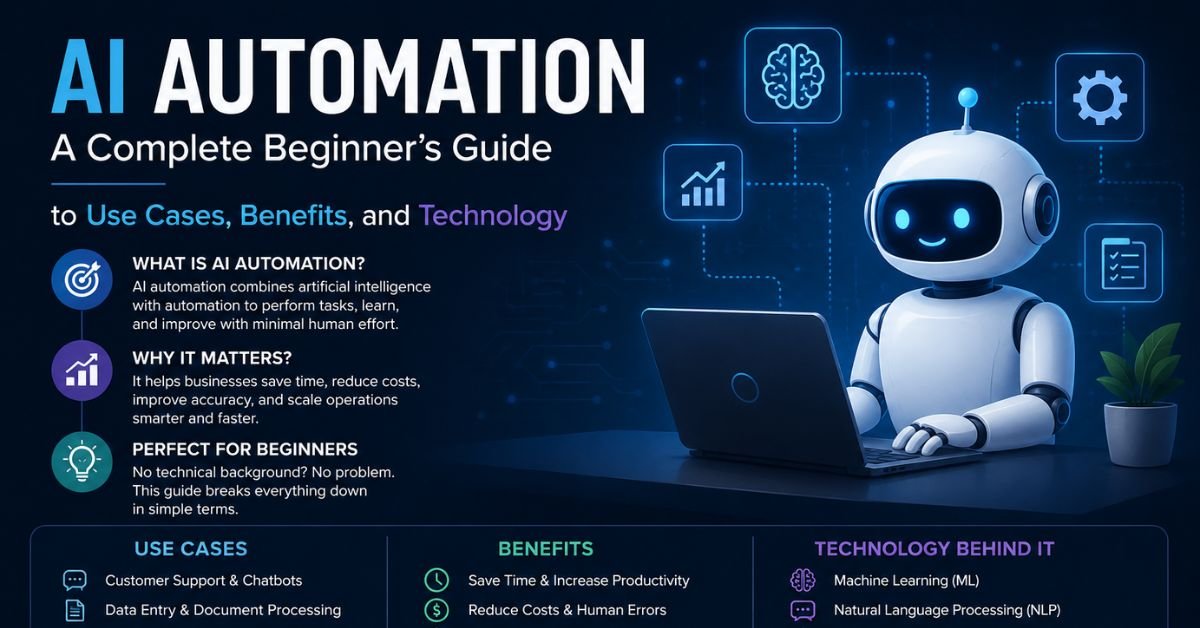
AI automation is the practice of combining artificial intelligence — including machine learning, natural language processing (NLP), and computer vision — with automation software to complete tasks that once required human judgment. Instead of simply following a rigid set of pre-programmed rules, an AI-powered system can interpret unstructured information, make context-aware decisions, and adjust its actions as conditions change.
Think of traditional automation as a train on fixed tracks: fast and reliable, but only within the boundaries it was built for. AI automation is closer to a skilled employee who can read a situation, apply judgment, and choose the best next step — except it does this at machine speed, around the clock, and across thousands of cases simultaneously.
At its core, AI automation typically blends three capabilities:
- Machine learning (ML) — systems that learn from historical data and improve their predictions over time
- Natural language processing (NLP) — the ability to understand, interpret, and generate human language
- Computer vision — the ability to “read” images, scanned documents, or video
When these capabilities are layered on top of workflow automation or robotic process automation (RPA), you get a system that doesn’t just execute tasks — it understands them.
AI Automation vs. Traditional Automation
It helps to see the difference side by side.
| Aspect | Traditional Automation | AI Automation |
|---|---|---|
| Logic | Fixed “if this, then that” rules | Learns patterns and adapts over time |
| Data handling | Structured data only | Structured, unstructured, and semi-structured data |
| Flexibility | Breaks when conditions change | Adjusts behavior as new information arrives |
| Decision-making | None — follows pre-set rules | Can make context-aware decisions |
| Example use | Auto-filling a spreadsheet field | Reading a support ticket, judging urgency, and drafting a reply |
| Maintenance | Frequent reprogramming needed | Improves with more data and feedback |
Traditional rule-based automation still has its place — it’s cheap, predictable, and excellent for repetitive, well-defined tasks. AI automation becomes valuable the moment a process involves free-text input, images, judgment calls, or exceptions that don’t fit a neat rulebook.
How AI Automation Works
AI automation isn’t magic — it follows a fairly consistent pattern no matter the industry or use case. Most AI-driven workflows are built around three layers: a trigger, an AI reasoning step, and an action.
1. The Trigger
Every automation starts with an event. This could be a new email arriving, a form submission, a webhook from another app, or a scheduled check that runs every hour. The trigger tells the system, “something has happened — pay attention.”
2. The AI Reasoning Layer
This is where the intelligence actually happens. Depending on the task, this layer might:
- Extract key details from an unstructured document or email
- Classify sentiment or intent (is the customer angry, confused, satisfied?)
- Predict an outcome based on historical patterns
- Generate a draft response, summary, or recommendation
- Decide which path the workflow should take next
Large language models (LLMs) like those built by Anthropic, OpenAI, and Google now handle much of this reasoning, especially for language-heavy tasks. For visual tasks, computer vision models analyze images or scanned documents. For numerical prediction, traditional machine learning models are often still the best fit.
3. The Action
Once the AI has made its decision, the system executes it — sending a reply, updating a database, escalating an issue to a human, triggering a refund, or kicking off the next step in a longer workflow.
Crucially, many of the best-designed systems include a human-in-the-loop (HITL) checkpoint, where a person reviews or approves AI-generated decisions before they go live — especially for high-stakes actions like financial transactions or public-facing communication.
A Simple Real-World Example
Picture a customer support ticket landing in a helpdesk tool:
- Trigger: A new ticket arrives.
- AI reasoning: The system reads the ticket, identifies the issue and account, classifies the sentiment, and drafts a reply in the company’s tone of voice.
- Action: If confidence is high and sentiment is neutral, the reply is sent automatically. If sentiment is negative or the issue is complex, it’s routed to a human agent with context already attached.
The trigger and the final action look similar to what traditional automation could already do. What’s new is the reasoning step in the middle — the part that used to require a human brain.
Benefits of AI Automation
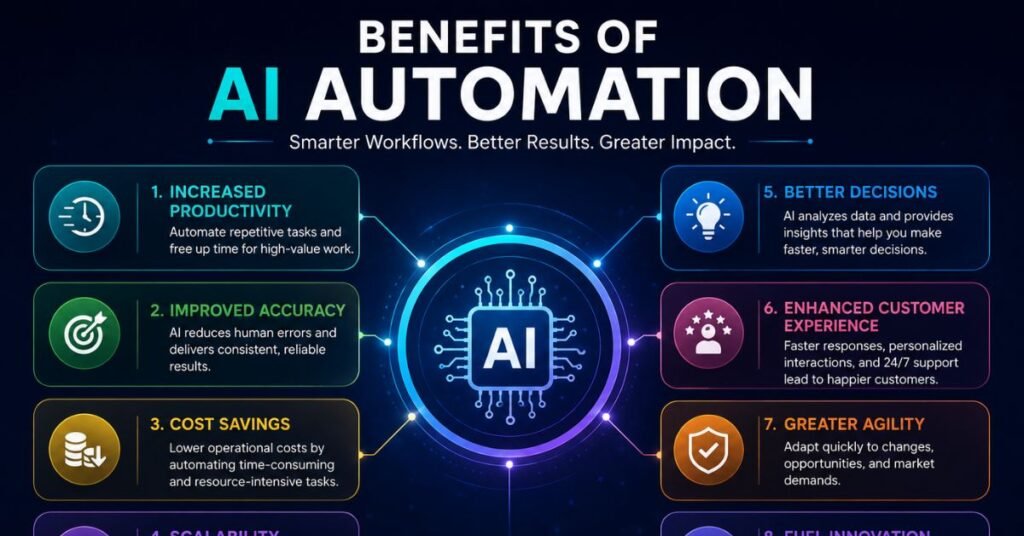
Organizations don’t adopt AI automation because it sounds impressive — they adopt it because it moves measurable business metrics. Here are the benefits that show up most consistently across industries.
- Faster cycle times — Tasks that used to take days, like ticket triage or lead qualification, can be completed in minutes.
- Reduced operational costs — Fewer manual hours are spent on repetitive data entry, document review, and routine communication.
- Higher accuracy — AI systems don’t get tired or distracted, which reduces human error in repetitive, detail-heavy work.
- Scalability — A well-built AI workflow can handle a sudden spike in volume without hiring more staff.
- Better decision-making — AI can surface patterns in large datasets that would take a human analyst far longer to find.
- 24/7 availability — Unlike a human team, AI-powered systems don’t need shifts, breaks, or time zones.
- Improved employee experience — Automating tedious, repetitive tasks frees people to focus on strategic, creative, or relationship-driven work.
That said, the benefits aren’t automatic just because a company adopts AI tools. Industry research consistently shows a gap between organizations experimenting with AI and those actually capturing measurable value from it — meaning the way automation is designed and implemented matters just as much as the technology itself.
Use Cases of AI Automation
AI automation shows up in far more places than most people realize. Some of the most common and highest-impact use cases include:
- Customer support automation — Reading, categorizing, and responding to support tickets or chat messages
- Document processing — Extracting data from invoices, contracts, and forms using computer vision and NLP
- Sales and lead management — Scoring leads, drafting outreach emails, and updating CRM records automatically
- Fraud detection — Scanning transactions in real time to flag suspicious activity
- Content generation — Drafting marketing copy, product descriptions, or social media posts
- HR and recruiting — Screening resumes and scheduling interviews based on candidate fit
- IT operations — Detecting anomalies in system logs and triggering alerts or fixes automatically
- Report generation — Pulling data from multiple sources and compiling it into a readable summary
Each of these examples follows the same underlying pattern described earlier: a trigger, an AI-driven decision, and an automated action.
AI Automation Tools
The market for AI automation platforms has grown rapidly, and different tools serve different needs. Some are built for technical teams that want full control; others are designed so non-developers can build automations visually.
| Tool Category | Examples | Best For |
|---|---|---|
| No-code / low-code automation | Make, Zapier, n8n | Connecting apps and building workflows without writing code |
| Robotic Process Automation (RPA) | UiPath, Automation Anywhere | Automating repetitive, rule-based desktop and enterprise tasks |
| AI agent platforms | Anthropic’s Claude, OpenAI’s tools, LangChain-based agents | Building autonomous or semi-autonomous AI agents |
| Document/data processing | Intelligent document processing (IDP) tools | Extracting and structuring data from unstructured documents |
| Enterprise workflow platforms | Salesforce Agentforce, Microsoft Power Automate | Embedding AI automation into existing business systems |
| CRM-native automation | HubSpot, Salesforce | Automating marketing, sales, and support workflows |
When choosing a tool, it usually comes down to a few practical questions: Does your team have developer resources? How complex are the workflows you want to automate? Do you need deep integration with existing enterprise software, or are you connecting a handful of cloud apps?
AI Agents
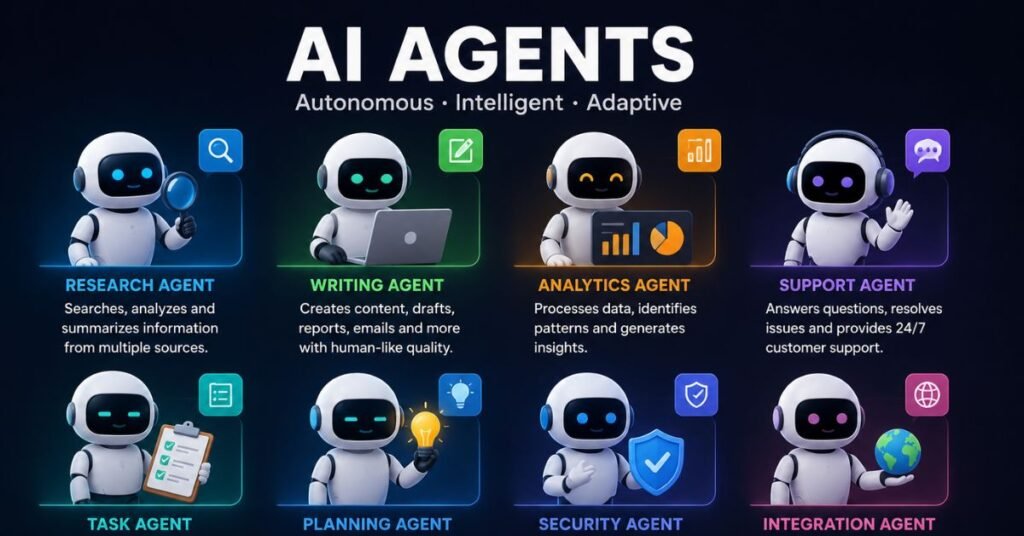
AI agents are one of the fastest-growing branches of AI automation, and they represent a meaningful step beyond simple task execution.
Where standard AI automation follows a defined sequence — trigger, reasoning, action — an AI agent can plan its own sequence of steps to reach a goal. Instead of being told exactly what to do at each stage, an agent is given an objective and a set of tools, and it figures out the path on its own, adjusting as new information comes in.
For example, instead of a fixed workflow that reads a support ticket and follows one of two branches, an AI agent might:
- Independently decide it needs more context and pull the customer’s order history
- Check a knowledge base for relevant policy details
- Draft a reply, evaluate its own confidence, and either send it or escalate
Key differences between AI automation and AI agents:
| Feature | Standard AI Automation | AI Agents |
|---|---|---|
| Task flow | Predefined by the builder | Planned dynamically by the AI |
| Flexibility | Follows set branches | Can adapt steps in real time |
| Autonomy | Executes assigned steps | Decides which steps to take |
| Best suited for | Predictable, well-scoped processes | Complex, multi-step, less predictable tasks |
AI agents are increasingly being embedded directly into enterprise software, and industry forecasts suggest task-specific agents will become a standard feature across business applications in the near future, rather than a novelty.
AI Workflows
An AI workflow is the structured sequence of steps — including triggers, AI decision points, and actions — that make up a complete automation. Designing a good AI workflow is less about the AI model itself and more about the architecture around it.
Well-designed AI workflows typically include:
- Clear entry points — a defined trigger that starts the process
- Data preparation — cleaning or formatting data before it reaches the AI model
- Reasoning checkpoints — one or more steps where the AI interprets data or makes a decision
- Conditional branching — different paths depending on the AI’s output (e.g., high vs. low confidence)
- Human review points — checkpoints for sensitive or high-risk actions
- Logging and monitoring — tracking what the AI decided and why, for auditing and improvement
A useful mental model: a workflow is the skeleton, and the AI reasoning step is the brain sitting inside it. Get the skeleton wrong — messy data, unclear triggers, no fallback for errors — and even the smartest AI model will produce unreliable results.
No-Code Automation
Not every business has a team of developers, and that’s exactly the gap no-code automation platforms fill. These tools let non-technical users build AI-powered workflows using visual, drag-and-drop interfaces instead of writing code.
Why no-code AI automation has taken off:
- Faster time to deployment — workflows can go live in hours instead of weeks
- Lower cost of entry — no need to hire developers for every automation
- Easier iteration — business users can adjust workflows themselves as needs change
- Built-in AI connectors — most no-code platforms now offer direct integrations with LLMs, allowing users to add AI reasoning steps without any machine learning expertise
A typical no-code AI workflow might connect a form submission tool, an AI model for classification or drafting, and a messaging or CRM app — all wired together visually, with no code required.
The trade-off is flexibility. No-code platforms are excellent for common, well-understood processes, but highly customized or performance-critical systems often still require custom development.
Industry Applications of AI Automation
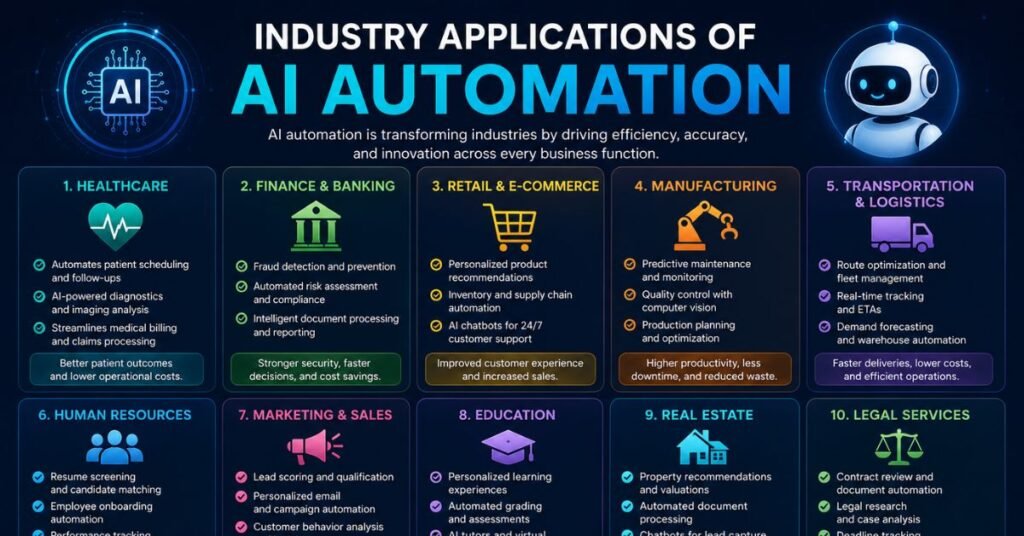
AI automation isn’t confined to one department or sector. Here’s how it plays out across major industries.
Healthcare
AI automation supports administrative tasks like patient scheduling, billing, and insurance claims processing, while also assisting with diagnostic imaging by helping flag early signs of disease in scans. It also supports the creation of more personalized treatment plans by analyzing medical history and other patient data.
Finance and Banking
Financial institutions use AI automation for real-time fraud detection, analyzing enormous volumes of transactions to spot suspicious patterns instantly. It’s also used for credit risk assessment, automated compliance checks, and personalized financial recommendations.
Manufacturing
Predictive maintenance is one of the biggest wins here — AI analyzes sensor data from equipment to flag potential failures before they cause downtime. Computer vision also powers automated quality control, catching defects at speeds and accuracy levels difficult for human inspectors to match.
Retail and E-Commerce
AI automation drives personalized product recommendations, dynamic pricing, inventory forecasting, and automated customer service through conversational agents that understand context and intent rather than just following scripts.
Customer Service
Beyond basic scripted bots, modern AI-driven support agents can understand sentiment, retain conversation history, and route complex issues to the right human team — while resolving simpler queries entirely on their own.
Human Resources
Resume screening, interview scheduling, and even initial candidate communication can be automated, freeing recruiters to focus on higher-judgment decisions like final interviews and offer negotiations.
| Industry | Primary AI Automation Use | Typical Impact |
|---|---|---|
| Healthcare | Diagnostics, admin automation | Faster processing, reduced admin burden |
| Finance | Fraud detection, risk scoring | Real-time protection, fewer losses |
| Manufacturing | Predictive maintenance, QC | Less downtime, higher product quality |
| Retail | Personalization, forecasting | Higher conversion, optimized inventory |
| Customer service | Conversational agents | Faster resolution, lower support costs |
| HR | Screening, scheduling | Reduced time-to-hire |
Challenges of AI Automation
AI automation delivers real value, but it isn’t a plug-and-play solution. Organizations run into a consistent set of obstacles.
- Data quality issues — AI models are only as good as the data they’re trained and operated on; messy or biased data leads to unreliable outcomes.
- Integration complexity — Connecting AI automation across CRMs, finance systems, and legacy software can be technically difficult.
- Lack of transparency — Some AI decisions are hard to explain, which creates challenges for compliance and trust, especially in regulated industries.
- Change management — Employees may resist automation out of fear of job displacement or distrust of AI-made decisions.
- Cost of implementation — Building robust AI workflows, especially with human-in-the-loop safeguards, requires upfront investment.
- Governance and ethics — Organizations need clear policies around bias auditing, data privacy, and accountability for AI-driven decisions.
- Skills gap — Many teams lack in-house expertise to design, monitor, and improve AI-powered workflows effectively.
Most of these challenges aren’t reasons to avoid AI automation altogether — they’re reasons to start with a focused, well-scoped pilot project rather than attempting a company-wide overhaul on day one.
Future Trends in AI Automation
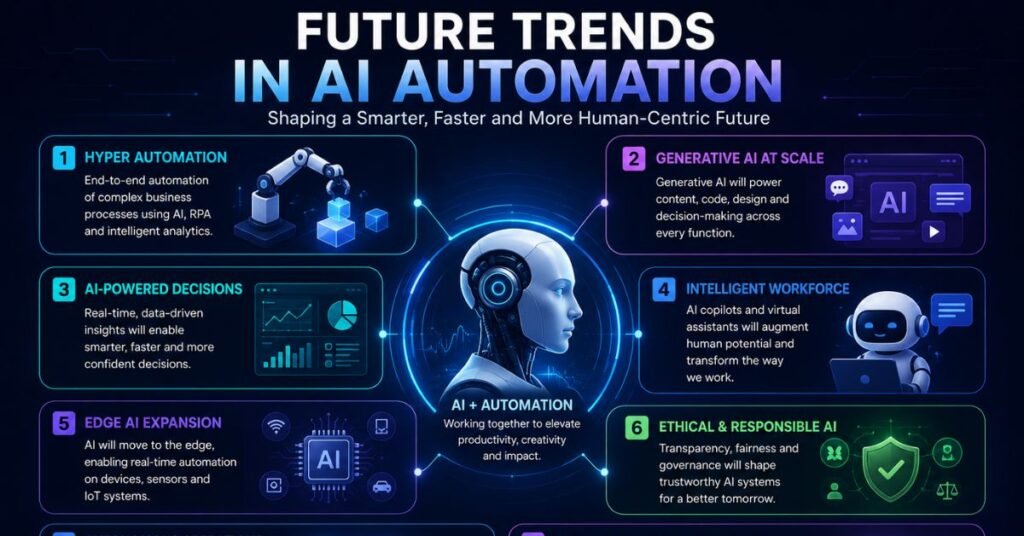
AI automation is evolving quickly, and a few trends stand out as shaping the next few years.
- Rise of agentic AI — Autonomous agents capable of planning and executing multi-step tasks with minimal human input are becoming more common across enterprise software.
- Multimodal AI — Systems are moving beyond text to understand images, audio, and video together, enabling richer automation across formats.
- Deeper enterprise integration — AI automation is being built directly into everyday business tools rather than existing as a separate add-on.
- Increased focus on governance — As adoption grows, expect more emphasis on explainability, auditability, and responsible AI practices.
- Human-AI collaboration models — Rather than full replacement, more workflows will be designed around AI handling routine work while humans focus on exceptions and judgment calls.
- Industry-specific AI agents — Purpose-built agents tailored to specific functions, like finance approvals or clinical documentation, are expected to become standard rather than experimental.
The overall direction is clear: AI automation is shifting from isolated, task-specific tools toward connected systems that reason, act, and learn across an entire organization.
Conclusion
AI automation represents a genuine shift in how work gets done — not by replacing human judgment entirely, but by handling the repetitive, data-heavy, and pattern-based parts of a task so people can focus on the parts that truly need a human touch. From reading a support ticket and drafting a reply, to catching a fraudulent transaction in real time, or predicting a machine failure before it happens, the pattern is consistent: a trigger, intelligent reasoning, and an action.
The organizations getting the most value aren’t necessarily the ones with the most advanced technology — they’re the ones that start with a clear, well-scoped process, choose the right tool for that specific job, and build in human oversight where it matters most.
What is AI automation in simple terms?
AI automation uses artificial intelligence to understand data, make decisions, and complete tasks automatically, going beyond fixed rule-based automation.
How is AI automation different from RPA?
RPA follows strict, predefined rules for repetitive tasks, while AI automation can interpret unstructured data and make context-aware decisions.
Is AI automation only for large enterprises?
No. Many no-code platforms make AI automation accessible and affordable for small businesses and individual teams.
What industries benefit most from AI automation?
Healthcare, finance, manufacturing, retail, and customer service see some of the largest measurable gains from AI automation today.
What is the difference between an AI workflow and an AI agent?
An AI workflow follows a predefined sequence of steps, while an AI agent can dynamically plan and adjust its own steps to reach a goal.
Do I need coding skills to build AI automation?
Not necessarily. No-code and low-code platforms allow non-technical users to build effective AI-powered workflows visually.
Is AI automation safe and reliable?
It can be, when built with proper data governance, monitoring, and human-in-the-loop checkpoints for sensitive decisions.
Will AI automation replace human jobs?
AI automation typically shifts human focus toward higher-judgment work rather than eliminating jobs entirely, though this varies by role and industry.