Generative AI is no longer just a buzzword it’s the engine powering how millions of people write, design, code, sell, and make decisions every day. Whether you’re a marketer looking to scale content, a developer tired of repetitive tasks, or a business leader trying to figure out which AI platform actually deserves a budget line, you’ve landed in the right place.
This guide compares the top 15 generative AI tools across features, pricing, and real-world use cases. We’ll also answer the most searched questions around this technology: Is ChatGPT really generative AI? How does agentic AI differ from generative AI? And how can you use these tools responsibly and effectively?
Let’s get into it.
What Is Generative AI? A Quick Primer
Generative AI refers to artificial intelligence systems trained on massive datasets—text, images, audio, code—that can then create entirely new content in response to a prompt. Unlike traditional AI that classifies or analyzes existing data, generative AI produces something that didn’t exist before.
At the core of most generative AI tools are Large Language Models (LLMs) and diffusion models that learn patterns from billions of data points and use that knowledge to generate outputs that feel natural, coherent, and useful. The outputs can be text, images, audio, video, code, or a combination of all of the above.
The generative AI market generated over $67 billion in revenue in 2023, and projections suggest it could reach $217 billion by 2025—a figure that underscores just how deeply this technology is reshaping industries.
Is ChatGPT Generative AI?
Yes—and it’s one of the clearest examples of generative AI in action.
ChatGPT, developed by OpenAI and launched publicly in November 2022, is built on large language models (GPT-3.5 and later GPT-4o) that generate human-like text in response to user prompts. It can write essays, summarize documents, generate code, answer complex questions, and even hold multi-turn conversations with remarkable fluency.
ChatGPT didn’t just popularize generative AI—it put it in the hands of everyday users. Within two months of launch, it reached 100 million users, making it one of the fastest-adopted consumer applications in history. So yes: ChatGPT is generative AI, and it remains one of the most capable and widely used tools in the category.
Top 15 Generative AI Tools Compared
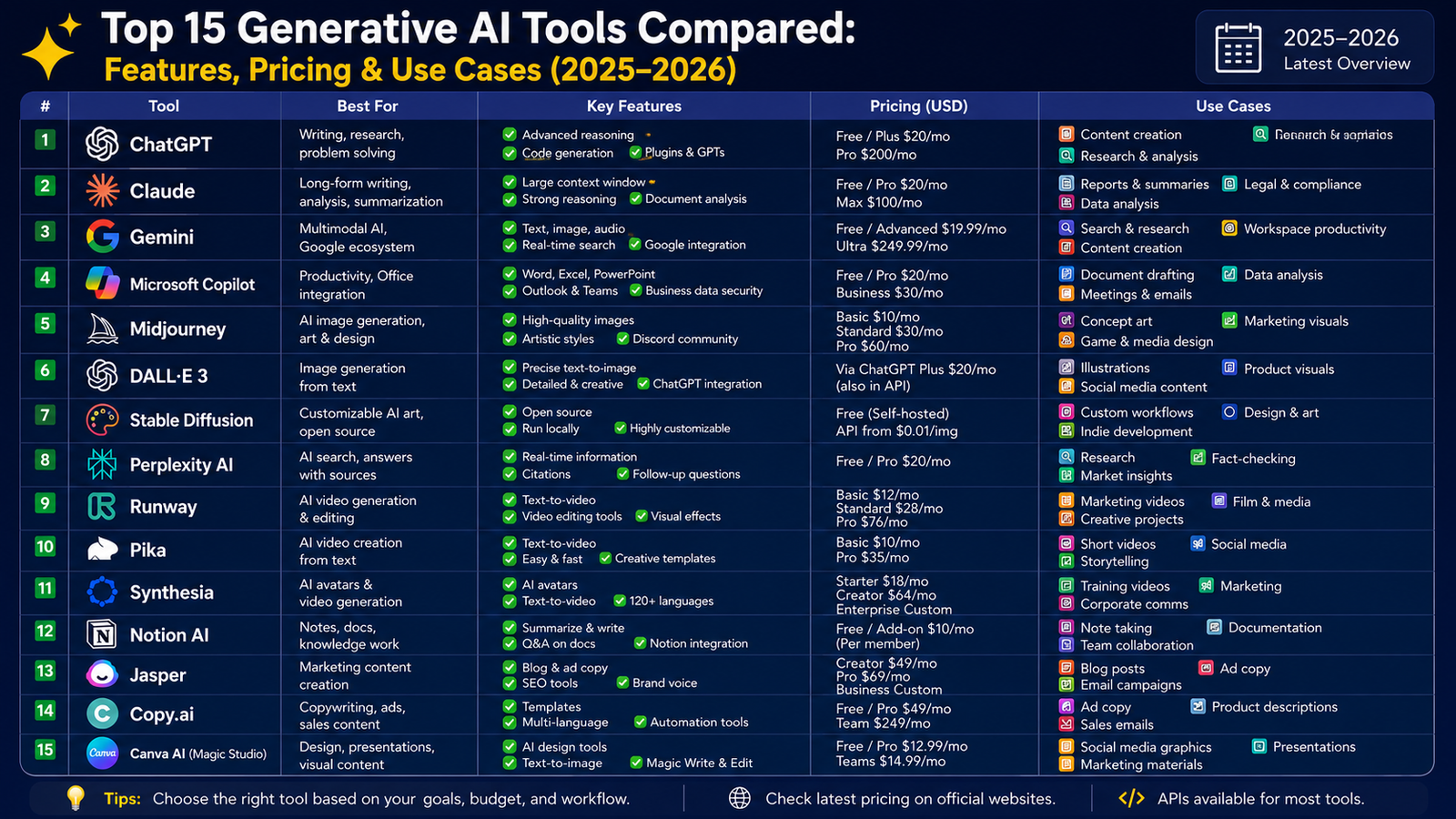
Below is a side-by-side overview of the top generative AI platforms, followed by a detailed breakdown of each.
| Tool | Best For | Free Plan | Starting Price | Output Types |
|---|---|---|---|---|
| ChatGPT (OpenAI) | General productivity & coding | ✅ Yes | $20/month | Text, image, audio, code |
| Claude (Anthropic) | Long-form writing & reasoning | ✅ Yes | $20/month | Text, code, documents |
| Google Gemini | Research & multimodal tasks | ✅ Yes | $19.99/month | Text, image, audio, video |
| Microsoft Copilot | Office & enterprise workflows | ✅ Yes | Bundled with M365 | Text, code, data |
| Jasper AI | Marketing content creation | ❌ No | $49/month | Text, image |
| Midjourney | AI image generation | ❌ No | $10/month | Images |
| DALL-E 3 | Creative image generation | Limited | Pay-per-use | Images |
| GitHub Copilot | Code generation & review | ❌ No | $10/month | Code |
| Runway ML | AI video generation | ✅ Limited | $15/month | Video, image |
| Synthesia | AI video & avatar creation | ❌ No | $29/month | Video |
| Perplexity AI | AI-powered research | ✅ Yes | $20/month | Text, citations |
| Notion AI | Productivity & note-taking | ❌ No | $10/month add-on | Text |
| Copy.ai | Sales & marketing copy | ✅ Limited | $49/month | Text |
| Adobe Firefly | Creative design & media | ✅ Limited | Bundled with CC | Image, video, audio |
| Cohere Generate | Enterprise text generation | ❌ No | $0.15/1M tokens | Text |
1. ChatGPT (OpenAI)
Best for: General-purpose productivity, coding, content creation, and research.
ChatGPT is the most versatile generative AI tool on the market. Its latest iteration, powered by GPT-4o, handles text, images, audio, video, and code—making it a true multimodal powerhouse. The free tier is remarkably capable, and the Plus plan ($20/month) unlocks faster responses, expanded context windows, and access to the latest models.
Key features:
- Advanced reasoning and instruction-following
- Web browsing and real-time information retrieval
- Code interpreter for data analysis and Python execution
- Custom GPTs for specialized workflows
- API access for developers
Use cases: Drafting emails, writing blog posts, debugging code, generating meeting summaries, customer support automation, and language translation.
Pricing:
- Free plan available
- ChatGPT Plus: $20/month
- ChatGPT Team: $30/user/month
- Enterprise: Custom pricing
2. Claude (Anthropic)
Best for: Long-form writing, nuanced reasoning, document analysis, and safety-conscious enterprises.
Claude stands out for its unusually large context window (up to 200K tokens in Claude 3 Opus), meaning it can read and analyze entire books, lengthy contracts, or massive codebases in a single session. It’s trained with a focus on being helpful, harmless, and honest—making it a popular choice for businesses with strict ethical AI requirements.
Key features:
- Extended context processing for large documents
- Strong analytical and summarization capabilities
- Thoughtful, nuanced written output
- Claude.ai web interface plus robust API access
- Vision capabilities for image analysis
Use cases: Legal document review, research synthesis, creative writing, technical documentation, and enterprise knowledge management.
Pricing:
- Free plan available
- Claude Pro: $20/month
- Claude Team: $30/user/month
- Enterprise: Custom pricing
3. Google Gemini
Best for: Multimodal research, Google Workspace integration, and advanced reasoning tasks.
Google’s Gemini (formerly Bard) is tightly integrated into the Google ecosystem—meaning if your team lives in Docs, Sheets, Gmail, and Meet, Gemini fits naturally into those workflows. Gemini 1.5 Pro features a 1 million token context window, one of the largest in the industry, enabling deep analysis across massive datasets.
Key features:
- Deep integration with Google Workspace
- Multimodal: understands text, images, audio, video, and code
- Grounded in Google Search for real-time information
- Advanced code generation with Google Colab integration
Use cases: Research and fact-checking, generating presentations in Google Slides, data analysis in Sheets, email drafting in Gmail.
Pricing:
- Free plan available
- Gemini Advanced (Google One AI Premium): $19.99/month
4. Microsoft Copilot
Best for: Enterprise productivity within Microsoft 365 environments.
Microsoft Copilot embeds generative AI directly into Word, Excel, PowerPoint, Outlook, and Teams—turning everyday tools into AI-powered productivity engines. It’s powered by OpenAI’s models and deeply integrated with your organization’s data through Microsoft Graph.
Key features:
- Drafts documents in Word, slide decks in PowerPoint
- Analyzes data and builds formulas in Excel
- Summarizes meetings and action items in Teams
- Manages email in Outlook with smart replies and prioritization
Use cases: Business reporting, meeting summarization, automated slide deck creation, spreadsheet modeling.
Pricing:
- Copilot in Windows: Free
- Microsoft 365 Copilot: $30/user/month (bundled with M365)
5. Jasper AI
Best for: Marketing teams that need branded content at scale.
Jasper is purpose-built for marketing and brand content creation. It allows teams to set brand voice guidelines, tone presets, and content templates so that every piece of AI-generated content stays on-brand. It’s one of the most feature-rich writing tools specifically designed for marketing workflows.
Key features:
- Brand Voice training to match your company’s tone
- 50+ content templates (blog posts, ads, product descriptions)
- SEO mode with SurferSEO integration
- Team collaboration features
- Image generation powered by DALL-E
Use cases: Ad copywriting, blog content, email marketing sequences, social media captions, product description generation.
Pricing:
- Creator: $49/month
- Pro: $69/month
- Business: Custom pricing
6. Midjourney
Best for: High-quality, artistic AI image generation.
Midjourney is the gold standard for creative image generation. It produces strikingly beautiful, artistic images from natural language prompts, and its community-driven Discord interface has become a creative hub for designers, illustrators, and content creators.
Key features:
- Industry-leading image quality and artistic style
- Extensive style controls (materials, lighting, artistic movements)
- Discord bot integration for easy access
- Version history and upscaling tools
- Style reference and character consistency features
Use cases: Social media graphics, book cover art, concept design, marketing visuals, brand identity exploration.
Pricing:
- Basic: $10/month
- Standard: $30/month
- Pro: $60/month
- Mega: $120/month
7. DALL-E 3
Best for: Integrated image generation within ChatGPT workflows.
DALL-E 3 is OpenAI’s image generation model, tightly integrated with ChatGPT. Unlike Midjourney, it excels at following complex, detailed prompts with high accuracy, making it ideal for users who need precise visual control rather than purely artistic output.
Key features:
- Strong prompt adherence and detailed instruction-following
- Available directly within ChatGPT Plus
- API access for developers to build image generation into apps
- Automatic prompt improvement for better results
Use cases: Generating custom illustrations, product mockups, marketing assets, and visual content for presentations.
Pricing:
- Included in ChatGPT Plus ($20/month)
- API: $0.040–$0.080 per image depending on resolution
8. GitHub Copilot
Best for: Developers who want AI-assisted code generation and review.
GitHub Copilot, powered by OpenAI’s Codex models, is the most widely adopted AI coding assistant in the world. It works directly inside VS Code, JetBrains, and other IDEs, suggesting code completions, generating entire functions, and helping debug errors in real time.
Key features:
- Context-aware code completions in 30+ languages
- GitHub Copilot Chat for code explanations and debugging
- PR summaries and code review assistance
- CLI support for command-line suggestions
- Security vulnerability detection
Use cases: Accelerating development, writing documentation, generating test cases, understanding legacy code.
Pricing:
- Individual: $10/month or $100/year
- Business: $19/user/month
- Enterprise: $39/user/month
9. Runway ML
Best for: AI-powered video generation and editing.
Runway is at the forefront of generative video AI, enabling creators to generate, edit, and transform videos using text prompts and AI models. Its Gen-3 Alpha model produces remarkably consistent, high-quality video clips that are changing how agencies and studios approach production.
Key features:
- Text-to-video and image-to-video generation
- AI-powered video editing (inpainting, motion tracking)
- Green screen removal and background replacement
- Multi-motion camera controls
- Collaboration features for teams
Use cases: Short-form social media content, concept video production, film prototyping, marketing video creation.
Pricing:
- Basic: Free (limited credits)
- Standard: $15/month
- Pro: $35/month
- Unlimited: $95/month
10. Synthesia
Best for: AI video creation with digital avatars for corporate training and marketing.
Synthesia lets you create professional talking-head videos with AI avatars—no camera, crew, or studio required. It’s particularly popular in L&D (learning and development) and corporate communications, where teams need to produce videos at scale without a production budget.
Key features:
- 230+ AI avatars in 140+ languages
- Custom avatar creation from a real person
- PowerPoint-to-video conversion
- Screen recording integration
- Brand kit and template library
Use cases: Employee training videos, product demos, multilingual corporate communications, sales enablement content.
Pricing:
- Starter: $29/month (9 videos/month)
- Creator: $89/month (30 videos/month)
- Enterprise: Custom pricing
11. Perplexity AI
Best for: AI-powered research with real-time citations.
Perplexity is best described as a conversational research engine. It grounds every answer in real-time web sources and displays citations inline, making it ideal for users who need up-to-date, verifiable information rather than static model knowledge.
Key features:
- Real-time web search integration
- Inline citations for every claim
- Pro Search for deeper multi-step research
- File upload for document analysis
- Focus modes (Academic, YouTube, Reddit, etc.)
Use cases: Market research, competitive analysis, academic research, fact-checking, staying current on industry trends.
Pricing:
- Free plan available
- Pro: $20/month or $200/year
12. Notion AI
Best for: Teams using Notion for project management and knowledge bases.
Notion AI adds a layer of generative intelligence directly into your Notion workspace, allowing users to summarize meeting notes, generate action items, draft documents, and improve writing without leaving their workspace.
Key features:
- AI writing assistant embedded in Notion pages
- Summarization of long documents and databases
- Q&A across your entire Notion workspace
- Autofill for database properties
- Multi-language support
Use cases: Meeting note summarization, project brief generation, knowledge base Q&A, team wiki maintenance.
Pricing:
- Notion AI add-on: $10/member/month
- Included in Notion Business+ plans
13. Copy.ai
Best for: Sales and marketing teams needing copy at scale.
Copy.ai is designed specifically for go-to-market teams—sales, marketing, and revenue operations. It offers automated workflows for outbound prospecting, content generation, and pipeline enablement, making it one of the most practical tools for sales enablement.
Key features:
- Go-to-market (GTM) AI workflows
- Automated outbound email and LinkedIn sequences
- Blog content and social post generation
- Brand voice customization
- 90+ templates for sales and marketing copy
Use cases: Cold email campaigns, LinkedIn outreach, landing page copy, product descriptions, sales battlecards.
Pricing:
- Free plan: 2,000 words/month
- Starter: $49/month
- Advanced: $249/month
- Enterprise: Custom pricing
14. Adobe Firefly
Best for: Creative professionals within the Adobe ecosystem.
Adobe Firefly is Adobe’s multimodal generative AI platform built specifically for creative professionals. Because it’s trained on licensed and public domain content, it’s one of the most commercially safe image generation tools available—a key differentiator for brands and agencies.
Key features:
- Text-to-image, text-to-video, and generative fill
- Direct integration with Photoshop, Illustrator, and Premiere Pro
- Style reference controls for brand consistency
- Commercially safe (trained on licensed data)
- Audio and soundtrack generation
Use cases: Brand asset creation, photo editing and retouching, video enhancement, product visualization.
Pricing:
- Included in Creative Cloud plans (from ~$54.99/month)
- Standalone Firefly: free generative credits with paid top-ups
15. Cohere Generate
Best for: Enterprises that need customizable, production-grade text generation via API.
Cohere is an enterprise-focused AI platform that allows businesses to build and deploy custom language models tuned to their specific brand voice, domain, and data. Unlike consumer-facing tools, Cohere is built for developers and data teams integrating AI into business applications.
Key features:
- Command model family for high-accuracy text generation
- Fine-tuning on proprietary data
- RAG (retrieval-augmented generation) for grounded outputs
- On-premise and cloud deployment options
- Enterprise-grade security and compliance
Use cases: Product descriptions, marketing emails, customer support automation, knowledge base generation, internal content pipelines.
Pricing:
- Command model: from $0.15 per 1 million input tokens
- Enterprise: Custom pricing
Agentic AI vs Generative AI: Key Differences
One of the most important distinctions in the AI landscape right now is the difference between generative AI and agentic AI. Many people use these terms interchangeably, but they describe very different capabilities.
| Feature | Generative AI | Agentic AI |
|---|---|---|
| Primary function | Creates content from prompts | Takes autonomous action to complete goals |
| Behavior | Reactive (responds when asked) | Proactive (initiates and plans steps) |
| Memory | Usually stateless per session | Maintains state across multi-step tasks |
| Tool use | Limited or API-dependent | Calls tools, APIs, and services autonomously |
| Human oversight needed | Moderate | High (autonomous actions have real consequences) |
| Examples | ChatGPT, Claude, DALL-E | AutoGPT, Devin, AI sales agents |
| Decision-making | Single-turn output | Multi-step planning and execution |
| Best for | Content creation, analysis, Q&A | Complex workflows, automation, task delegation |
| Risk profile | Hallucinations, bias in outputs | Operational risk from autonomous actions |
| Maturity | Production-ready, widely deployed | Emerging, often narrow in scope |
The core distinction, as IBM puts it, is that generative AI is reactive while agentic AI is proactive. Generative AI waits for a prompt and produces an output. Agentic AI receives a goal, figures out the steps needed to reach it, uses tools to execute those steps, evaluates the results, and adjusts—all with minimal human intervention.
Think of it this way: generative AI helps you write a cold email. Agentic AI researches a prospect, drafts the email, schedules the send, monitors for replies, and updates your CRM—automatically.
The two technologies are increasingly being combined. A sales follow-up agent, for instance, might use generative AI to craft personalized messages while the agentic layer handles sequencing, timing, and CRM updates.
Conversational AI vs Generative AI
Another distinction worth understanding is the difference between conversational AI and generative AI—two technologies that overlap but serve different purposes.
| Dimension | Conversational AI | Generative AI |
|---|---|---|
| Primary goal | Simulate natural dialogue | Create new content |
| Core technology | NLP, NLU, dialogue management | LLMs, diffusion models, GANs |
| Output | Structured responses within dialogue | Text, images, video, code, audio |
| Behavior | Turn-based conversation management | Prompt-driven content generation |
| Examples | Siri, Alexa, customer service bots | ChatGPT, Claude, Midjourney |
| Best use case | Customer support, lead qualification | Content creation, coding, design |
| Data dependency | Domain-specific training | Broad training data (internet-scale) |
| Response style | Controlled, rule-governed | Open-ended, creative |
| Enterprise risk | Lower (structured flows) | Higher (hallucinations possible) |
Conversational AI is optimized for structured interaction—it knows how to handle a customer asking about their order status or a prospect asking about pricing. Generative AI is optimized for creation—it produces something new based on a prompt.
The most powerful enterprise applications today combine both. A modern customer service agent might use conversational AI to manage the dialogue flow and intent detection, while a generative AI layer crafts the personalized, natural-sounding response the customer actually receives.
Generative AI for Sales: A Practical Overview

Sales teams have become one of the biggest beneficiaries of generative AI. Here’s why: sales is fundamentally about communication, research, and personalization—three things generative AI does exceptionally well.
According to HubSpot’s 2025 State of Sales Report, 38% of sales professionals are already using generative AI to create personalized outbound emails, and sellers using AI report an average 28% higher response rate from prospects.
How Sales Teams Use Generative AI
1. Intelligent prospecting AI tools analyze vast datasets to identify leads that match your ideal customer profile, surfacing buying signals like job changes, funding rounds, and intent data. Tools like Clay, Apollo, and HubSpot’s AI Prospecting Agent automate this research.
2. Personalized outreach at scale Generic sales pitches have poor results. Generative AI enables hyper-personalized cold emails that reference a prospect’s recent LinkedIn post, company news, or 10-K filing—at the scale of hundreds of contacts per day.
3. Predictive lead scoring AI models score leads based on historical deal data, firmographics, and behavioral signals—helping reps prioritize their time on accounts most likely to convert. Salesforce Einstein, HubSpot, and 6sense all offer this capability.
4. Call analysis and coaching Tools like Gong and Chorus transcribe sales calls, identify objections, and surface winning talk tracks. Sales managers use these insights to coach reps and scale best practices across the team.
5. CRM hygiene and automation Generative AI automatically updates CRM records from emails, meeting notes, and call summaries—saving reps hours of manual data entry every week.
6. Follow-up content and proposals AI drafts follow-up emails, tailored proposals, and case studies in seconds, ensuring no prospect falls through the cracks and every communication feels considered.
Key stat: AI sales tools can increase leads by up to 50% and reduce acquisition costs by 60% through enhanced targeting and scoring (McKinsey, 2025).
How Can Generative AI Be Used Responsibly?
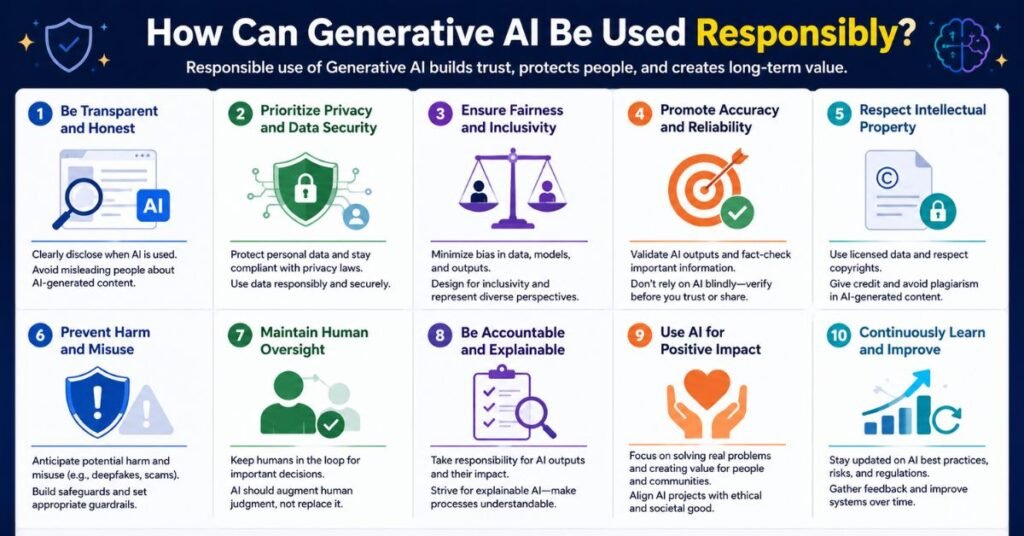
The power of generative AI comes with real responsibility. Here are the key principles for responsible use:
1. Always verify AI outputs Generative AI can hallucinate—producing confident-sounding information that is factually wrong. Always fact-check claims, especially for medical, legal, financial, or technical content before publishing or acting on them.
2. Maintain transparency Be transparent with customers, colleagues, and stakeholders when AI has been involved in creating content or making recommendations. This builds trust and ensures accountability.
3. Protect sensitive data Avoid entering confidential business data, personal customer information, or proprietary trade secrets into public AI tools. Use enterprise-grade platforms with appropriate security controls, or deploy models on-premise.
4. Preserve the human in the loop AI should augment human judgment, not replace it—especially for high-stakes decisions in healthcare, legal, financial, or safety-critical contexts. Keep humans accountable for final decisions.
5. Watch for bias AI models can reflect and amplify biases present in their training data. Monitor outputs for discriminatory language, unequal representation, or skewed recommendations—particularly in hiring, lending, or medical applications.
6. Respect intellectual property Understand the training data behind the tools you use. For commercial creative work, use tools trained on licensed content (like Adobe Firefly) and be cautious about copyright implications of AI-generated images or text.
7. Consider environmental impact Training and running large AI models requires significant computing power. Choose providers who are transparent about their energy use and carbon footprint commitments.
8. Follow regulatory requirements Stay current with evolving AI regulations in your region, including the EU AI Act, sector-specific guidelines for financial services and healthcare, and data privacy laws like GDPR.
Generative Engine Optimization (GEO): What It Is and Why It Matters
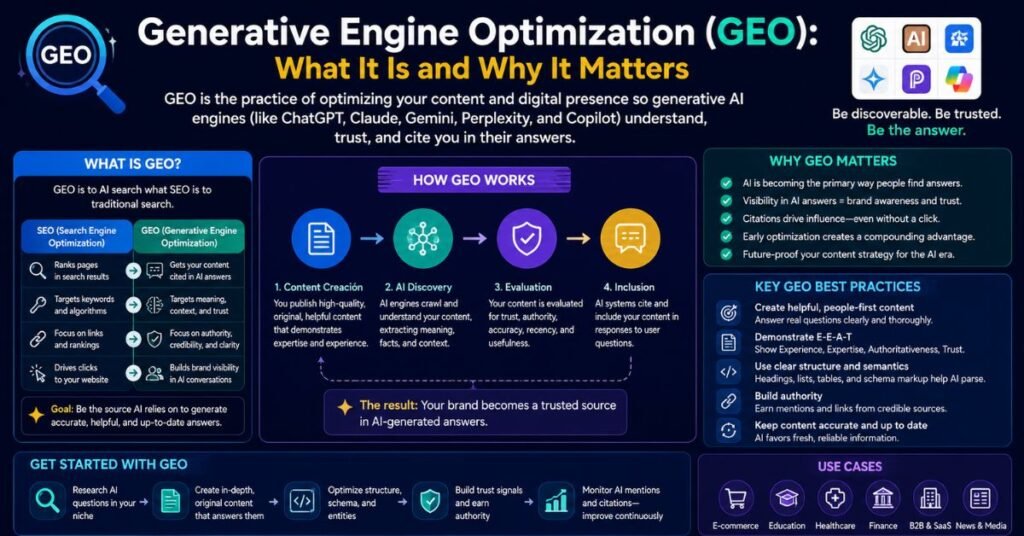
As generative AI reshapes how people search for information, a new discipline has emerged: Generative Engine Optimization (GEO).
Traditional SEO focuses on ranking in Google’s blue-link search results. GEO focuses on ensuring your content is cited, referenced, and recommended by AI systems like ChatGPT, Perplexity, Claude, and Google’s AI Overviews.
Top-Rated GEO Strategies
1. Authoritative, well-cited content AI systems favor content from credible sources. Build topical authority through consistent, in-depth coverage of your niche, backed by real data, expert quotes, and citations.
2. Structured data and schema markup Help AI systems understand your content with structured data. FAQ schema, How-To schema, and Article schema all improve the likelihood of your content being parsed and surfaced by generative engines.
3. Answer featured-snippet-style questions Write content that directly and concisely answers questions in the format AI models prefer: clear definitions, bulleted lists, comparison tables, and numbered steps.
4. Conversational, long-tail query alignment Generative AI engines handle conversational, multi-word queries better than keyword-stuffed content. Write for how people actually speak and think, not just for search bots.
5. Build brand entity recognition The more your brand is mentioned, linked, and discussed across the web—in news articles, forums, reviews, and databases like Wikipedia—the more likely AI systems are to include you in generated responses.
6. Freshness and accuracy Keep content updated. AI systems that index the web in real time (like Perplexity) favor recent, accurate information. Stale content is less likely to be cited.
Tips to Use Generative AI Effectively
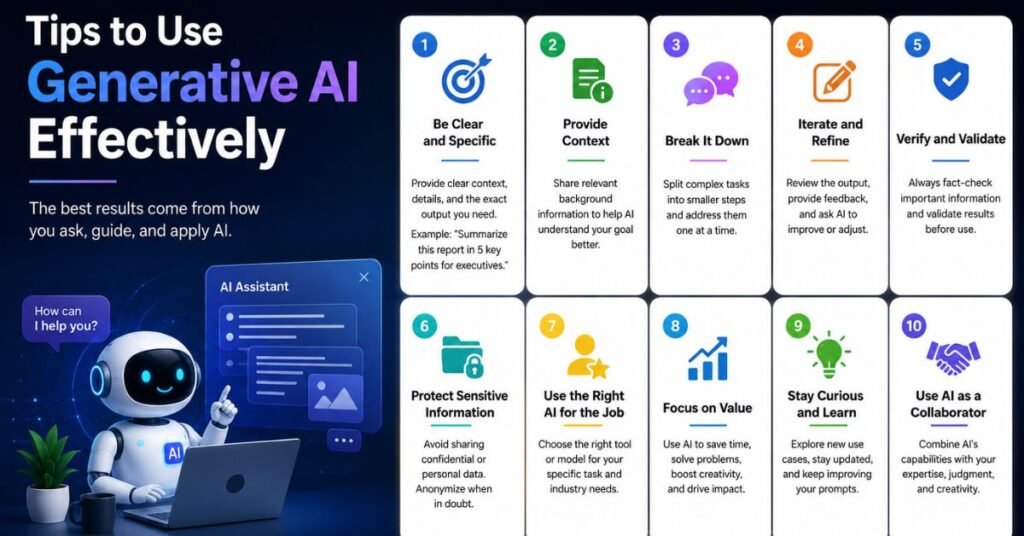
Getting good results from generative AI is a skill. Here’s how to make the most of these tools:
1. Be specific in your prompts
Vague prompts produce vague results. The more context you give—audience, tone, format, purpose, length—the better the output. Instead of “write a blog post about AI,” try: “Write a 1,000-word blog post for marketing managers explaining how to measure ROI from generative AI tools, using a conversational tone with practical examples.”
2. Use system prompts and role-setting
Start conversations by giving the AI a role: “You are a senior sales strategist at a B2B SaaS company.” This primes the model to respond with relevant vocabulary, perspective, and context.
3. Iterate, don’t accept the first draft
Treat AI output as a first draft, not a finished product. Ask for revisions: “Make this more concise,” “Add a real-world example,” “Rewrite in a more casual tone.”
4. Chain your prompts
Break complex tasks into steps. Instead of asking for a complete sales strategy document in one prompt, ask for an outline first, then expand each section, then refine the language.
5. Provide examples
Show the AI what good output looks like. Paste in a sample of the writing style you want: “Write in the style of this example: [paste text].”
6. Use temperature controls when available
Via API or advanced settings, lower temperature settings produce more predictable, consistent outputs. Higher settings produce more creative, varied responses. Match the setting to your use case.
7. Verify facts independently
Never publish AI-generated claims about statistics, events, or people without verifying them from primary sources. Hallucinations are real and can damage your credibility.
8. Build feedback loops
Keep notes on which prompts produce the best results for your specific use cases. Over time, you’ll develop a prompt library that dramatically accelerates your workflow.
9. Combine AI strengths
Use different tools for different tasks: Perplexity for research, Claude for long-form writing, GitHub Copilot for coding, Midjourney for visuals. No single tool does everything best.
10. Train your team
The productivity gains from AI are multiplied when your whole team uses it effectively. Invest in AI literacy: prompt engineering workshops, shared prompt libraries, and clear guidelines on responsible use.
Generative AI Across Industries: Real-World Applications
The versatility of generative AI means it’s finding traction across virtually every sector. Here’s a snapshot of how different industries are putting these tools to work today.
Healthcare
Generative AI is accelerating drug discovery by generating molecular structures, helping radiologists write reports faster, and powering patient-facing symptom checkers. It’s also being used to generate synthetic medical data for training AI models—allowing researchers to access realistic datasets without violating patient privacy.
Legal
Law firms use AI tools like Harvey (built on GPT-4) to draft contracts, summarize case law, and flag clauses that deviate from standard terms. Paralegals use Claude and ChatGPT to rapidly review long documents and produce plain-language summaries. The key challenge remains accuracy: hallucinated case citations are a real risk that makes human review non-negotiable.
Education
Generative AI is transforming how educators create lesson plans, assessments, and personalized learning materials. Platforms like Khan Academy’s Khanmigo use Claude to offer students Socratic tutoring—asking guiding questions rather than giving answers directly. For institutions, AI drafts course syllabi, generates rubrics, and translates materials for multilingual learners.
Finance
Banks and investment firms use generative AI to produce earnings summaries, automate report writing, and generate alerts from complex market data. Bloomberg’s BloombergGPT is a domain-specific model trained on financial data, designed to outperform general-purpose LLMs on finance-specific tasks like sentiment analysis and document classification.
E-commerce
Product description generation is one of the most immediately practical applications of generative AI. Tools like Jasper and Cohere Generate allow retailers to create thousands of unique, SEO-optimized product listings in hours rather than weeks. AI also powers personalized product recommendations, dynamic pricing copy, and review summarization.
Human Resources
HR teams use generative AI to draft job descriptions, generate interview questions, summarize candidate applications, and produce onboarding materials. AI-powered chatbots handle common employee queries about benefits, policies, and processes—freeing HR teams to focus on strategic people management.
Common Mistakes to Avoid When Using Generative AI
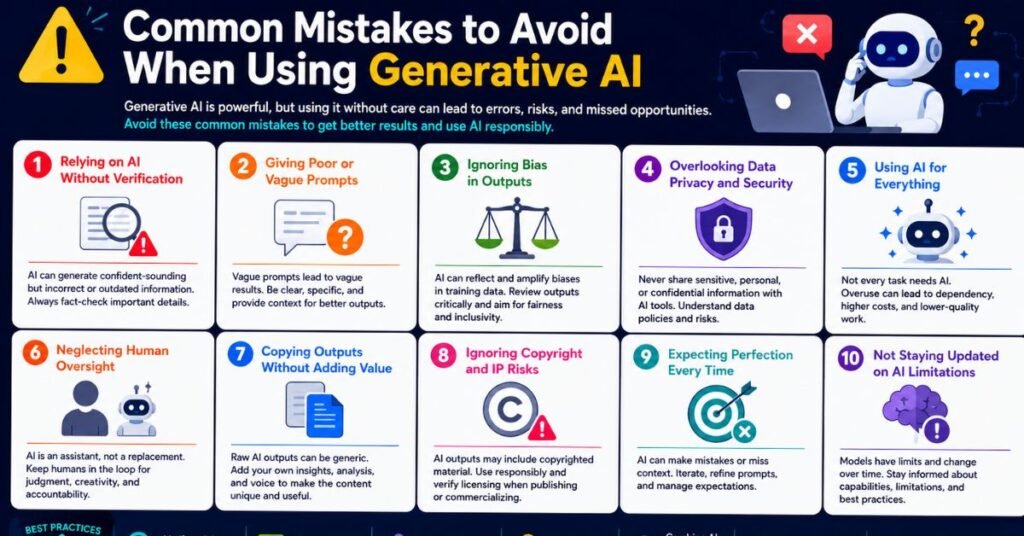
Even experienced users make costly errors with generative AI. Here are the most common pitfalls:
Over-trusting AI outputs without verification. Hallucinations are not edge cases—they’re a feature of how these models work. Any specific claim, statistic, or quote generated by AI should be independently verified before publication.
Using the wrong tool for the job. Using a general-purpose chat tool for a highly specialized task (like legal document analysis or medical diagnosis) without appropriate fine-tuning or expert oversight is a recipe for errors.
Ignoring data privacy. Pasting confidential customer data, financial records, or proprietary code into a consumer AI tool is a serious data governance risk. Enterprise tools with appropriate security controls are essential for sensitive work.
Expecting perfection on the first try. The best results come from iterative refinement—reviewing, editing, and prompting again. Treating AI output as a finished product without human review almost always produces mediocre results.
Failing to document AI use. As AI becomes part of standard workflows, teams need clear policies about what was AI-generated, who reviewed it, and when. This matters for compliance, audit trails, and maintaining accountability.
Choosing the Right Generative AI Tool for Your Needs
With so many options, how do you choose? Here’s a quick decision framework:
| If you need… | Use this tool |
|---|---|
| General productivity & brainstorming | ChatGPT or Claude |
| Marketing content at scale | Jasper AI or Copy.ai |
| Enterprise Microsoft integration | Microsoft Copilot |
| Google Workspace integration | Google Gemini |
| AI image generation (artistic) | Midjourney |
| AI image generation (precise) | DALL-E 3 or Adobe Firefly |
| Code assistance & debugging | GitHub Copilot |
| AI video creation | Runway ML or Synthesia |
| Research with real-time citations | Perplexity AI |
| Enterprise API text generation | Cohere Generate |
| Document summarization | Claude |
| Workspace productivity (Notion) | Notion AI |
Conclusion
Generative AI has moved from a novelty to a genuine competitive advantage—and the tools available in 2025 are more capable, more accessible, and more specialized than ever before.
Whether you’re a solo creator looking to 10x your output, a sales team trying to personalize at scale, or an enterprise architect evaluating which platforms deserve investment, the 15 tools in this guide represent the best the category has to offer.
The key takeaways:
- ChatGPT remains the most versatile all-rounder
- Claude leads for long-form reasoning and document analysis
- Jasper and Copy.ai dominate for marketing and sales content
- Midjourney sets the bar for artistic image generation
- GitHub Copilot is essential for development teams
- Agentic AI is the next frontier—it doesn’t just create, it acts
- Conversational AI and generative AI work best in combination
- Responsible use means verifying outputs, protecting data, and keeping humans in the loop
The organizations that will win in the next few years won’t be the ones that have AI—they’ll be the ones that use it with clarity, purpose, and skill.
Frequently Asked Questions (FAQ)
What is generative AI in simple terms?
Generative AI is a type of artificial intelligence that creates new content—text, images, video, code, or audio—based on patterns learned from massive training datasets, in response to a user prompt.
Is ChatGPT generative AI?
Yes. ChatGPT is one of the most well-known examples of generative AI, built on OpenAI’s large language models that generate human-like text in response to prompts.
What is the difference between agentic AI and generative AI?
Generative AI creates content reactively when prompted. Agentic AI autonomously plans and executes multi-step tasks to achieve a defined goal, often calling external tools and APIs without constant human direction.
What is generative AI used for in sales?
Generative AI is used in sales for personalized outreach, lead research, predictive scoring, proposal drafting, call analysis, CRM data enrichment, and follow-up automation—helping reps close more deals in less time.
How is conversational AI different from generative AI?
Conversational AI manages structured, real-time dialogue—like a chatbot handling customer support. Generative AI creates new content from prompts. The two are often combined in modern enterprise applications.
What is Generative Engine Optimization (GEO)?
GEO is the practice of optimizing content to be cited and recommended by AI-powered search engines and chat assistants like Perplexity, ChatGPT, and Google’s AI Overviews—analogous to SEO for traditional search.
How can generative AI be used responsibly?
Responsible use includes verifying AI outputs, being transparent about AI involvement, protecting sensitive data, avoiding bias, maintaining human oversight for important decisions, and following applicable regulations.
Which generative AI tool is best for beginners?
ChatGPT and Google Gemini are the most beginner-friendly options, with intuitive interfaces, free plans, and broad capability across a wide range of everyday tasks.
What does generative AI cost?
Most leading tools offer free tiers. Paid plans typically start at $10–$49/month for individuals and scale to custom enterprise pricing. API pricing is usually consumption-based (per token or per image).
What is the future of generative AI?
The future includes more capable multimodal models, deeper integration into enterprise software, the rise of agentic systems that can execute complex workflows autonomously, and increased focus on governance, transparency, and compliance.