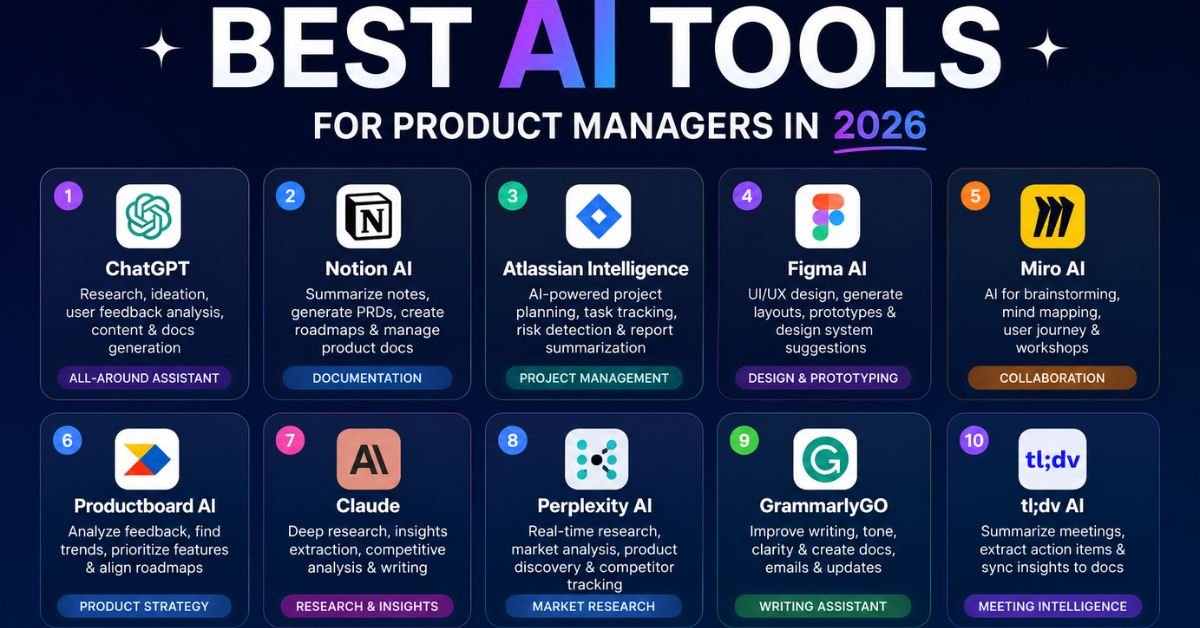
Most “best AI tools” lists read like someone dumped a spreadsheet of software names into a blog post. That’s not useful when you’re a product manager trying to figure out which tool to open on a Tuesday morning when you have forty interview transcripts, a roadmap review in three hours, and a PRD that’s still a bulleted mess.
This guide is organized the way PM work actually happens: by the job you’re trying to do, not by which tool has the flashiest homepage. You’ll find picks for research and discovery, roadmapping and documentation, analytics, prototyping, and automation, plus a practical framework for deciding what’s actually worth paying for. Every recommendation below is something real product teams are using in 2026, not a hypothetical “AI could theoretically do this” claim.
How I Tested and Chose These Tools
I evaluated tools against four criteria that matter more than feature checklists:
- Does it solve a real, recurring PM bottleneck — not a nice-to-have, but something that eats hours every week (feedback synthesis, spec writing, meeting notes, competitive research).
- Does the output need heavy editing, or is it usable with light review? A tool that saves 20 minutes of work but creates 25 minutes of cleanup isn’t actually saving time.
- Does it fit into an existing stack — Slack, Notion, Jira, Linear, Figma — without forcing a workflow migration.
- Is there a genuinely usable free tier or trial, so you can validate fit before committing budget.
I leaned on tools I could verify are in active, documented use by product teams — general-purpose assistants like Claude and ChatGPT, coding agents like Claude Code and Cursor, research tools like Perplexity and NotebookLM, and PM-specific platforms like Productboard, Linear, and Dovetail. Where a tool’s claims were vague or unverifiable, I left it out rather than pad the list.
A quick note on how to read this guide: tools are grouped by the job they do, not by brand recognition, because the biggest mistake PMs make with AI isn’t picking the “wrong” tool — it’s picking a tool before defining the problem. If you skip straight to the comparison tables, you’ll still get value. If you read the selection framework first, you’ll waste less money getting there.
How Product Managers Should Choose AI Tools
Before you add anything new to your stack, map it to a single job-to-be-done. Product management breaks down into a handful of distinct workflows — discovery, prioritization, documentation, analytics, and delivery tracking — and each one rewards a different kind of tool. A tool that writes a great PRD is rarely the same tool that synthesizes two hundred customer interviews well, and platforms that promise to do everything usually do most things adequately and nothing exceptionally.
A simple decision framework:
- Start with your biggest time sink, not your favorite category. If documentation eats six hours a week and research eats one, fix documentation first.
- Buy one strong tool per workflow stage, not three overlapping ones. Two research tools that do the same thing create decision fatigue, not leverage.
- Weight integration over feature count. A tool that connects to Slack, Jira, and your data warehouse beats a more powerful tool that lives in its own silo.
- Treat data privacy as a real constraint, not an afterthought. For anything touching user data or unreleased strategy, confirm the vendor’s training and retention policy before you paste in a transcript.
- Re-evaluate quarterly. This category moves fast enough that a tool ranked in your top three in January may have a stronger competitor by summer.
It also helps to separate two layers that get conflated constantly: a productivity layer and a capability layer. The productivity layer is what most PMs think of first — writing assistants, research tools, and roadmapping platforms that make existing tasks faster. The capability layer is newer and more interesting: coding and prototyping tools that let a PM do something they couldn’t do before, like build a working click-through prototype without waiting for engineering bandwidth. Most PMs should build out the productivity layer first, since it has the fastest payback, then add one capability-layer tool once the basics are running smoothly.
Common Mistakes When Adopting AI Tools
A few patterns show up repeatedly among PMs who try AI tools and give up on them within a month:
- Trying a tool once, on a small task, and judging it there. Most of these tools compound — the tenth interview transcript you summarize goes faster than the first because you’ve learned how to prompt it.
- Pasting in sensitive data without checking the vendor’s policy. This is the fastest way to trigger a security review that kills a tool’s adoption entirely.
- Treating the AI output as final rather than a first draft. The time savings come from skipping the blank page, not from skipping review.
- Adopting five tools in the same week. Stagger rollout so you can tell which tool is actually responsible for the time saved.
Best AI Tools for Product Managers by PM Workflow
Product Discovery and User Research
Discovery is the highest-leverage stage in the PM workflow because every downstream decision — what you prioritize, what you build, what you measure — inherits the quality of the evidence gathered here. If discovery is shallow, prioritization becomes guesswork dressed up in a spreadsheet.
What AI actually helps with:
- Synthesizing themes across dozens of interview transcripts in minutes instead of a full afternoon
- Clustering open-ended survey and support-ticket feedback into recurring themes
- Drafting interview guides and follow-up probes based on a research goal
- Running AI-moderated interviews at scale for early-stage validation
Tools worth knowing:
| Tool | Best for | Notes |
|---|---|---|
| Dovetail | Centralizing and tagging qualitative research | Strong for teams running continuous discovery |
| NotebookLM | Q&A grounded in your own uploaded documents | Low hallucination risk since it only draws from what you upload |
| Sprig | In-product micro-surveys with AI-clustered themes | Good for validating a specific flow with live users |
| Maze | Usability testing on prototypes | Pairs well with Figma-based prototypes |
| Claude or ChatGPT | Summarizing exported feedback and interview notes | General-purpose, but requires you to organize the input yourself |
One caution worth repeating: AI can speed up synthesis and outreach, but it can’t replace talking to real users. Synthetic personas and AI-simulated feedback are useful for stress-testing edge cases, not for validating whether people actually want what you’re building.
A realistic workflow: export interview transcripts from your call-recording tool, drop them into Claude, ChatGPT, or NotebookLM with a prompt asking for recurring themes, direct quotes that illustrate each theme, and anything that contradicts your current assumptions. Review the output against two or three transcripts yourself before trusting it fully — the summarization is strong, but it can occasionally over-weight a vivid anecdote from one interview over a quieter pattern that showed up five times.
Road Mapping and Documentation
This is where most PMs feel AI’s impact first, because writing eats a disproportionate share of the week — PRDs, one-pagers, release notes, stakeholder updates, and the endless job of translating a technical decision into language a VP will actually read.
What works well:
- Drafting a first-pass PRD from a rough outline or a set of bullet points
- Turning meeting transcripts into structured action items and decisions
- Converting a feature list into a stakeholder-ready roadmap narrative
- Rewriting the same update for three different audiences (engineering, exec, customer-facing)
Tools worth knowing:
- Claude and ChatGPT — general-purpose writing assistants; both hold up well for long, structured documents. Claude in particular tends to stay consistent across a long PRD, keeping acceptance criteria tied to the right user stories rather than drifting by the second half of the document.
- ChatPRD — a purpose-built tool for drafting and refining PRDs, with templates aimed specifically at product spec structure.
- Notion AI — useful if your team already lives in Notion; it can summarize, draft, and reformat directly inside your existing docs.
- Productboard and Aha! — roadmap platforms with AI layers that cluster feedback and suggest prioritization, going beyond pure documentation into planning.
- Granola — AI meeting notes that don’t require a bot to join the call, useful for turning planning meetings straight into structured notes.
How to get a usable first draft, not a generic one: the difference between a PRD that needs ten minutes of editing and one that needs a rewrite almost always comes down to context. Give the tool your actual constraints — the engineering team’s tech stack, past decisions that shaped the current design, the metric you’re trying to move — rather than just the feature idea. Tools like Claude Projects or custom GPTs let you save that context once so you’re not re-explaining your product every session, which is where most of the time savings actually come from over weeks, not from any single document.
Analytics and Decision-Making
Interviews tell you why; analytics tells you what and how many. The AI layer in modern analytics tools is mostly about removing the dependency on a data analyst for routine questions — funnels, retention curves, cohort comparisons — by letting you ask in plain English instead of writing SQL.
| Tool | Strength | Typical use |
|---|---|---|
| Amplitude | Behavioral cohorting and experimentation | “Show retention for users who onboarded last month” |
| Mixpanel | Fast, self-serve exploration | Ad hoc funnel and drop-off analysis |
| PostHog | Analytics, session replay, and feature flags in one stack | Teams wanting an open-source, all-in-one option |
| Linear | AI-assisted backlog triage and progress tracking | Reducing manual status-update overhead |
The trap here is treating dashboards as a substitute for talking to customers. Analytics tells you where users drop off; it rarely tells you why, which is where discovery work still has to carry the weight.
Best AI Coding and Prototyping Tools for Product Managers
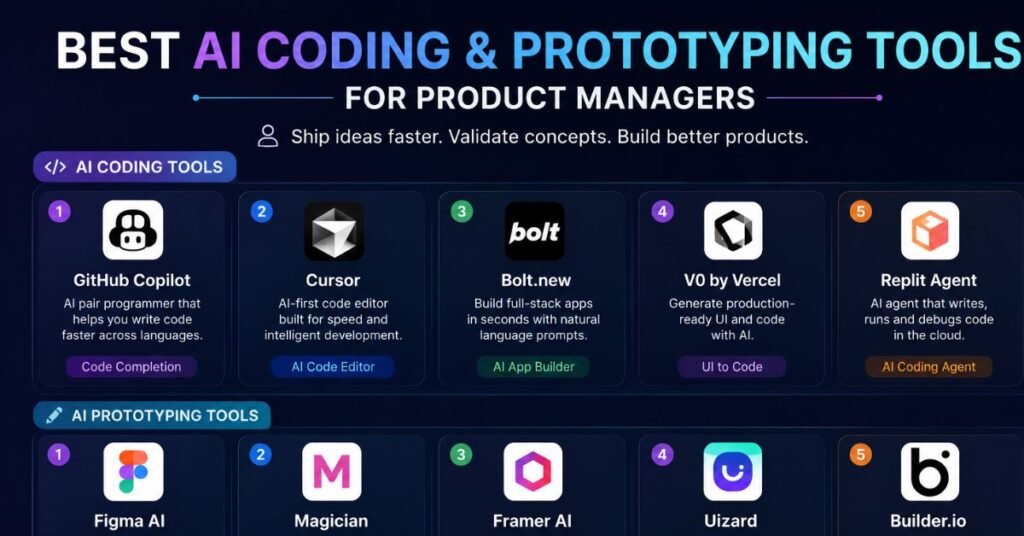
A meaningful shift in the last year is what’s sometimes called “vibe coding” — PMs building working prototypes directly, instead of waiting on engineering time to validate an idea. This doesn’t replace developers on production code, but it closes the gap between having an idea and having something a user can actually click through.
The main options:
- Claude Code — a terminal-based coding agent that can navigate an entire repository, make multi-file edits, and run tests with minimal supervision. Originally built for developers, but PMs increasingly use it for small, self-contained prototypes and internal tooling because it can carry a multi-step build to completion rather than requiring a prompt-by-prompt back-and-forth.
- Cursor — an AI-native code editor for PMs who want to get hands-on with code directly, with more manual control than an autonomous agent.
- v0 by Vercel — generates working UI from plain-English descriptions, well suited to quickly mocking up a screen or flow to test with users or stakeholders.
- Replit Agent — takes a product idea through build, run, and deploy inside one environment, useful for PMs prototyping a full small app rather than a single screen.
- Figma AI — not a coding tool exactly, but increasingly used alongside these to move from wireframe to near-functional prototype faster.
A reasonable way to start: pick one backlog idea that’s stuck because engineering capacity is limited, and use one of these to build a rough, clickable version yourself. It won’t be production code, but it can turn an abstract debate about a feature into something people can react to.
Where this fits — and doesn’t — in your workflow:
These tools are strongest for internal tools, quick prototypes, and validating a UX flow before committing engineering time, not for shipping production features. A prototype built by a PM in an afternoon still needs a real engineering review before it reaches production users — for security, accessibility, performance, and integration with existing systems. Treat the output as a rapid way to de-risk a decision, not a shortcut around your engineering team.
| Tool | Learning curve | Best output type |
|---|---|---|
| Claude Code | Moderate — command-line comfort helps | Multi-file prototypes, internal tools, automation scripts |
| Cursor | Moderate | Hands-on code edits inside a familiar editor |
| v0 by Vercel | Low | Single-screen UI mockups from a text description |
| Replit Agent | Low to moderate | Small, deployable full apps |
Best AI Research Tools for Product Managers
Research tools compress what used to take days of googling, reading, and note-taking into an afternoon — with the important caveat that verifiable sourcing matters more here than almost anywhere else in the PM AI stack, since research often ends up in front of executives.
- Perplexity — an AI search engine that returns cited, sourced answers instead of a list of links. Its Pro Search mode runs multi-step research, following up on its own findings. The citations matter because they let you verify a claim before it goes into a strategy deck.
- NotebookLM — best when you want answers grounded strictly in your own uploaded documents (market reports, competitor decks, past research), since it won’t wander outside what you’ve given it.
- Claude and ChatGPT — useful for synthesizing and reasoning over research you’ve already gathered, though neither has live, cited web access built in the same way Perplexity does by default.
A note on trust and verification. Research tools are only as useful as the confidence you can place in their output. Before a research summary goes into a stakeholder deck, spot-check the two or three claims that matter most against the original source — a pricing figure, a market-size number, a competitor’s stated roadmap. This takes a few extra minutes and catches the occasional case where a summary drifts from what the source actually said.
Best AI Agents for Product Manager Automation
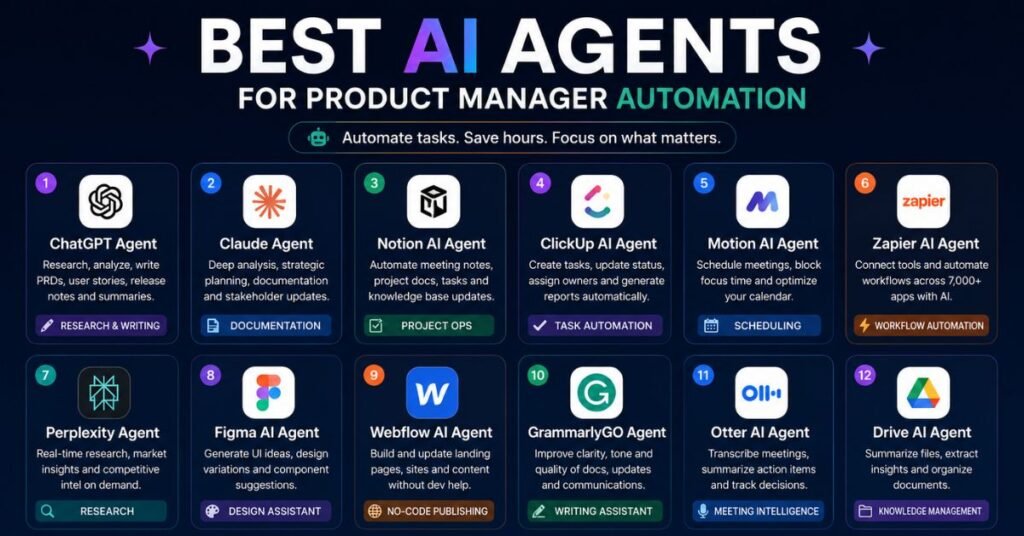
“Agent” gets used loosely, but the meaningful distinction is between a chat assistant that answers one question at a time and an agent that can carry out a multi-step task with limited supervision — draft a document, run a search, revise based on what it finds, and deliver a finished artifact.
- Claude Code and Claude Cowork — run multi-step tasks through to completion rather than requiring a new prompt at every step, which is the main practical difference from a standard chatbot for anything involving several dependent steps.
- Jira’s Rovo AI — surfaces backlog insights without requiring you to write query language by hand.
- Linear’s AI triage — automatically routes and tags incoming issues, cutting down manual backlog grooming.
- Workflow-specific agents inside PM platforms (Productboard, Aha!) — increasingly handle feedback clustering and initial prioritization scoring without a human triggering each step.
The practical test for whether something counts as a genuine automation win: does it hand you a finished draft or decision to review, or does it just answer a question you still have to act on yourself? The former saves real time; the latter is still a chatbot.
AI Tools for Market Research and Validation
Market and competitive research is a distinct job from user research — it’s about understanding competitors, market sizing, and positioning rather than individual user behavior.
- Perplexity — well suited to fast competitive scans (“how do the top three competitors handle onboarding”) with sources attached for verification.
- Crayon — purpose-built competitive intelligence, tracking competitor changes automatically rather than requiring manual monitoring.
- AI-moderated interview platforms (CleverX, Perspective AI-style tools) — run structured conversations with target audiences at scale, useful for validating a problem hypothesis before you’ve built anything.
A caution that applies across this whole category: AI-generated market summaries are a starting point, not a source of truth. Cross-check any number that will end up in a business case — market size, growth rate, competitor pricing — against a primary source before it goes into a deck.
Comparing Free vs Paid AI Tools for Product Managers
Free tiers in this category are genuinely usable in 2026, not crippled trial versions — which makes it worth testing before you commit budget.
| Category | Solid free option | When paid is worth it |
|---|---|---|
| Writing & PRDs | ChatGPT free, Claude free | Paid tiers (~$20/month) unlock longer context, more usage, and file uploads — worth it once AI is a daily habit, not occasional use |
| Research | Perplexity free tier | Pro unlocks deeper multi-step research and higher usage caps |
| Coding & prototyping | Cursor free tier, v0 free credits | Paid plans matter once you’re prototyping weekly rather than occasionally |
| Meeting notes | Granola free plan | Paid tiers remove usage caps for teams with back-to-back meetings |
| Analytics | PostHog free tier | Amplitude/Mixpanel paid plans matter at scale, with pricing that can run from tens of dollars to enterprise contracts depending on event volume |
| Roadmapping | Linear free plan (small teams) | Productboard and Aha! AI features are typically add-ons on top of a base subscription |
A workable starting stack for an individual PM: one general-purpose assistant (Claude or ChatGPT), one cited-research tool (Perplexity), and one meeting-notes tool (Granola). That combination covers documentation, research, and meeting overhead — the three things that eat the most PM time — for a modest monthly cost, and every one of them has a free tier worth trying first.
When to upgrade to paid: the moment a free-tier usage cap starts interrupting your actual workflow, or when a feature gated behind a paid plan (longer context, priority research, team sharing) would save you more time than the subscription costs. Don’t upgrade preemptively — validate the habit on the free tier first.
Conclusion
The AI tools worth adding to a PM’s stack in 2026 aren’t the ones promising to replace half your job they’re the ones that quietly remove the grunt work standing between you and the decisions only you can make. Start with whichever workflow is currently costing you the most hours, pick one strong tool for it, and resist the pull to add five more before you’ve actually used the first one for a month. The PMs getting the most out of this category aren’t running the longest tool list; they’re running the smallest one that actually fits how they work.
Frequently Asked Questions
What is the Role of AI in Product Management?
AI acts as a productivity layer for product managers — speeding up research synthesis, documentation, and analytics — while judgment, prioritization tradeoffs, and stakeholder alignment remain the PM’s responsibility.
Can AI Replace Product Managers?
No. AI can accelerate synthesis, drafting, and analysis, but it can’t replace human judgment, empathy with users, or the political and strategic work of aligning a team around a decision.
What’s the Difference Between Claude Code and General AI Chatbots for PMs?
Claude Code is an agent that can carry out multi-step coding tasks — navigating a repo, editing multiple files, running tests — largely unsupervised, while general chatbots answer one prompt at a time and need a new instruction for each step.
What AI Tools Do Product Managers Use for Research?
Most PMs combine Perplexity for cited web research, NotebookLM for grounded analysis of their own documents, and Claude or ChatGPT for synthesizing findings into a summary.
Is Claude or ChatGPT Better for Writing PRDs?
Both work well; Claude tends to hold structure and consistency better across long documents, while ChatGPT is often faster for getting a rough first draft unstuck.
How Much Does an AI Tool Stack Cost for a Product Manager?
A solid individual stack — one writing assistant, one research tool, one meeting-notes tool — typically runs somewhere in the range of $40–$60 a month, though free tiers on most of these are usable enough to try before paying anything.
Is It Safe to Paste Customer Data into AI Tools?
Only if the vendor’s policy confirms your inputs aren’t used for model training and are handled under your company’s data agreement; for anything containing personal user data, use enterprise-tier plans or check with your security team first.
Do I Need a Different AI Tool for Every Stage of the PM Workflow?
Not necessarily — one general-purpose assistant can cover writing and light synthesis, but discovery, analytics, and coding each benefit enough from a specialized tool that it’s usually worth adding one per stage as your usage grows.
A Simple Starter Checklist
If this is your first pass at building an AI stack, here’s a sequence that avoids overwhelm:
- Pick one general-purpose assistant (Claude or ChatGPT) and use it daily for two weeks before adding anything else.
- Add a research tool once you notice yourself doing repetitive competitive or market lookups.
- Add a meeting-notes tool once note-taking during calls starts costing you focus.
- Add a coding or prototyping tool only once you have a specific backlog idea you want to test yourself.
- Revisit the stack every quarter and drop anything you haven’t opened in the last two weeks.